




When leading code reviews, it is important to have the right peoplepresent. The people who will be in attendance at the peer code review will be agreed upon with the project manager. The programmer(s) responsible for submitting the code for review will be present at the code review unless they work remotely. In the case of remote working, the reviewer will review the code and either accept the pull request, decline the pull request, or send the developer some questions to be answered before taking any further action.
A suitable lead for a code review should possess the following skills and knowledge:
- Be a technical authority: The person leading the code review should be a technical authority that understands the company's coding guidelines and software development methodologies. It is also important that they have a good overall understanding of the software under review.
- Have good soft skills: As the leader of the code review, the person must be a warm and encouraging individual who is able to provide constructive feedback. It is important that the person reviewing the programmer's code has good soft skills so that there is no conflict between the reviewer and the person whose code is being reviewed.
- Not be overly critical: The leader of the code review must not be over-critical and must be able to explain their critique of the programmer's code. It is useful if the leader has been exposed to different programming styles, and can view the code objectively to ensure that it meets the project's requirements.
In my experience, peer code reviews are always carried out on pull requests in the version control tool being used by the team. A programmer will submit the code to version control and then issue a pull request. The peer code reviewer will then review the code in the pull request. Constructive feedback will be provided in the form of comments that will be attached to the pull request. If there are problems with the pull request, then the reviewer will reject the change request and comment on specific issues that need to be addressed by the programmer. If the code review is successful, then the reviewer may add a comment providing positive feedback, merge the pull request, and close it.
Programmers will need to note any comments made by the reviewer and take them on board. If the code needs to be resubmitted, then the programmer will need to ensure that all the reviewer's comments have been addressed prior to resubmitting.
It is a good idea to keep code reviews short, and to not review too many lines at any one time.
Since a code review normally starts with a pull request, we will look at issuing a pull request followed by responding to a pull request.
Issuing a pull request
When you have finished coding and you are confident in the quality of your code and that it builds, you are able to then push or check in your changes, depending on what source control system you use. When your code has been pushed, you can then issue a pull request. When a pull request is raised, other people that are interested in the code are notified and able to review your changes. These changes can then be discussed and comments made regarding any potential changes that you need to make. In essence, your pushing to your source control repository and issuing a pull request is what kick-starts the peer code review process.
To issue a pull request, all you have to do (once you've checked your code in or pushed it) is click on the Pull requests tab of your version control. There will then be a button you can click on – New pull request. This will add your pull request to a queue to be picked up by the relevant reviewers.
In the following screenshots, we will see the process of requesting and fulfilling a pull request via GitHub:
- On your GitHub project page, click on the Pull requests tab:
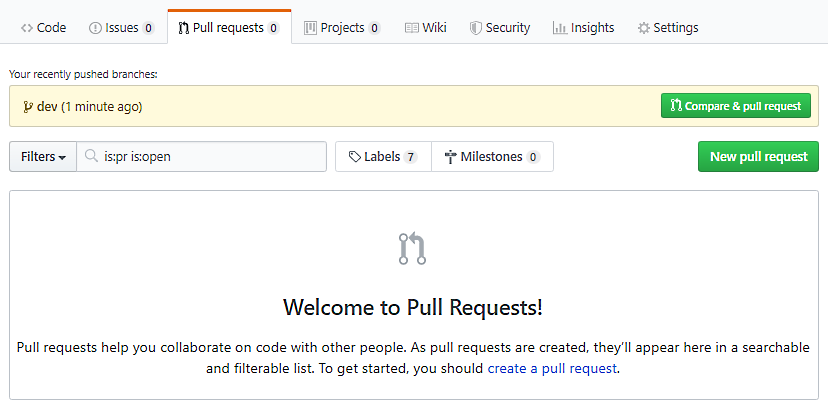
- Then, click on the New pull request button. This will display the Comparing changes page:
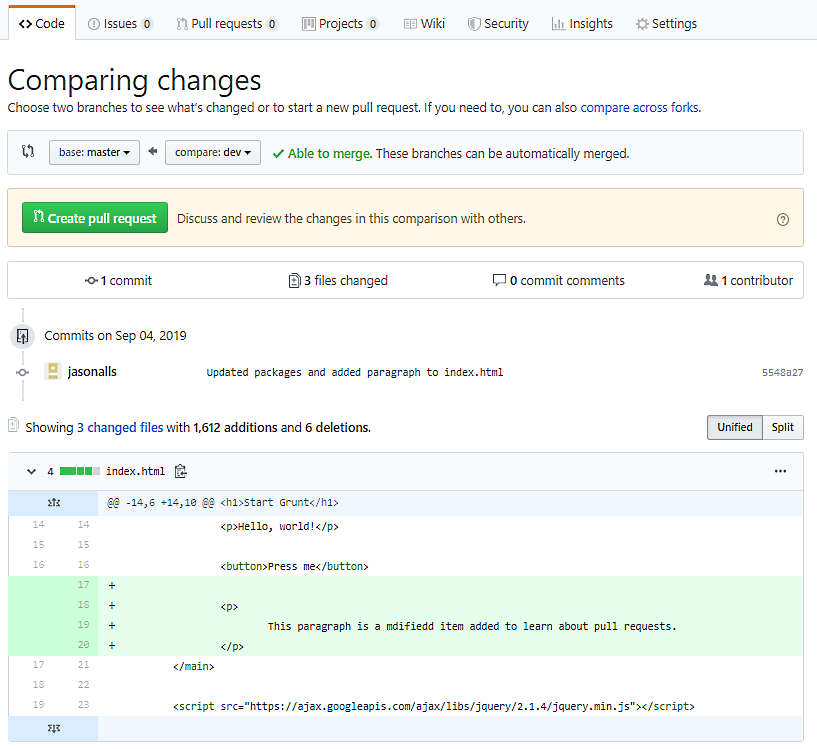
- If you are happy, then click on the Create pull request button to start the pull request. You will then be presented with the Open a pull request screen:
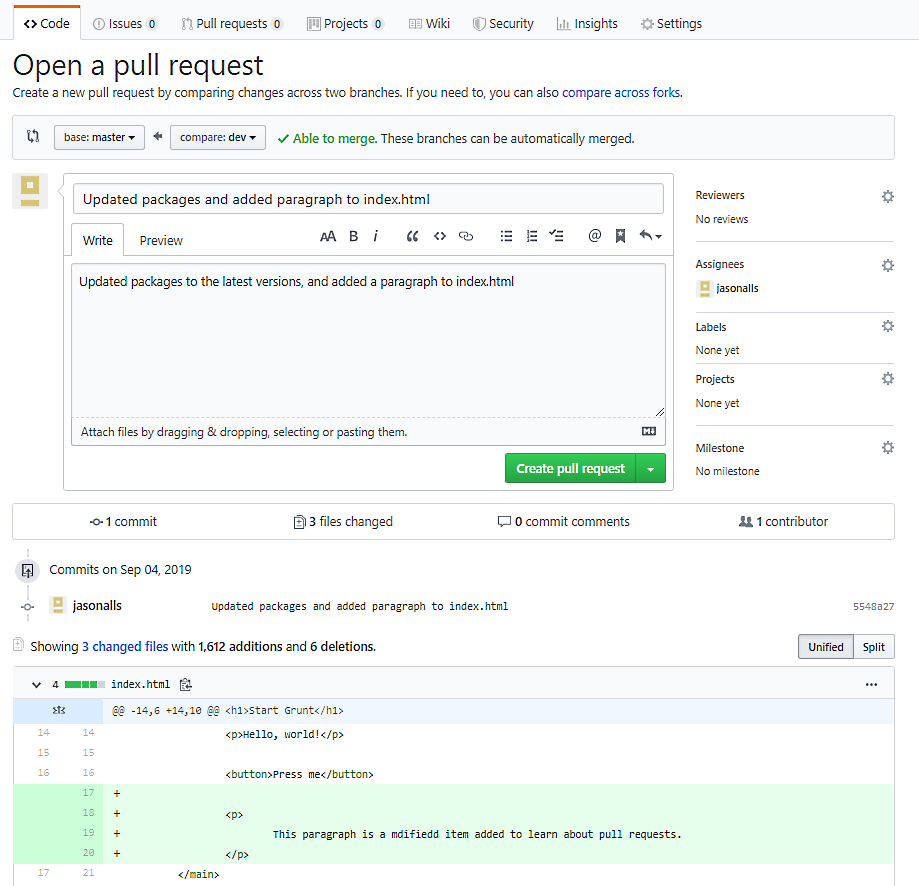
- Write your comment regarding the pull request. Provide all the necessary information for the code reviewer, but keep it brief and to the point. Useful comments include identification of what changes have been made. Modify the Reviewers, Assignees, Labels, Projects, and Milestones fields as necessary. Then, once you are happy with the pull request details, click on the Create pull request button to create the pull request. Your code will now be ready to be reviewed by your peers.
Responding to a pull request
Since the reviewer is responsible for reviewing pull requests prior to merges of branches, we would do well to look at responding to pull requests:
- Start by cloning a copy of the code under review.
- Review the comments and changes in the pull request.
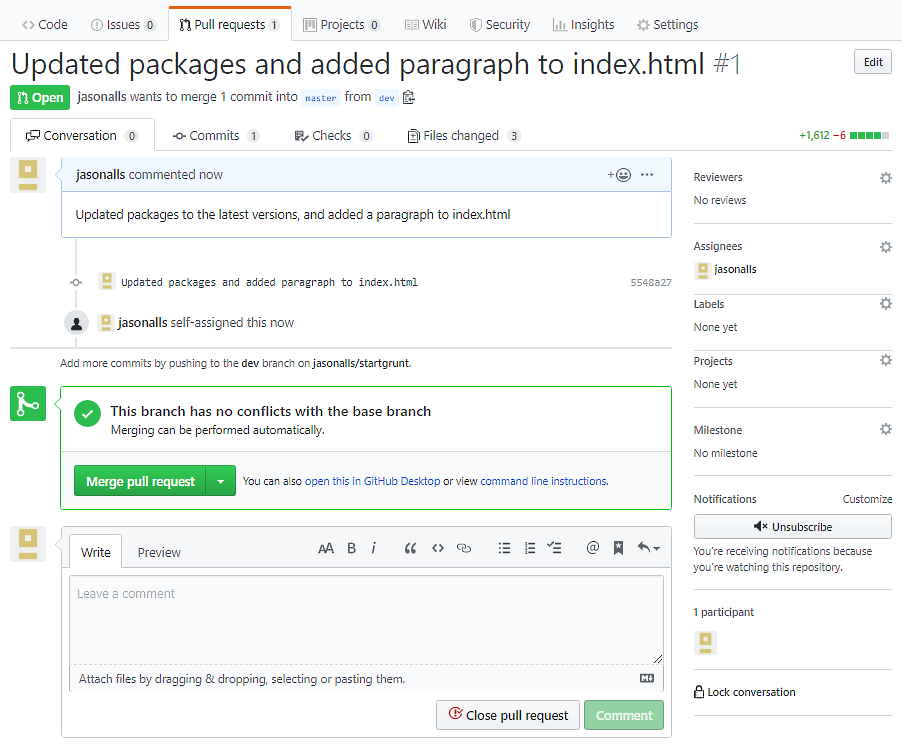
- Check that there are no conflicts with the base branch. If there are, then you will have to reject the pull request with the necessary comments. Otherwise, you can review the changes, make sure the code builds without errors, and make sure there are no compilation warnings. At this stage, you will also look out for code smells and any potential bugs. You will also check that the tests build, run, are correct, and provide good test coverage of the feature to be merged. Make any comments necessary and reject the pull request unless you are satisfied. When satisfied, you can add your comments and merge the pull request by clicking on the Merge pull request button, as shown here:
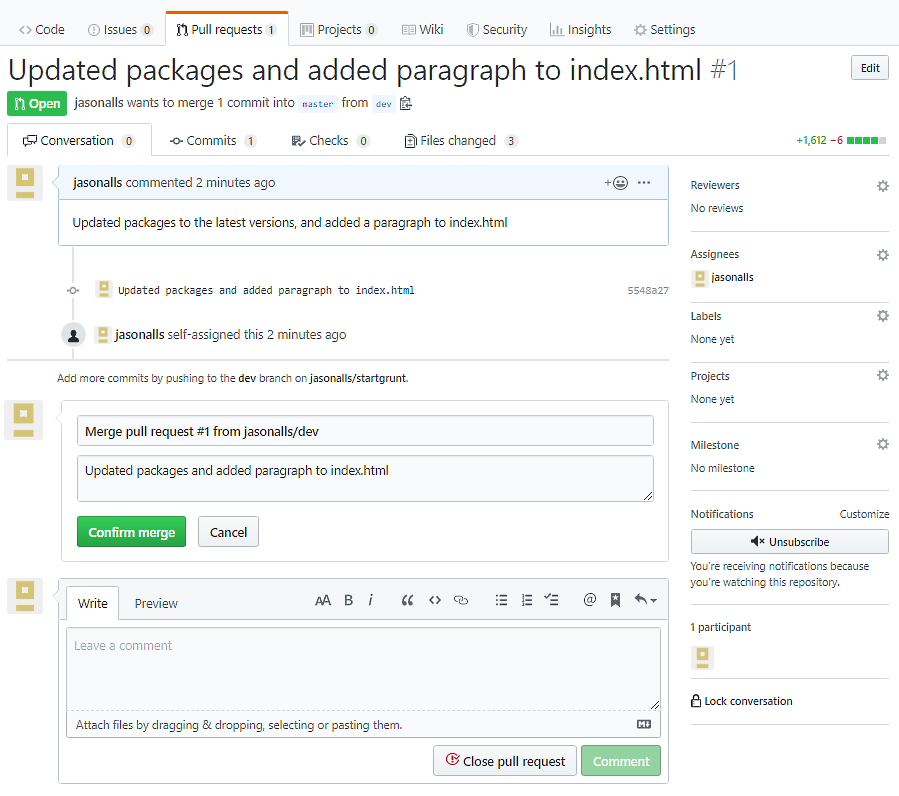
- Now, confirm the merge by entering a comment and clicking on the Confirm merge button:
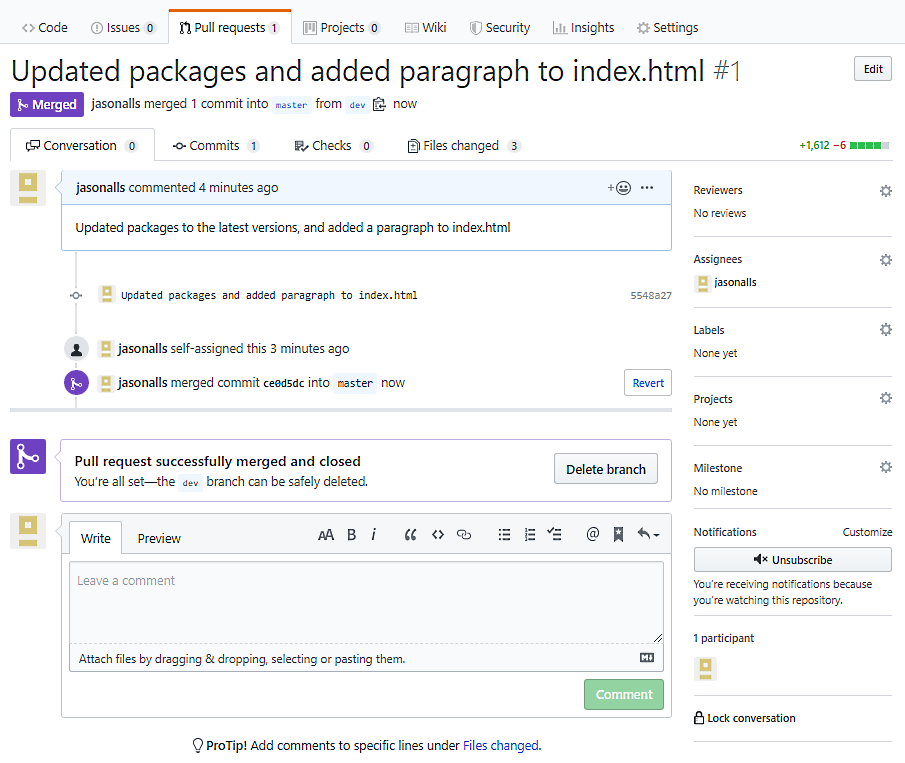
- Once the pull request has been merged and the pull request closed, the branch can be deleted by clicking on the Delete branch button, as can be seen in the following screenshot:
In the previous section, you saw how the reviewee raises a pull request to have their code peer-reviewed before it is merged. And in this section, you have seen how to review a pull request and complete it as part of a code review. Now, we will look at what to review in a peer code review when responding to a pull request.
Effects of feedback on reviewees
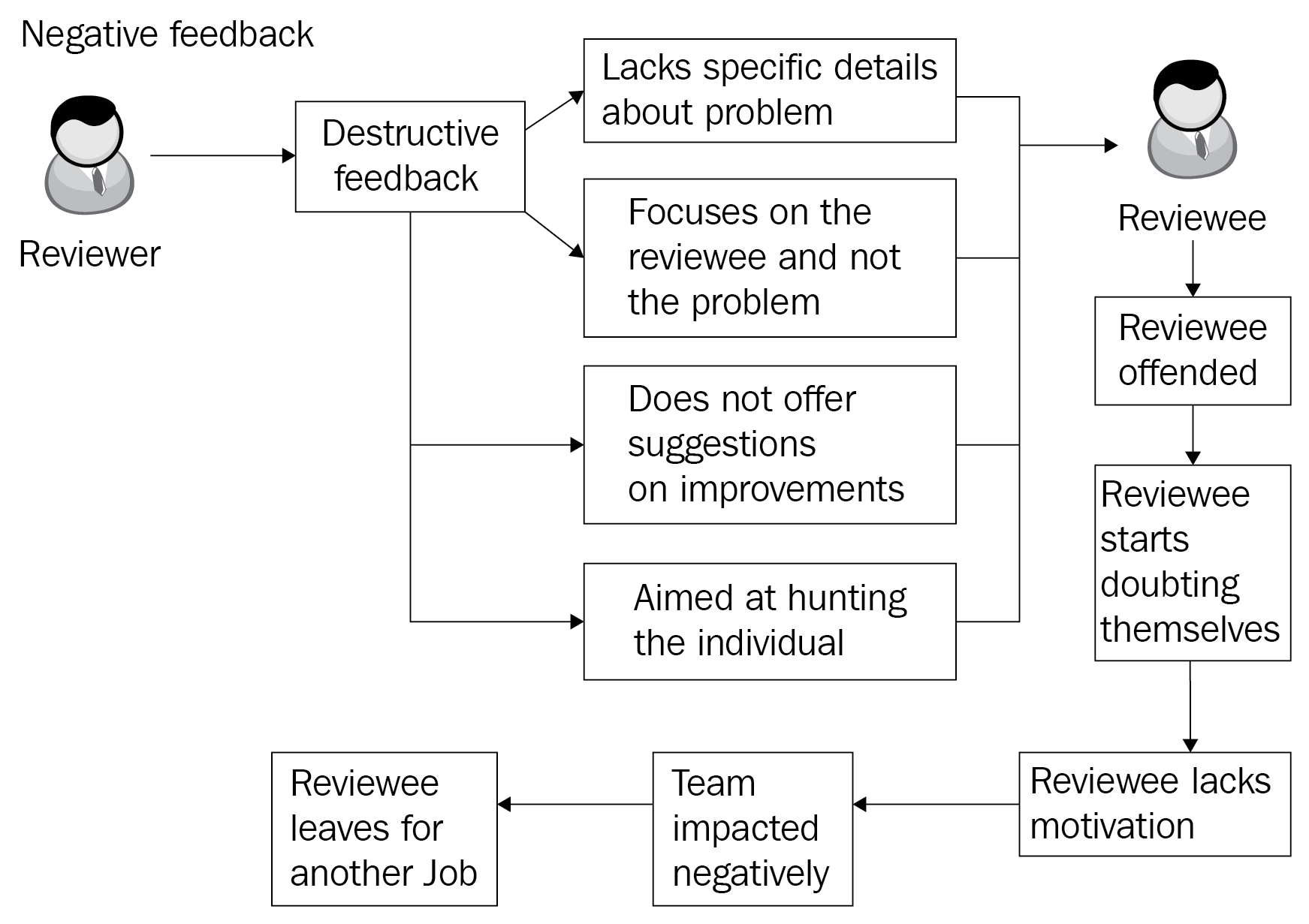
When performing a code review of your peer's code, you must also take into consideration the fact that feedback can be positive or negative. Negative feedback does not provide specific details about the problem. The reviewer focuses on the reviewee and not on the problem. Suggestions for improving the code are not offered to the reviewee by the reviewer, and the reviewer's feedback is aimed at hurting the reviewee.
Such negative feedback received by the reviewee offends them. This has a negative impact and can cause them to start doubting themselves. A lack of motivation then develops within the reviewee and this can negatively impact the team, as work is not done on time or to the required level. The bad feelings between the reviewer and the reviewee will also be felt by the team, and an oppressive atmosphere that negatively impacts everyone on the team can ensue. This can lead to other colleagues becoming demotivated, and the overall project can end up suffering as a result.
In the end, it gets to the point where the reviewee has had enough and leaves for a new position somewhere else to get away from it all. The project then suffers time-wise and even financially, as time and money will need to be spent on finding a replacement. Whoever is found to fill the position then has to be trained upon the system and the working procedures and guidelines. The following diagram shows negative feedback from the reviewer toward the reviewee:
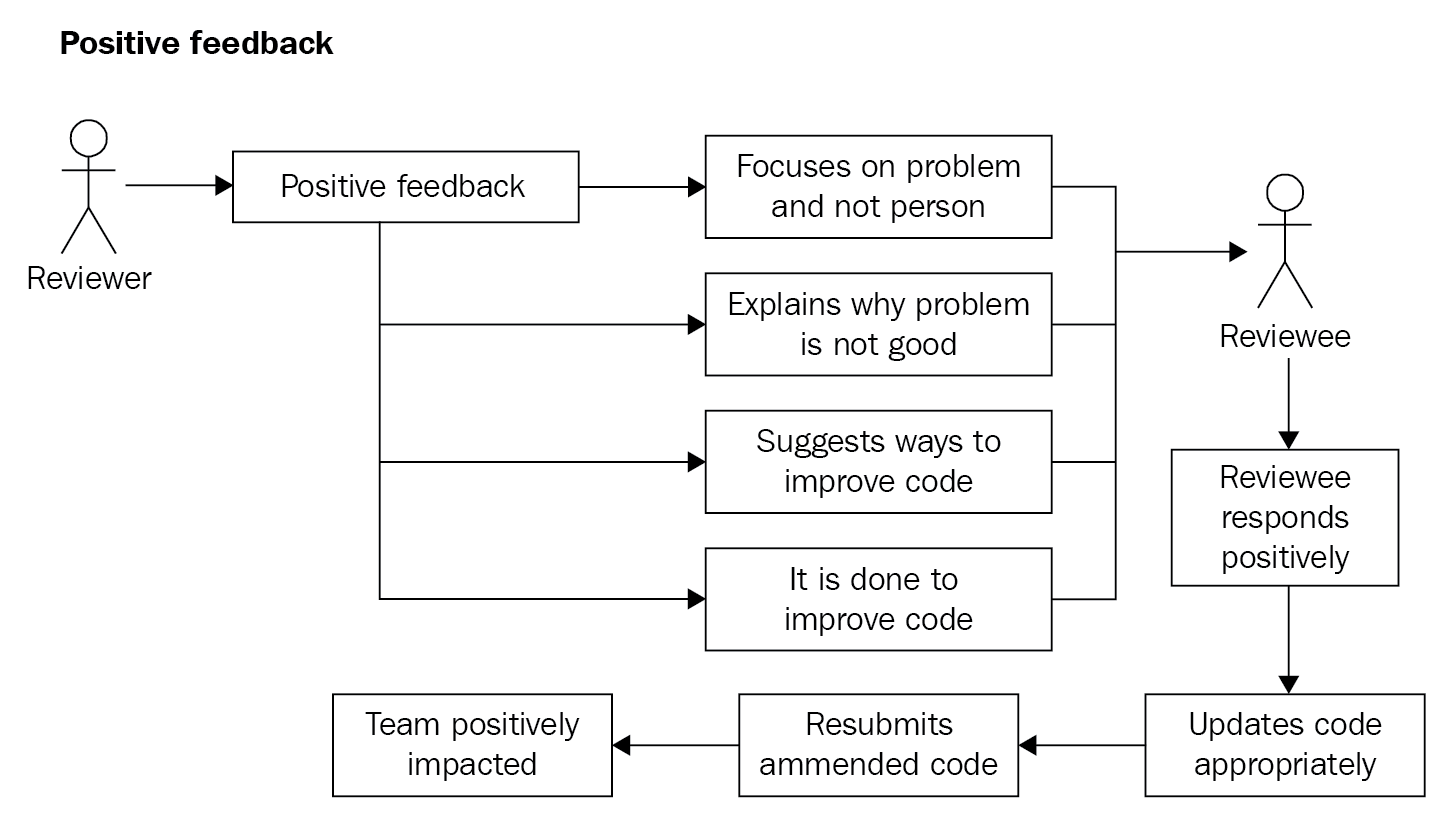
Conversely, positive feedback from the reviewer to the reviewee has the opposite effect. When the reviewer provides positive feedback to the reviewee, they focus on the problem and not on the person. They explain why the code submitted is not good, along with the problems it can cause. The reviewer will then suggest to the reviewee ways in which the code can be improved. The feedback provided by the reviewer is only done to improve the quality of the code submitted by the reviewee.
When the reviewee receives the positive (constructive) feedback, they respond in a positive manner. They take on board the reviewer's comments and respond in the appropriate manner by answering any questions, asking any relevant questions themselves, and the code is then updated, based on the reviewer's feedback. The amended code is then resubmitted for review and acceptance. This has a positive impact on the team as the atmosphere remains a positive one, and work is done on time and to the required quality. The following diagram shows the results of positive feedback on the reviewee from the reviewer:
The point to remember is that your feedback can be constructive or destructive. Your aim as a reviewer is to be constructive and not destructive. A happy team is a productive team. A demoralized team is not productive and is damaging to the project. So, always strive to maintain a happy team through positive feedback.
A technique for positive criticism is the feedback sandwich technique. You start with praise on the good points, then you provide constructive criticism, and then you finish with further praise. This technique can be very useful if you have members on the team that doesn't react well to any form of criticism. Your soft skills in dealing with people are just as important as your software skills in delivering quality code. Don't forget that!
We will now move on to look at what we should review.


