Sign In Start Free Trial
Account

Add to playlist

Create a Playlist

Modal Close icon
You need to login to use this feature.
  • Book Overview & Buying Mastering Veeam Backup & Replication
  • Table Of Contents Toc
Mastering Veeam Backup & Replication

Mastering Veeam Backup & Replication - Third Edition

By : Childerhose
4.6 (10)
close
close
Mastering Veeam Backup & Replication

Mastering Veeam Backup & Replication

4.6 (10)
By: Childerhose

Overview of this book

Veeam is one of the leading modern data protection solutions, making it a necessary skill for anyone responsible for backing up virtual environments. This new edition of Mastering Veeam Backup & Replication is revised and updated to cover Veeam version 12. This edition covers some new features added to the application, such as VeeaMover, Per Machine Backup chains, and MFA on the console. The book guides you through implementing modern data protection solutions for your cloud and virtual infrastructure with Veeam while helping you master advanced concepts such as Continuous Data Protection (CDP), extended object storage support, VeeaMover, and security settings. You’ll dive deep into other new features as well, such as Direct to Object storage, Object to Tape and learn about CDP from a service provider perspective with Veeam Cloud Connect (VCC). By the end of this Veeam book, you'll be able to successfully implement Veeam Backup & Replication to secure your environment and enable disaster recovery.
Table of Contents (13 chapters)
close
close
1
Part 1: Installation – Best Practices, Core Architecture, and Other Enhancements
6
Part 2: Security, Object Storage Direct, CDP, and Cloud Connect

Configuring and optimizing Proxy Servers

Proxy Servers are the workhorses of the Veeam Backup & Replication v12 application, and they do all the heavy lifting or processing of tasks for backup and restore jobs. When you set up Veeam, you need to ensure that the Proxy Servers are configured as per best practices:

Introduced in Veeam Backup & Replication v12 is the ability to use Linux proxies in conjunction with Continuous Data Protection (CDP) and a standard proxy like in the previous version, v11a. This is another way for companies to move away from having to license a Windows Server and use one of the many Linux distributions. Not all Linux versions are supported, as noted here: https://helpcenter.veeam.com/archive/backup/120/vsphere/system_requirements.html#vmware-backup-proxy-server.

When you decide to deploy a Proxy server, Veeam Backup & Replication will install two components on the server:

  • Veeam Installer Service: This gets used to check the server and upgrade software as required
  • Veeam Data Mover: This is the processing engine for the Proxy server and does all the required tasks

Veeam Backup & Replication Proxy Servers use a transport mode to retrieve data during backup. Three standard modes are available, and they are listed in order, starting with the most efficient method:

  • Direct Storage Access: The proxy is placed in the same network as your storage arrays and can retrieve data directly.
  • Virtual Appliance: This mode mounts the VMDK files to the Proxy server for what we typically call Hot-Add Mode to back up the server data.
  • Network: This mode is the least efficient but will be used when the previous methods are unavailable. It moves the data through your network stack. It is recommended not to use 1 GB but instead 10 GB.

In addition to these standard transport modes, which are provided natively for VMware environments, Veeam provides two other transport modes: Backup from Storage Snapshots and Direct NFS. These provide storage-specific transport options for NFS systems and storage systems that integrate with Veeam.

Refer to the integration with storage systems guide for more details: https://helpcenter.veeam.com/docs/backup/vsphere/storage_integration.html?ver=120.

Along with the transport modes, there are specific tasks that the Proxy server performs:

  • Retrieving the VM data from storage
  • Compressing data that’s being backed up
  • Deduplicating data blocks so that only one copy is stored
  • Encrypting data in transit and backup files
  • Sending the data to the backup Repository Server (backup job) or another backup proxy server (replication job)

Veeam Proxy Servers leverage what is known as VMware vStorage APIs – Data Protection (formerly known as VMware vStorage APIs for Data Protection or VADP) when using all transport modes other than Backup from Storage Snapshots and Direct NFS.

It would be best if you considered the following regarding your Proxy Servers:

  • Operating system: Most software vendors will always recommend the latest and greatest, so if you choose Windows, choose 2022. Alternatively, you can select Linux using the newest release (for example, Ubuntu 22.04.1 LTS). For Linux VMware, backup proxies support all transport modes as of Veeam Backup & Replication v11a and support being a CDP Proxy in v12.
  • Proxy placement: Depending on the transport mode for the server, you will need to place it as close to the servers you want to back up, such as on a specific host in VMware. The closer to the source data, the better!
  • Proxy sizing: This can be tricky to determine and will depend on the physical or virtual server. Veeam Proxy Servers complete tasks where one virtual disk is processed for a VM or one physical disk is processed for a server. Therefore, Veeam recommends one physical core or one vCPU and 2 GB of RAM per task.

Veeam has a formula for calculating the required resources for a Proxy server:

  • D: Source data in MB
  • W: Backup window in seconds
  • T: Throughput in MB/s = D/W
  • CR: Change rate
  • CF: Cores required for a full backup = T/100
  • CI: Cores required for an incremental backup = (T * CR)/25

Based on these requirements, we can use a data sample to perform the calculations:

  • 500 virtual machines
  • 100 TB of data
  • An 8-hour backup window
  • 10% change rate

Using these numbers, we can perform the following calculations:

We can use the numbers we calculated to determine the required amount of cores needed to run both full and incremental backups to meet our defined SLA.

Based on our calculations and considering that you require 2 GB of RAM for each task, you need a virtual server with 36 vCPUs and 72 GB of RAM. This size may seem like a considerable server, but keep in mind that it uses sample data. Your calculations will likely be much smaller or more extensive, depending on your dataset.

Should you use a physical server as a Proxy, you should have a server with two to 10 core CPUs. In the case of our sample data, two physical servers are what you require. If you are using virtual servers for proxies, the best practice is to configure them with a maximum of 8 vCPUs and add as many as needed for your environment – in this case, you would need five servers.

Should you want to size things based on incremental backups only, your requirements are less than half the full backup sizing – 15 vCPUs and 30 GB of RAM.

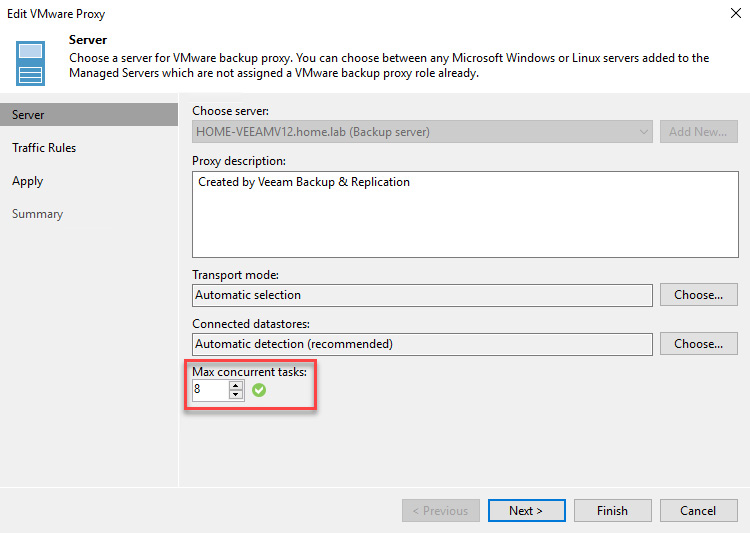
There are limitations for Proxy Servers that you need to be aware of when it comes to job processing and performance. As we noted previously, a Proxy server performs tasks, which are assigned CPU resources. Concurrent task processing depends on the resources available in your infrastructure and the number of Proxy Servers you have deployed. As shown in the following screenshot, when it comes to adding a Proxy server to Veeam Backup & Replication, there is the Max concurrent tasks option, which correlates to the number of CPUs that are assigned:

Figure 1.19 – Max concurrent tasks limitation for Proxy Servers

Figure 1.19 – Max concurrent tasks limitation for Proxy Servers

Task limits can be found at https://helpcenter.veeam.com/docs/backup/vsphere/limiting_tasks.html?ver=120.

Important note

Job performance will be impacted based on the tasks of a Proxy server. For example, if you had a Proxy server with 8 CPUs and added two virtual machines for backup, one with four disks and another with six disks, the Proxy server would process only eight of the 10 disks in parallel. The remaining two disks would have to wait on resources before being backed up in previous versions of Veeam.

With Veeam Backup & Replication v12, when you add a new Proxy server, it will have the concurrent tasks set automatically based on the number of CPUs/vCPUs that the physical or virtual server has. So, in the case of my lab, the Veeam server has four vCPU, so it got configured with eight concurrent tasks. Yes, this does not follow the sizing rule, but Veeam allows two times the number of CPUs/vCPUs for the concurrent task count.

You should now be able to right-size your Proxy Servers in terms of the CPU and RAM and understand proxy placement and how it processes tasks. Proxy Servers process and send data to Repository Servers, which is the focus of the next section.

Visually different images
CONTINUE READING
83
Tech Concepts
36
Programming languages
73
Tech Tools
Icon Unlimited access to the largest independent learning library in tech of over 8,000 expert-authored tech books and videos.
Icon Innovative learning tools, including AI book assistants, code context explainers, and text-to-speech.
Icon 50+ new titles added per month and exclusive early access to books as they are being written.
Mastering Veeam Backup & Replication
notes
bookmark Notes and Bookmarks search Search in title playlist Add to playlist font-size Font size

Change the font size

margin-width Margin width

Change margin width

day-mode Day/Sepia/Night Modes

Change background colour

Close icon Search
Country selected

Close icon Your notes and bookmarks

Confirmation

Modal Close icon
claim successful

Buy this book with your credits?

Modal Close icon
Are you sure you want to buy this book with one of your credits?
Close
YES, BUY

Submit Your Feedback

Modal Close icon
Modal Close icon
Modal Close icon