In the fast-paced world of web development, React is a widely used library for building applications, while Node.js and Express support scalable server-side solutions and web services. TypeScript enhances JavaScript projects with robustness and maintainability, making it an essential tool for large-scale applications.
This edition provides a hands-on guide to mastering these technologies, with new chapters and updated content that reflects current industry practices. Begin with a solid foundation in TypeScript to build high-quality web applications. Explore React 19, leveraging the Hooks API and Redux Toolkit for state management. Then transition to server-side development with Express, incorporating modern practices like JWT-based authentication and Prisma ORM for database management. A major focus of this edition is production readiness. Learn how to containerize your application with Docker and Podman, automate builds and tests with GitHub Actions, and deploy to the cloud.
New chapters add monitoring and observability with OpenTelemetry and Grafana plus a hands-on guide to AI-assisted development with LLM coding agents. Other updates include Vitest for testing and expanded content on Postgres and Prisma ORM.
By the end of this book, you will have built and deployed a comprehensive full-stack application, ready for production.
In this section, we'll look at some of the core types available in TypeScript. Using most of these types will give you error-checking and compiler warnings that can help improve your code. They will also provide information about your intent to other developers on your team. So, let's continue and see how these types work.
The any type
any is a type that opts out of static type checking and can be set to any other type. If you declare a variable to be of type any, this means that you can set it to anything and later reset it to anything. It is, in effect, no type because the compiler will not check the type on your behalf. There is a key fact to remember about the any type: the compiler will not intercede and warn you of issues at development time, and it will also allow any values to flow into other variables, silently disabling type safety wherever they go. Therefore, if possible, using the any type should be avoided. For this reason, most TypeScript projects enable the noImplicitAny compiler option, which turns accidental, unannotated any values into errors.
In a large application, it is not always possible for a developer to control the objects that are used in their code. For example, if a developer is relying on a web service API call to get data, that data's type may be controlled by some other team or even a different company entirely. It is also possible that an API result schema may change frequently. Situations such as these require type flexibility and an escape hatch from the type system. The any type can provide that escape hatch.
It is important not to abuse the any type. You should be careful to only use it when you have no other way of creating a type. There are, however, some alternatives to using the any type, and the unknown type is one of them. Unlike any, unknown forces you to check the type before using the value, making it a safer choice. We'll cover that type next.
The unknown type
unknown is a type released in TypeScript version 3. It is similar to any in that once a variable of this type is declared, a value of any type can be set to it. That value can subsequently be changed to any other type, just like the any type. However, unlike any, you cannot perform almost any operation on an unknown value, such as accessing its properties, calling it, or assigning it to another variable, without first confirming what type it really is. The only time you can set an unknown variable to another variable, without first checking its type, is when you set an unknown type to another unknown or an any type.
Let's take a look at an example of any, and then we'll see why the unknown type is preferable to using the any type (it is, in fact, recommended by the TypeScript team):
First, let's take a look at an example of the issue with using any. Go to VSCode and create a file called any.ts, and then type the following code:
letval: any = 22;
val = "string value";
val = newArray();
val.push(33);
console.log(val);
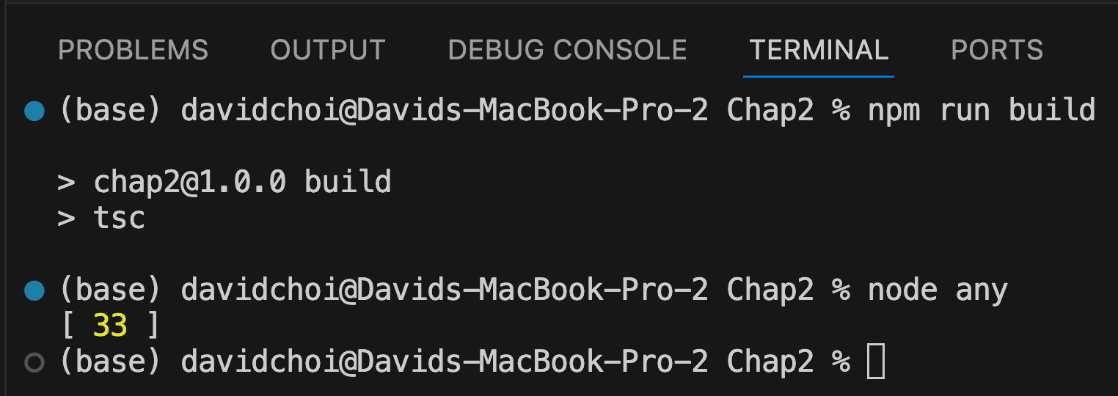
First, the val variable is declared, set to the any type, and given a value of 22, a number. Then, that same variable is set to string. Then, it is reset into an empty Array. Finally, the Array has a push method called on it, which adds an element with a value of 33 to the end of the Array. If you run this code using the following commands, you will see this result:
Figure 2.2 – Any run result
Since val is of the any type, we can set it to whatever we like. As you can see, we set the variable to multiple different types. But once it is set to an array, we call push on it, since push is a method of Array. However, this is obvious only because we, as developers, are aware that Array has a method called push on it. What if we accidentally called something that does not exist on Array? Let's replace the previous code with the following:
letval: any = 22;
val = "string value";
val = newArray();
val.doesnotexist(33);
console.log(val);
As you can see, the new code contains a call to a function called doesnotexist that is clearly not a valid Array function.
Let's try running the TypeScript compiler again:
npm run build
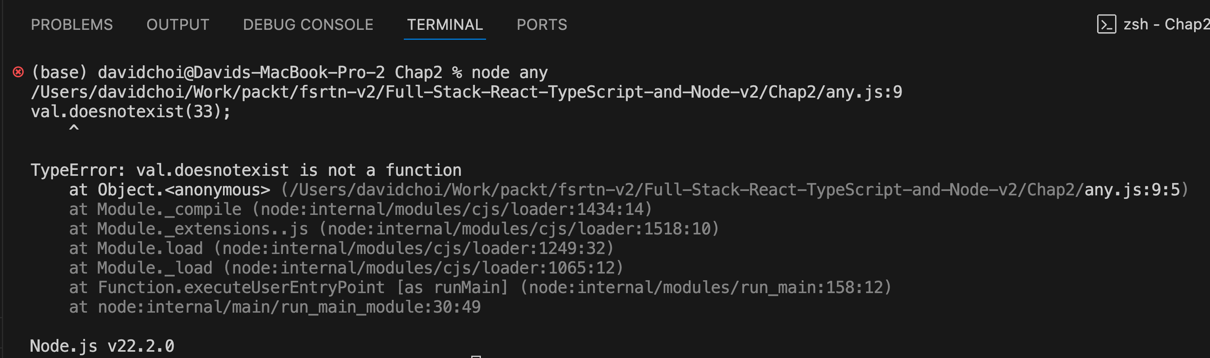
The compiler succeeds with no errors, unfortunately, since making something of the any type causes the compiler to no longer check the type. Additionally, we also lost IntelliSense, the VSCode development-time code highlighter and error checker. When you hover your mouse over the doesnotexist function, all you see is the any type. Only when we try and run the code do we get any indication that there is a problem, which is never what we want. Let's see what the exact error is when we run the code:
Figure 2.3 – Any failing
In a complex application, it is an easy error to make, even if the mistake is simply mistyping something.
Let's see a similar example using unknown:
First, comment out your code inside of any.ts and delete the any.js file (as we will use the same variable names, if you do not do this, it will cause conflict errors).
We'll learn about something called namespaces later, which can eliminate these sorts of conflicts.
Now, create a new file called unknown.ts and add the following code to it:
letval: unknown = 22;
val = "string value";
val = newArray();
val.push(33);
console.log(val);
You will notice that VSCode gives you an error immediately, complaining about the push function. This is weird since obviously, Array has a method called push in it. This behavior shows how the unknown type works. You can consider the unknown type to be sort of like a label more than a type, and underneath that label is the actual type. However, the compiler cannot figure out the type on its own, so we need to explicitly prove the type to the compiler ourselves.
We use type guards to prove that val is of a certain type:
letval: unknown = 22;
val = "string value";
val = newArray();
if (val instanceofArray) {
val.push(33);
}
console.log(val);
As you can see, we've wrapped our push call with a test to see whether val is an instance of Array
Note that we'll learn more about instanceof in Chapter 3, Building Better Apps with ES6+ Features.
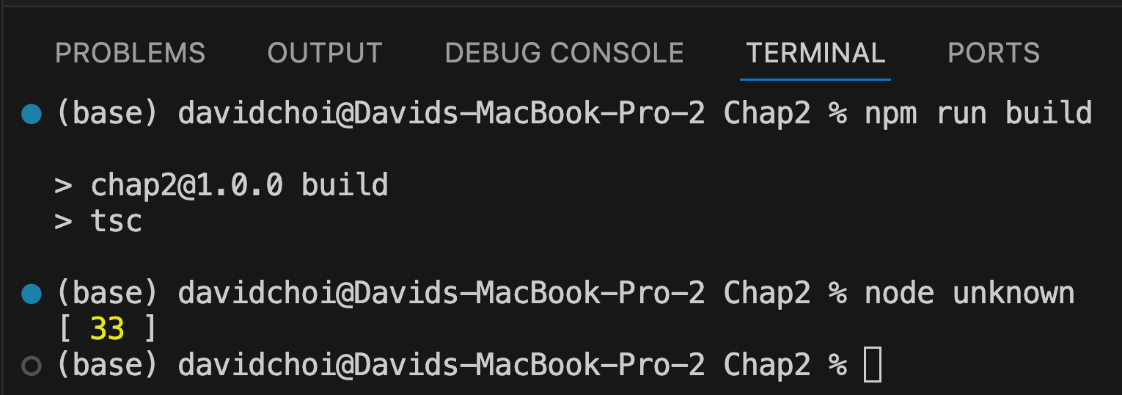
Once we've made this check, the call to push can proceed without error, as shown here:
Figure 2.4 – Unknown
This mechanism is a bit cumbersome since we always have to test the type before calling members. However, it is still preferable to using the any type and a lot safer since it is checked by the compiler.
Intersection and union types
Remember when we started this section by saying that the TypeScript compiler focuses on type shape and not the name? This structural approach makes it natural for TypeScript to support what are called intersection types. This means that TypeScript allows the developer to create new types by combining (or merging) multiple distinct types together. Note that, despite the name, an intersection type contains all the fields of the combined types, not just their common ones. The "intersection" refers to the set of values that satisfy both types at once. This is hard to imagine, so let me give you an example. If you look at the following code, you can see a variable called obj that has what looks like two types associated with it, with each type having only one field, name or age:
What we are doing in this code is merging two distinct types into a new single type by using the & symbol. This is why the obj variable can be set to the value that has both the name and age fields.
Let's try running this code and displaying the result on the console. Create a new file called intersection.ts and add the following code to it:
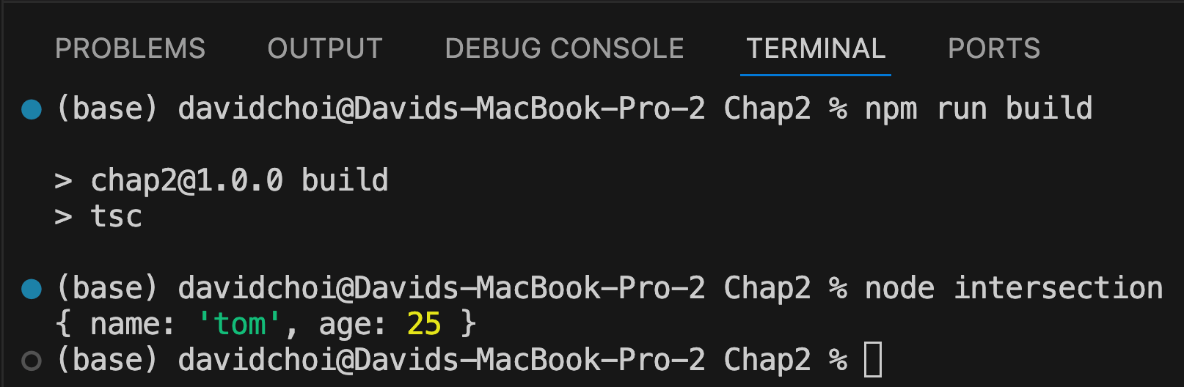
If you compile and run this code, you will see an object that contains both the name and age properties together:
Figure 2.5 – Intersection result
As you can see, both IntelliSense and the compiler accept the code, and the final object has both fields. This is an intersection type.
Now there is another type that is somewhat similar in syntax to the intersection type, but opposite in meaning, and that is the union type. In the case of unions, instead of combining types, we are using them in an "or" fashion, where it's one type or another. Let's look at an example.
Create a new file called union.ts and add the following code to it:
The unionObj variable is declared to be of the null or { name: string } type, by using the | symbol. If you compile and run this code, you'll see that it compiles and accepts both type values, just not at the same time. This means that the type value can be either null or an object instance of the { name: string } type. Note that before you can safely use a union value (for example, accessing unionObj.name), TypeScript will require you to first narrow the type, typically with a check like if (unionObj !== null).
Literal types
Literal types let you constrain a variable to a specific hardcoded value, such as a particular string, number, boolean, or bigint. They are often combined with union types to allow a small, fixed set of values.
Let's create another file called literal.ts and add this simple example of string literal types combined in a union:
As you can see, we have a bunch of hardcoded strings as the type. This means that only values that are the same as any of these strings will be accepted for the literal variable.
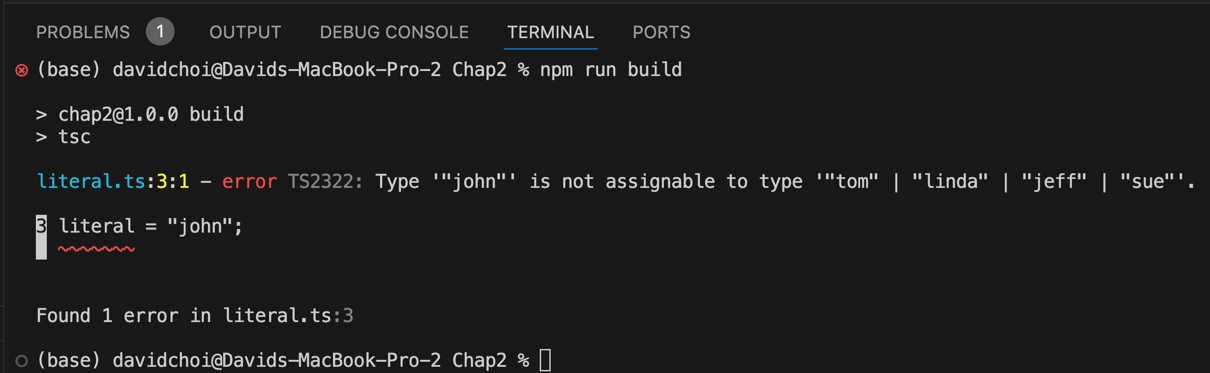
The compiler is happy to receive any of the values on the list, and even have it reset. However, it will not allow the setting of a value that is not on the list. Doing that will give a compile error. Let's see an example of this. Update the code as shown by resetting the literal variable to john:
Here, we set the literal variable to john, and compiling gives the following error:
Figure 2.6 – A literal error
This type is great when you have multiple possible values for a variable, but you want to make them specific and limited.
Type aliases
Type aliases are used very frequently in TypeScript. A type alias does not create a new type; it simply gives an existing type another name, and it is often used to provide a shorter, simpler name to some complex type, or to reuse the same type consistently in multiple places. Note that TypeScript also has interface, which can serve a similar purpose for object shapes; we'll look at the differences later. For example, here's one possible usage:
In this code, we take a long numeric literal type and give it a shorter name of Points. Then, we declare score as the Points type and give it a value of 20, which is one of the possible values for Points. And, of course, if we tried to set the score to, let's say, 99, the compilation would fail.
Another example of type aliases would be for object literal type declarations:
Since the type declaration is very long and does not have a name, like, for example, a class would, we use an alias instead. Type aliasing can be used for just about any type in TypeScript, including unions, intersections, tuples, functions, and generics, which we'll explore further later in the chapter.
Function return types
For completeness' sake, I wanted to show one example of a function return declaration. It's quite similar to a typical variable declaration. Create a new file called functionReturn.ts and add this code to it:
functionrunMore(distance: number): number {
return distance + 10;
}
console.log(runMore(20));
The runMore function takes a parameter called distance of type number and returns a number. The parameter declaration is just like any variable declaration, but the function return comes after the parentheses and indicates what type is returned by the function. Declaring the return type explicitly is not just for readability; it also lets the compiler catch cases where the function body accidentally returns the wrong type. If you compile and run this function, it will, of course, display 30 in the terminal.
If a function returns nothing, then you can either omit the return type and let TypeScript infer it, or you can declare void to be more explicit. Note that void and undefined are not the same thing in TypeScript: void is a signal that the caller should not use the return value, even though at runtime such a function still produces undefined. Let's look at an example of returning void. Comment out the runMore function and console log, and then compile and run this code:
functioneat(calories: number) {
console.log("I ate " + calories + " calories");
}
functionsleepIn(hours: number): void {
console.log("I slept " + hours + " hours");
}
let ate = eat(100);
console.log(ate);
let slept = sleepIn(10);
console.log(slept);
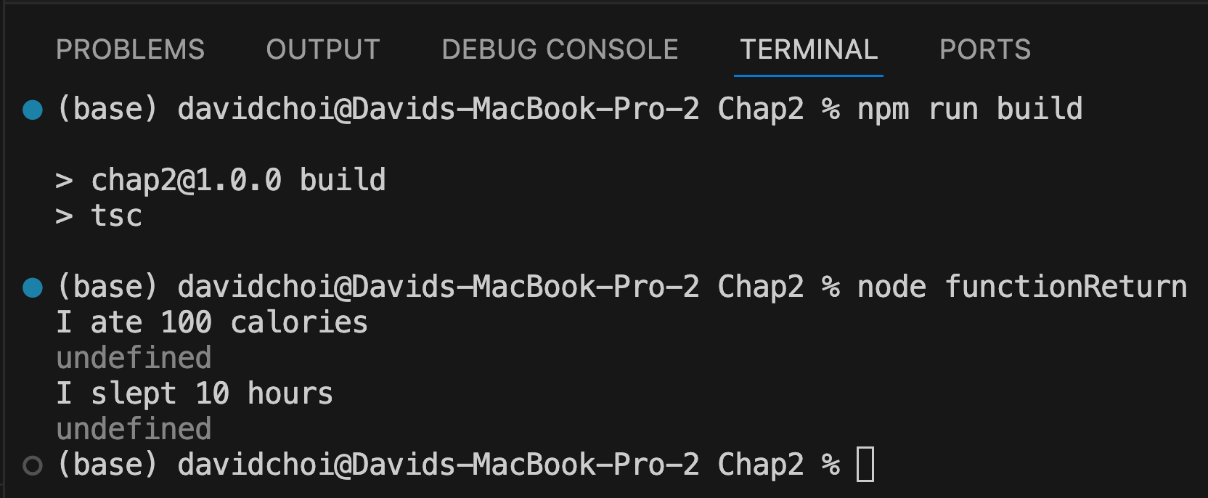
The two functions both return void, but only the sleepIn function is explicit about that. Here's the output:
Figure 2.7 – Function void results
As you can see, their internal console.log statements do run and display messages. However, the two variables, ate and slept, which accept the function returns, are both undefined, since undefined is JavaScript's value for something that has no value. So, the function return type declaration is quite similar to variable declarations.
Now, if we use function types as parameter types, it looks a bit different. Let's take a look at that in the next section.
Functions as types
It may seem a bit odd at first, but in TypeScript, a type can also be an entire function signature. Since functions are first-class values in JavaScript, they need their own types too. In TypeScript, this signature can also act as a type for an object's fields or another function's parameters.
Let's take a look at an example of this. Create a new file called functionSignature.ts and add the following code to it:
typeRun = (miles: number) =>boolean;
letrunner: Run = function (miles: number): boolean {
if (miles > 10) {
returntrue;
}
returnfalse;
}
console.log(runner(9));
The first line shows us a function type that we will be using in this code. The Run type alias is there to give the function signature a reusable name. The actual function type is (miles: number) => boolean. This is TypeScript's arrow-style syntax for function types, and it should look familiar if you've used arrow functions in JavaScript. So, the only things needed then are the parentheses to indicate parameters, the => symbol, which indicates that this is a function, and then the return type. Note that the parameter name (miles) in the type is only for documentation; the compiler matches parameters by position and type, not by name, so an implementation is free to use a different parameter name.
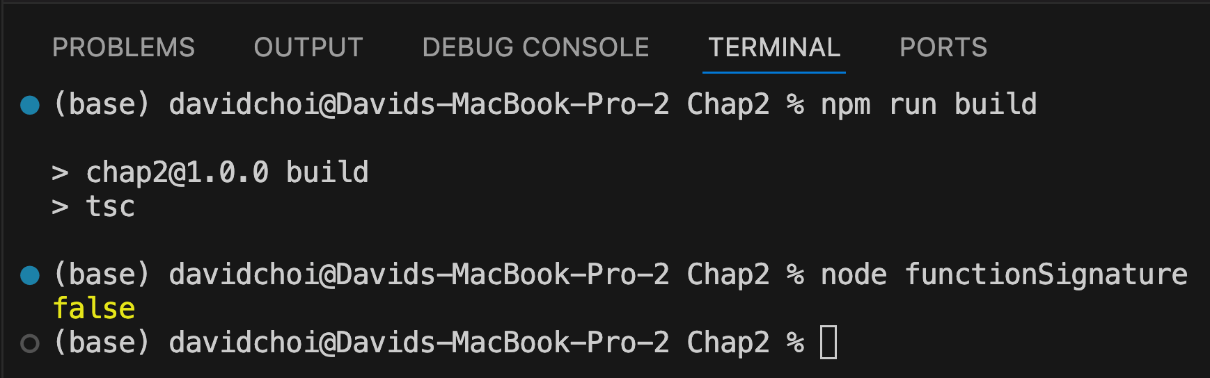
In the code after the function definition line, you have the declaration of the runner variable, which is of the Run type, our function type. This function simply checks whether the person has run more than 10 miles and returns true if they have and false if they have not. Now, this means that our variable runner is actually a function, and we can call it like any other function by using parentheses wrapped around a parameter value, like this: runner(9). This call is passed directly into console.log, which writes out the result of the function call. Compile and run this code and you should see this:
Figure 2.8 – Function type result
Calling runner with a parameter of 9 would make the function return false, which is correct.
The never type
A type called never seems quite strange at first glance, so let's try and understand it. The never type is used as a return type for a function that never returns in the normal sense, either because it always throws an error or because it runs forever in an infinite loop. At first, this sounds like the void type. However, they are quite different. In void, a function does return, in the completed sense of the word; it just does not return any value (it returns undefined, which is effectively no value). In the case of never, the function does not finish at all. Now, this may seem totally useless, but it's actually quite powerful for indicating intent.
Let's look at an example. Create a file called never.ts and add the following code:
functionoldEnough(age: number): never | boolean {
if (age > 59) {
throwError("Too old!");
}
if (age <= 18) {
returnfalse;
}
returntrue;
}
As you can see, oldEnough function either throws (when age is over 59) or returns a boolean, which is what never | boolean expresses. Note the annotation is redundant, since never is absorbed in unions, so it is simply boolean. On its own, never is the return type of a function that never returns (always throws or loops forever), documenting that intent; the compiler also treats code after such a call as unreachable.
In this section, we learned about the many built-in types in TypeScript. We were able to see why using these types can improve our code quality and help us catch errors earlier in the coding cycle. In the next section, we'll learn how we can use TypeScript to create our own types and also follow object-oriented programming (OOP) principles.
Read this chapter and the full book FREE of cost - No Credit card required!
Plus access over 9,000 other expert tech books and videos just by signing up - No commitment!
CONTINUE READING
83
Tech Concepts
36
Programming languages
73
Tech Tools
Unlimited access to the largest independent learning library in tech of over 8,000 expert-authored tech books and videos.
Innovative learning tools, including AI book assistants, code context explainers, and text-to-speech.
50+ new titles added per month and exclusive early access to books as they are being written.





 Free Chapter