Sign In Start Free Trial
Account

Add to playlist

Create a Playlist

Modal Close icon
You need to login to use this feature.
  • Book Overview & Buying Full-Stack React, TypeScript, and Node
  • Table Of Contents Toc
Full-Stack React, TypeScript, and Node

Full-Stack React, TypeScript, and Node - Second Edition

By : David Choi, Cihan Yakar
close
close
Full-Stack React, TypeScript, and Node

Full-Stack React, TypeScript, and Node

By: David Choi, Cihan Yakar

Overview of this book

In the fast-paced world of web development, React is a widely used library for building applications, while Node.js and Express support scalable server-side solutions and web services. TypeScript enhances JavaScript projects with robustness and maintainability, making it an essential tool for large-scale applications. This edition provides a hands-on guide to mastering these technologies, with new chapters and updated content that reflects current industry practices. Begin with a solid foundation in TypeScript to build high-quality web applications. Explore React 19, leveraging the Hooks API and Redux Toolkit for state management. Then transition to server-side development with Express, incorporating modern practices like JWT-based authentication and Prisma ORM for database management. A major focus of this edition is production readiness. Learn how to containerize your application with Docker and Podman, automate builds and tests with GitHub Actions, and deploy to the cloud. New chapters add monitoring and observability with OpenTelemetry and Grafana plus a hands-on guide to AI-assisted development with LLM coding agents. Other updates include Vitest for testing and expanded content on Postgres and Prisma ORM. By the end of this book, you will have built and deployed a comprehensive full-stack application, ready for production.
Table of Contents (19 chapters)
close
close
17
Other Books You May Enjoy
18
Index

Utility types

Utility types are created by the TypeScript team and provide pre-built solutions for common use cases in TypeScript. In this section, we'll learn about a few of the more commonly used utility types.

ReturnType<Type>

ReturnType is a very useful utility type, especially when working with functions whose return types you don't control directly. As the name implies, ReturnType<Type> allows us to create a type from the type a function returns. Let's create an example. Create the returnType.ts file and add this code to it:

function getData() {
  return [
    {
      name: "jon",
      age: 24,
    },
    {
      name: "linda",
      age: 35,
    },
    {
      name: "tom",
      age: 21,
    },
  ];
}

As you can see, this function returns person data as an array. It does not have an explicit return type, so we want to type that explicitly. Let's add some more code to create that explicit type. Add this underneath the function:

type Result = ReturnType<typeof getData>;

Let's unpack this code. First, we start with a type alias called Result. Then, we make our ReturnType call and add a type in between the arrow brackets. The code typeof getData tells TypeScript to get the return type of the getData function and then associate it with ReturnType. The ReturnType is a generic. Note that you will learn more about typeof in Chapter 3, Building Better Apps with ES6+ Features. This line of code makes our Result type look like this:

{
  name: string;
  age: number;
}[]

Notice that it is an array type, as indicated by the square brackets. Next, let's add the code that will call our getData function and view its results:

const result: Result = getData();
console.log(result);

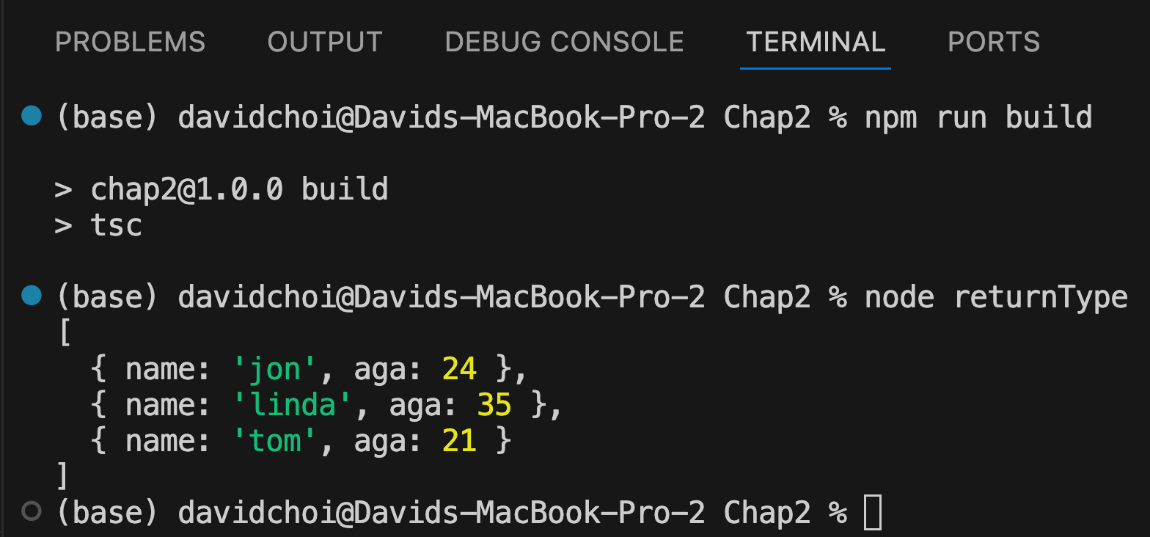
As you can see, we have a variable, result, of type Result that receives the getData function's return value, and then we log it on the console. If you compile and run this code, the result will look like this:

Figure 2.17 – The returnType.ts result

Figure 2.17 – The returnType.ts result

Pick<Type, Keys>

Sometimes, when dealing with things such as an API, we may find that the type has more information than we actually need. This may make dealing with that type unnecessarily complex. Therefore, this utility type allows us to be selective about which properties we care about and only populate our type with those properties.

Let's create an example. Create a new file, pick.ts, and add this code:

interface SuperComplexType {
  name: string;
  age: number;
  street: string;
  state: string;
  zip: string;
  employeeId: number;
  dateStarted: Date;
  favoriteFood: string;
  favoriteColor: string;
  favoriteSportsTeam: string;
  homeTown: string;
  corporateOfficeCity: string;
}

Now, let's pretend that the API we need to call is returning an object that has this type of information. Clearly, if we didn't need every single field here, it would be cumbersome to have to deal with such a type. So, let's create our own type with just the fields we need by using Pick. Add this code below SuperComplexType:

type SimpleType = Pick<
  SuperComplexType,
  "name" | "age" | "corporateOfficeCity"
>;

const adam: SimpleType = {
  name: "adam",
  age: 33,
  corporateOfficeCity: "New York",
};

Now, starting at the SimpleType line, you can see that we use the Pick utility type, pass our original SuperComplexType, and then select each field that we want in our new type. If you hover over this new SimpleType, you will see that it only includes the fields we selected. The adam variable was added just to give us confirmation that this new type works as expected. Note that Pick only affects the type at compile time; it does not filter out fields from the actual runtime data. If the API sends all twelve fields, they will still be there in memory, but TypeScript will only let you access the three you picked.

Omit<Type, Keys>

Now, if there's a type for including only the properties you want, you would think there's a type for removing the ones you don't. There is: Omit<Type, Keys>. Let's revisit the Pick example we just used and revise it for Omit. Create a file called omit.ts and add this code:

// copy SuperComplexType here
type SimpleTypeOmit = Omit<
  SuperComplexType,
  "name" | "age" | "corporateOfficeCity"
>;

Make sure to copy the SuperComplexType interface to the top of your omit.ts file. If you hover over the SimpleTypeOmit type, it will show you a list of all the properties inside of SuperComplexType except the three properties you included in the Omit type.

There are many utility types that you can choose from to provide helpers to improve and streamline your code. These utility types are part of TypeScript's standard library, well-tested, and widely used. Therefore, before rolling your own helper, you should check the documentation and see whether there is a suitable type that already exists and use that.

CONTINUE READING
83
Tech Concepts
36
Programming languages
73
Tech Tools
Icon Unlimited access to the largest independent learning library in tech of over 8,000 expert-authored tech books and videos.
Icon Innovative learning tools, including AI book assistants, code context explainers, and text-to-speech.
Icon 50+ new titles added per month and exclusive early access to books as they are being written.
Full-Stack React, TypeScript, and Node
notes
bookmark Notes and Bookmarks search Search in title playlist Add to playlist font-size Font size

Change the font size

margin-width Margin width

Change margin width

day-mode Day/Sepia/Night Modes

Change background colour

Close icon Search
Country selected

Close icon Your notes and bookmarks

Confirmation

Modal Close icon
claim successful

Buy this book with your credits?

Modal Close icon
Are you sure you want to buy this book with one of your credits?
Close
YES, BUY

Submit Your Feedback

Modal Close icon
Modal Close icon
Modal Close icon