-
Book Overview & Buying
-
Table Of Contents
Full-Stack React, TypeScript, and Node - Second Edition
By :
Generics allow a type definition to include an associated type that can be chosen by the user of the generic type, instead of being dictated by the type creator. Think of as a parameter, but for types instead of values. In this way, there are structures and rules, but still some amount of flexibility. Generics will definitely come into play later when we code with React, so let's learn about them here.
Generics can be used for functions, classes, and interfaces. Let's look at an example of generics with functions. Create a file called functionGeneric.ts and add the following code:
function getLength<T>(arg: T): number {
if(arg.hasOwnProperty("length")) {
return arg["length"];
}
return 0;
}
console.log(getLength<number>(22));
console.log(getLength("Hello world."));
Note that this code has errors, but we'll work through those together. If we start at the top, we see a function called getLength<T>. This function uses a generic, <T>, that tells the compiler that wherever it sees the T symbol, it can expect some associated type. Now, our function implementation checks to see whether the arg parameter has a field called length, by using the hasOwnProperty function. This function is built into JavaScript, and as you can see, it checks whether a certain property exists. If it does not have a length value, it just returns 0. Finally, toward the bottom, you can see that the getLength function is called two times: once for a number and another time for a string. Additionally, you can see that for number, it explicitly has the <number> type indicator, whereas for string, it does not. These two examples are there only to show that you can be explicit about what the associated type is, but the compiler can usually figure out which type you meant based on the usage.
Now, the first issue with this code is the errors. When T is unconstrained, TypeScript treats it much like unknown: you cannot access any properties or call any methods on it, because the compiler has no guarantee about what T actually is. That is why both the hasOwnProperty call and the bracket notation arg["length"] produce errors. So, let's update this code to eliminate these errors.
First, comment out the code we just wrote and add the following new code below it:
interface HasLength {
length: number;
}
function getLength<T extends HasLength>(arg: T): number {
return arg.length;
}
console.log(getLength<number>(22));
console.log(getLength("Hello world."));
This code is quite similar, except we use a HasLength interface to constrain what types are allowed. Constraining generic types is done with the extends keyword. By writing T extends HasLength, we are telling the compiler that whatever T is, it must inherit from or be of the HasLength type, which effectively means that it must have the length property. Therefore, when the two previous getLength calls are made, it fails for number types, since they don't have a length property, but it works for string.
OK, now let's look at an example that uses interfaces and classes together. Let's create a file called classGeneric.ts and add the following code to it:
namespace GenericNamespace {
interface Wheels {
count: number;
diameter: number;
}
interface Vehicle<T> {
getName(): string;
getWheelCount: () => T;
}
// more code coming here
}
So, we can see that we have an interface called Wheels, which provides wheel information such as count and diameter. We can also see that the Vehicle interface takes a generic of type T. You can probably guess what we're going to do, but let's continue by adding another type, Automobile, and replace the comment line with it:
class Automobile implements Vehicle<Wheels> {
constructor(private name: string, private wheels: Wheels){}
getName(): string {
return this.name;
}
getWheelCount(): Wheels {
return this.wheels;
}
}
We see that the Automobile class implements the Vehicle interface with the generic as the Wheels type, which gives an implementation to the getName and getWheelCount methods. Then, finally, let's add another class into the namespace just below our Automobile class called Chevy:
class Chevy extends Automobile {
constructor() {
super("Chevy", { count: 4, diameter: 18 });
}
}
In the case of the Chevy class, we do not need to implement anything because we are directly inheriting from Automobile and, therefore, receiving its methods without having to also create them inside of Chevy. After all these types are defined, add this code after the Chevy class:
const chevy = new Chevy();
console.log("car name ", chevy.getName());
console.log("wheels ", chevy.getWheelCount());
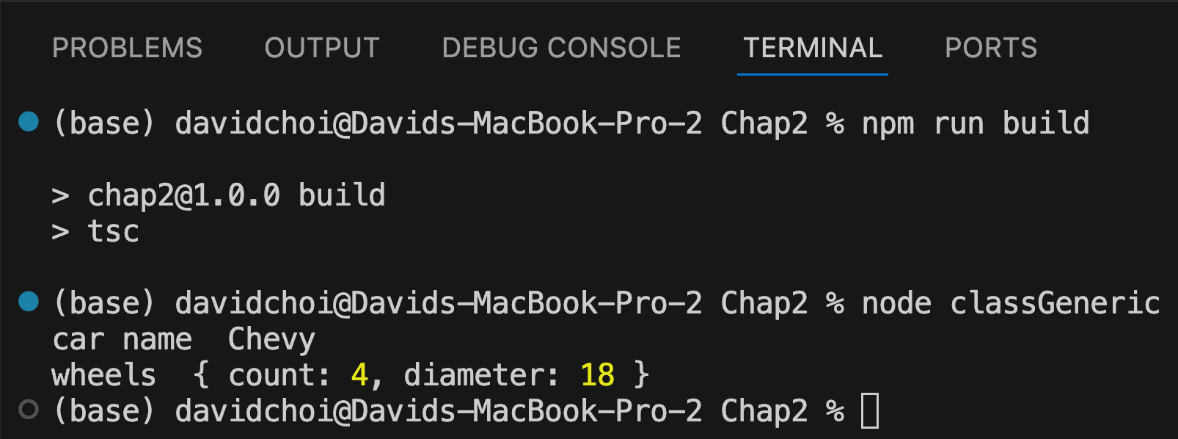
The last three lines create an instance of the Chevy class, and then its methods are called inside the console logs. If you compile and run, you should see this:

Figure 2.16 – The classGeneric.ts result
You can see that our inheritance hierarchy is several levels deep, but our code is able to successfully return a valid result.
In this section, we learned about using generics on both functions and class types. Generics are a foundational feature of TypeScript that you will encounter everywhere, from collections and utility types to API wrappers, and they are especially common in React development, as we'll see soon.
Change the font size
Change margin width
Change background colour