Sign In Start Free Trial
Account

Add to playlist

Create a Playlist

Modal Close icon
You need to login to use this feature.
  • Book Overview & Buying Moodle 2.0 First Look
  • Table Of Contents Toc
Moodle 2.0 First Look

Moodle 2.0 First Look

4.3 (7)
close
close
Moodle 2.0 First Look

Moodle 2.0 First Look

4.3 (7)

Overview of this book

Moodle is currently the world's most popular E-learning platform. The long-awaited second version of Moodle is now available and brings with it greatly improved functionality. If you are planning to upgrade your site to Moodle 2.0 and want to be up-to-date with the latest developments, then this book is for you.This book takes an in-depth look at all of the major new features in Moodle 2.0 and how it differs from previous Moodle versions. It highlights changes to the standard installation and explains the new features with clear screenshots, so you can quickly take full advantage of Moodle 2.0. It also assists you in upgrading your site to Moodle 2.0, and will give you the confidence to make the move up to Moodle 2.0, either as an administrator or a course teacher.With its step-by-step introduction to the new features of Moodle 2.0, this book will leave you confident and keen to get your own courses up and running on Moodle 2.0. It will take you on a journey from basic navigation to advanced administration, looking at the changes in resource management and activity setup along the way. It will show you new ways tutors and students can control the pace of their learning and introduce you to the numerous possibilities for global sharing and collaborating now available in Moodle 2.0
Table of Contents (14 chapters)
close
close
Moodle 2.0 First Look
Credits
About the Author
About the Reviewers
Preface
1
Index

The Blog Menu block


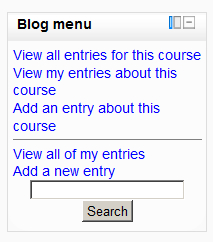
To add this to a course a teacher such as Stuart needs to turn on the editing and select Blog menu from the list of available blocks:

The Blog menu displays the following links:

  • View all entries for this course: Here's where Emma and others can read blog entries specific to that course. This link shows users all the blog posts for the course they are currently in.

  • View my entries about this course: Here's where Emma can check the entries she has already made associated with this course. This link shows users their own blog posts for the course they are currently in.

  • Add an entry about this course: Here's where Emma can add a blog entry related only to this course. When she does that, she is taken to the editing screen for adding a new blog entry, which she starts as shown in the following screenshot:

Just as in Moodle 1.9, she can attach documents, choose to publish publicly or keep to herself and add tags. The changes come as we scroll down. At the bottom of the screen is...

CONTINUE READING
83
Tech Concepts
36
Programming languages
73
Tech Tools
Icon Unlimited access to the largest independent learning library in tech of over 8,000 expert-authored tech books and videos.
Icon Innovative learning tools, including AI book assistants, code context explainers, and text-to-speech.
Icon 50+ new titles added per month and exclusive early access to books as they are being written.
Moodle 2.0 First Look
notes
bookmark Notes and Bookmarks search Search in title playlist Add to playlist font-size Font size

Change the font size

margin-width Margin width

Change margin width

day-mode Day/Sepia/Night Modes

Change background colour

Close icon Search
Country selected

Close icon Your notes and bookmarks

Confirmation

Modal Close icon
claim successful

Buy this book with your credits?

Modal Close icon
Are you sure you want to buy this book with one of your credits?
Close
YES, BUY

Submit Your Feedback

Modal Close icon
Modal Close icon
Modal Close icon