Sign In Start Free Trial
Account

Add to playlist

Create a Playlist

Modal Close icon
You need to login to use this feature.
  • Book Overview & Buying Mastering TypoScript: TYPO3 Website, Template, and Extension Development
  • Table Of Contents Toc
Mastering TypoScript: TYPO3 Website, Template, and Extension Development

Mastering TypoScript: TYPO3 Website, Template, and Extension Development

4.6 (5)
close
close
Mastering TypoScript: TYPO3 Website, Template, and Extension Development

Mastering TypoScript: TYPO3 Website, Template, and Extension Development

4.6 (5)

Overview of this book

Free, open-source, flexible, and scalable, TYPO3 is one of the most powerful PHP content management systems. It is well suited for creating intranets and extranets for the enterprise. While providing an easy-to-use web interface for non-technical authors and editors of content, its messaging and workflow system enable shared authoring and collaboration. TYPO3 provides flexible and powerful interfaces for both content editors and administrators, giving them full control of the core aspects the system. However for developers who need to customize the system, TYPO3 offers a powerful configuration language called TypoScript. Good knowledge of TypoScript is really a prerequisite for implementing complex applications with TYPO3 and gives developers full control over the configuration of TYPO3 and its template engine. TypoScript enables the complete output template to be created and manipulated, giving you full control over the layout of the site. TypoScript also allows you to integrate dynamic contents, JavaScript-based menus, Flash, Graphics, etc. with ease. You have maximum control over the design of the website and can control all options that would otherwise be addressed by HTML-simple text output, formatting, and much more. TypoScript also allows you to generate graphics at run time and display different content dynamically.
Table of Contents (19 chapters)
close
close
Mastering TypoScript: TYPO3 Website, Template, and Extension Development
Credits
About the Author
Preface

SQL Queries


Working with SQL queries gets really interesting when developing extensions. You will learn how to develop your own TYPO3 extensions in Chapter 11. But in anticipation, we are going to foreshadow what this entails.

Let's assume that you are developing your own extension that will list your customers' references in detail on an existing page. The focus in this chapter is on the programming of SQL queries.

In the following sections we will show you the Kickstarter, the extension key, and the importance of the individual fields when building an extension.

Constructing an Extension with Kickstarter

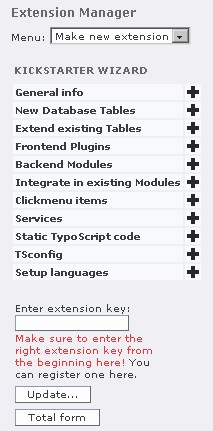
If it has already been installed, you will find the Kickstarter extension in the extension manager in the Menu list box under Make new extension. Chapter 11 will provide you with comprehensive information about this tool and its installation.

Call the KICKSTARTER WIZARD from Make new extension.

Enter user_references into the Enter Extension key field and confirm it by clicking the Update button...

CONTINUE READING
83
Tech Concepts
36
Programming languages
73
Tech Tools
Icon Unlimited access to the largest independent learning library in tech of over 8,000 expert-authored tech books and videos.
Icon Innovative learning tools, including AI book assistants, code context explainers, and text-to-speech.
Icon 50+ new titles added per month and exclusive early access to books as they are being written.
Mastering TypoScript: TYPO3 Website, Template, and Extension Development
notes
bookmark Notes and Bookmarks search Search in title playlist Add to playlist font-size Font size

Change the font size

margin-width Margin width

Change margin width

day-mode Day/Sepia/Night Modes

Change background colour

Close icon Search
Country selected

Close icon Your notes and bookmarks

Confirmation

Modal Close icon
claim successful

Buy this book with your credits?

Modal Close icon
Are you sure you want to buy this book with one of your credits?
Close
YES, BUY

Submit Your Feedback

Modal Close icon
Modal Close icon
Modal Close icon