Sign In Start Free Trial
Account

Add to playlist

Create a Playlist

Modal Close icon
You need to login to use this feature.
  • Book Overview & Buying TrixBox Made Easy
  • Table Of Contents Toc
TrixBox Made Easy

TrixBox Made Easy

3.1 (8)
close
close
TrixBox Made Easy

TrixBox Made Easy

3.1 (8)

Overview of this book

TrixBox is a telephone system based on the popular open source Asterisk PBX (Private Branch eXchange) Software. TrixBox allows an individual or organization to setup a telephone system with traditional telephone networks as well as Internet based telephony or VoIP (Voice over Internet Protocol). SugarCRM can be integrated with Asterisk, and is bundled with Trixbox offering real power and flexibility. The book begins by introducing telephony concepts before detailing how to plan a telephone system and moving on to the installation, configuration, and management of a feature packed PBX. This book is rich with practical examples and tools. It provides examples of well laid out telephone systems with accompanying spreadsheets to aid the reader in building stable telephony infrastructure.
Table of Contents (16 chapters)
close
close
TrixBox Made Easy
Credits
About the Authors
About the Reviewers
Preface
Lock Free Chapter
1
Introduction to VoIP
6
TrixBox Configuration
chevron up
1
Commonly Used VoIP Terms

Chapter 6. TrixBox Configuration

The TrixBox system is up and running now and all the basic concepts have been understood. Hopefully, you have taken the time to design your IVR menus and have all your PSTN and VoIP connectivity options ready to go. In this chapter, you will learn to make the essential configurations for TrixBox. To get a basic system up and running, the following options will need to be configured:

  • FreePBX

  • Extensions

  • Trunks

  • Inbound routing

  • Outbound routing

  • Digital receptionist

  • Ring groups

  • Queues

  • Music on-hold

  • General settings

FreePBX

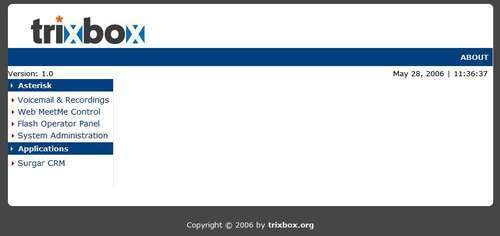
To get to the FreePBX administration page, we need to go to the TrixBox configuration web page:

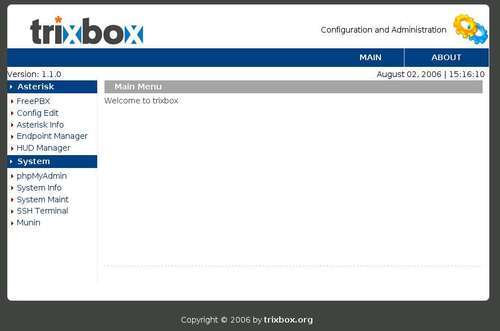
If we click on the System Administration link, we will arrive at the following screenshot:

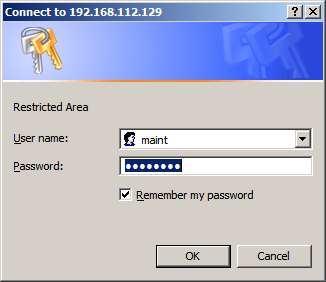
Clicking on the FreePBX link will prompt us for a username and password. The default login is maint with a password of password. Later on, we will see how to change these when we discuss securing our TrixBox server inChapter 10.

Once we are logged in, we will be presented...

CONTINUE READING
83
Tech Concepts
36
Programming languages
73
Tech Tools
Icon Unlimited access to the largest independent learning library in tech of over 8,000 expert-authored tech books and videos.
Icon Innovative learning tools, including AI book assistants, code context explainers, and text-to-speech.
Icon 50+ new titles added per month and exclusive early access to books as they are being written.
TrixBox Made Easy
notes
bookmark Notes and Bookmarks search Search in title playlist Add to playlist font-size Font size

Change the font size

margin-width Margin width

Change margin width

day-mode Day/Sepia/Night Modes

Change background colour

Close icon Search
Country selected

Close icon Your notes and bookmarks

Confirmation

Modal Close icon
claim successful

Buy this book with your credits?

Modal Close icon
Are you sure you want to buy this book with one of your credits?
Close
YES, BUY

Submit Your Feedback

Modal Close icon
Modal Close icon
Modal Close icon