
Sign In Start Free Trial
Account

Add to playlist

Create a Playlist

Modal Close icon
You need to login to use this feature.
  • Book Overview & Buying Learn Clip Studio Paint
  • Table Of Contents Toc
Learn Clip Studio Paint

Learn Clip Studio Paint - Second Edition

By : Liz Staley
4 (20)
close
close
Learn Clip Studio Paint

Learn Clip Studio Paint

4 (20)
By: Liz Staley

Overview of this book

Clip Studio Paint, the successor to Manga Studio, is used by over four million illustrators and comic creators around the world. This book will guide you through every step of learning this software, from system requirements and installation, all the way through to exporting your work for print or the web. Learn how to create new documents, customize tools to fit your working style, use ruler tools to create anything from straight lines to intricate backgrounds, add 3D elements, create comic panels using the specialized panel tools, utilize screentones and materials, add text and word balloons to your comics, create sound effects, easily flat and color your comics using reference layers, and bring your drawings to life using the animation features. By the end of this book, you will be able to navigate the Clip Studio Interface and program preferences, customize the various tools, and be able to create your own black-and-white and color illustrations and comics from start to finish.
Table of Contents (21 chapters)
close
close

Creating frames

In order to create frame border panels, you will need an open page. I recommend using one of the templates under the comic category to test out the panel creation tools, but use any size canvas that you feel comfortable with! I recommend the comic templates because they already have the Inner border size set, so it's easy to see where you should keep the panels to avoid them getting cut off.

Before we get into actually creating some panels, let's take a look at the sub tools used to make them and some of the options for those sub tools. The Frame Border sub tools can be found under the Figure category of tools in the Toolbar. These sub tools are shown in the following screenshot:
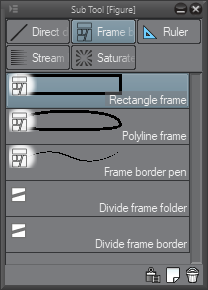
In this section, we are going to concentrate on the Rectangle frame, Polyline frame, and Frame border pen tools. We will discuss the other two sub tools in the Dividing and...

CONTINUE READING
83
Tech Concepts
36
Programming languages
73
Tech Tools
Icon Unlimited access to the largest independent learning library in tech of over 8,000 expert-authored tech books and videos.
Icon Innovative learning tools, including AI book assistants, code context explainers, and text-to-speech.
Icon 50+ new titles added per month and exclusive early access to books as they are being written.
Learn Clip Studio Paint
notes
bookmark Notes and Bookmarks search Search in title playlist Add to playlist font-size Font size

Change the font size

margin-width Margin width

Change margin width

day-mode Day/Sepia/Night Modes

Change background colour

Close icon Search
Country selected

Close icon Your notes and bookmarks

Confirmation

Modal Close icon
claim successful

Buy this book with your credits?

Modal Close icon
Are you sure you want to buy this book with one of your credits?
Close
YES, BUY

Submit Your Feedback

Modal Close icon
Modal Close icon
Modal Close icon