Sign In Start Free Trial
Account

Add to playlist

Create a Playlist

Modal Close icon
You need to login to use this feature.
  • Book Overview & Buying Unity Game Development Essentials
  • Table Of Contents Toc
Unity Game Development Essentials

Unity Game Development Essentials

By : Will Goldstone
4.3 (38)
close
close
Unity Game Development Essentials

Unity Game Development Essentials

4.3 (38)
By: Will Goldstone

Overview of this book

Game engines are central to the video games we know and love. From the artwork to the mathematics that underpin the frames onscreen, the engine calls the shots. Aside from offering one of the leading 3D game engines, Unity also provides a superlative development tool ñ a tool that can produce professional standard games for Mac, PC, and the Unity Web Player. This book is a complete exercise in game development covering environments, physics, sound, particles, and much more, to get you up and working with Unity quickly. Taking a practical approach, this book will introduce you to the concepts of developing 3D games before getting to grips with development in Unity itself. From creating 3D worlds to scripting and creating simple game elements you will learn everything you'll need to get started with game development for the PC, Mac, and Web. This book is designed to cover a set of easy to follow examples, which culminate in the production of a First Person 3D game, complete with an interactive island environment. By introducing common concepts of game and 3D production, you'll explore Unity to make a character interact with the game world, and build puzzles for the player to solve, in order to complete the game. At the end of the book, you will have a fully working 3D game and all the skills required to extend the game further, giving your end-user, the player, the best experience possible. Soon you will be creating your own 3D games with ease!
Table of Contents (17 chapters)
close
close
Unity Game Development Essentials
Credits
About the Author
About the Reviewers
Preface
1
Index

Adding the outpost


Before we begin to use both collision detection and ray casting to open the door of our outpost, we'll need to introduce it to the scene. In Chapter 2, we set up the animation states for the model, and it will be those states that we'll be addressing when we write a script later in the chapter.

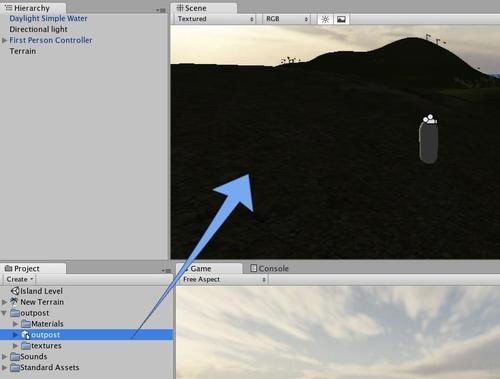
To begin, drag the outpost model from the Project panel to the Scene view and drop it anywhere — bear in mind you cannot position it when you drag-and-drop; this is done once you have dropped the model (that is, let go off the mouse).

Once the outpost is in the Scene, you'll notice its name has also appeared in the Hierarchy panel and that it has automatically become selected. Now you're ready to position and scale it!

Positioning

As your terrain design from Chapter 2 may be different to mine, select the Transform tool and position your outpost in a free area of land by dragging the axis handles in the scene.

Tip

Be careful when using the axis handles for positioning. Dragging the...

Visually different images
CONTINUE READING
83
Tech Concepts
36
Programming languages
73
Tech Tools
Icon Unlimited access to the largest independent learning library in tech of over 8,000 expert-authored tech books and videos.
Icon Innovative learning tools, including AI book assistants, code context explainers, and text-to-speech.
Icon 50+ new titles added per month and exclusive early access to books as they are being written.
Unity Game Development Essentials
notes
bookmark Notes and Bookmarks search Search in title playlist Add to playlist font-size Font size

Change the font size

margin-width Margin width

Change margin width

day-mode Day/Sepia/Night Modes

Change background colour

Close icon Search
Country selected

Close icon Your notes and bookmarks

Confirmation

Modal Close icon
claim successful

Buy this book with your credits?

Modal Close icon
Are you sure you want to buy this book with one of your credits?
Close
YES, BUY

Submit Your Feedback

Modal Close icon
Modal Close icon
Modal Close icon