Sign In Start Free Trial
Account

Add to playlist

Create a Playlist

Modal Close icon
You need to login to use this feature.
  • Book Overview & Buying SAP BusinessObjects Dashboards 4.1 Cookbook
  • Table Of Contents Toc
  • Feedback & Rating feedback
SAP BusinessObjects Dashboards 4.1 Cookbook

SAP BusinessObjects Dashboards 4.1 Cookbook

By : David Lai
4.9 (8)
close
close
SAP BusinessObjects Dashboards 4.1 Cookbook

SAP BusinessObjects Dashboards 4.1 Cookbook

4.9 (8)
By: David Lai

Overview of this book

If you are a developer with a good command and knowledge of creating dashboards, but are not yet an advanced user of SAP BusinessObjects Dashboards, then this is the perfect book for you. Prerequisites include a good working knowledge of Microsoft Excel as well as knowledge of basic dashboard practices.
Table of Contents (17 chapters)
close
close
16
Index

Running connections after loading the dashboard

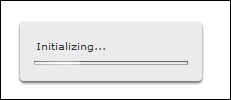
When you run a dashboard, the initialization message and a loading bar is shown. When initialization is finished the message disappears and the dashboard is presented and made available for usage.

Running connections after loading the dashboard

During initialization, all dashboard connections and queries are loaded by default when the Refresh Before Components Are Loaded option in the Usage tab of the Data Manager is set. This means that when you have one or more connections that require some time to load, the whole dashboard has to wait for them to finish. Only when all data is loaded is the initialization message removed and the dashboard can be used. Why not let users see the dashboard immediately and let it fill with data as soon as a connection has finished loading? Luckily, there is a workaround for this issue, as we will see in this recipe.

Getting ready

Use a dashboard with one or more Data Manager connections or Queries Browser queries.

How to do it…

  1. For the connection, go to...
Visually different images
CONTINUE READING
83
Tech Concepts
36
Programming languages
73
Tech Tools
Icon Unlimited access to the largest independent learning library in tech of over 8,000 expert-authored tech books and videos.
Icon Innovative learning tools, including AI book assistants, code context explainers, and text-to-speech.
Icon 50+ new titles added per month and exclusive early access to books as they are being written.
SAP BusinessObjects Dashboards 4.1 Cookbook
notes
bookmark Notes and Bookmarks search Search in title playlist Add to playlist font-size Font size

Change the font size

margin-width Margin width

Change margin width

day-mode Day/Sepia/Night Modes

Change background colour

Close icon Search
Country selected

Close icon Your notes and bookmarks

Confirmation

Modal Close icon
claim successful

Buy this book with your credits?

Modal Close icon
Are you sure you want to buy this book with one of your credits?
Close
YES, BUY

Submit Your Feedback

Modal Close icon
Modal Close icon
Modal Close icon