Sign In Start Free Trial
Account

Add to playlist

Create a Playlist

Modal Close icon
You need to login to use this feature.
  • Book Overview & Buying SAP BusinessObjects Dashboards 4.1 Cookbook
  • Table Of Contents Toc
  • Feedback & Rating feedback
SAP BusinessObjects Dashboards 4.1 Cookbook

SAP BusinessObjects Dashboards 4.1 Cookbook

By : David Lai
4.9 (8)
close
close
SAP BusinessObjects Dashboards 4.1 Cookbook

SAP BusinessObjects Dashboards 4.1 Cookbook

4.9 (8)
By: David Lai

Overview of this book

If you are a developer with a good command and knowledge of creating dashboards, but are not yet an advanced user of SAP BusinessObjects Dashboards, then this is the perfect book for you. Prerequisites include a good working knowledge of Microsoft Excel as well as knowledge of basic dashboard practices.
Table of Contents (17 chapters)
close
close
16
Index

Using a bullet chart


A bullet chart is in fact a bar or column chart with a lot of extra options. It can serve as a replacement for gauges and meters. Besides visualizing a data point as bar and column charts do, a bullet chart is able to show a target and two or more qualitative ranges. These ranges can indicate whether a value can be considered bad, satisfactory, good, and so on.

This recipe will show you how to configure a bullet chart. SAP BusinessObjects Dashboards has two bullet chart components: horizontal and vertical. Both components have exactly the same configuration options and work in the same manner. This recipe will use the horizontal bullet chart.

Getting ready

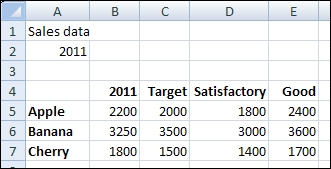
Open a new file in SAP BusinessObjects Dashboards and enter the data into the spreadsheet, as shown in the following screenshot:

How to do it...

  1. Drag a Horizontal Bullet Chart component into the canvas.

  2. Bind the By Range field to the spreadsheet range from A4 to E7:

  3. Also bind the Chart field in the Titles section to spreadsheet...

Visually different images
CONTINUE READING
83
Tech Concepts
36
Programming languages
73
Tech Tools
Icon Unlimited access to the largest independent learning library in tech of over 8,000 expert-authored tech books and videos.
Icon Innovative learning tools, including AI book assistants, code context explainers, and text-to-speech.
Icon 50+ new titles added per month and exclusive early access to books as they are being written.
SAP BusinessObjects Dashboards 4.1 Cookbook
notes
bookmark Notes and Bookmarks search Search in title playlist Add to playlist font-size Font size

Change the font size

margin-width Margin width

Change margin width

day-mode Day/Sepia/Night Modes

Change background colour

Close icon Search
Country selected

Close icon Your notes and bookmarks

Confirmation

Modal Close icon
claim successful

Buy this book with your credits?

Modal Close icon
Are you sure you want to buy this book with one of your credits?
Close
YES, BUY

Submit Your Feedback

Modal Close icon
Modal Close icon
Modal Close icon