
Sign In Start Free Trial
Account

Add to playlist

Create a Playlist

Modal Close icon
You need to login to use this feature.
  • Book Overview & Buying Learning RxJava
  • Table Of Contents Toc
Learning RxJava

Learning RxJava - Second Edition

By : Nick Samoylov, Nield
4.8 (4)
close
close
Learning RxJava

Learning RxJava

4.8 (4)
By: Nick Samoylov, Nield

Overview of this book

RxJava is not just a popular library for building asynchronous and event-based applications; it also enables you to create a cleaner and more readable code base. In this book, you’ll cover the core fundamentals of reactive programming and learn how to design and implement reactive libraries and applications. Learning RxJava will help you understand how reactive programming works and guide you in writing your first example in reactive code. You’ll get to grips with the workings of Observable and Subscriber, and see how they are used in different contexts using real-world use cases. The book will also take you through multicasting and caching to help prevent redundant work with multiple Observers. You’ll then learn how to create your own RxJava operators by reusing reactive logic. As you advance, you’ll explore effective tools and libraries to test and debug RxJava code. Finally, you’ll delve into RxAndroid extensions and use Kotlin features to streamline your Android apps. By the end of this book, you'll become proficient in writing reactive code in Java and Kotlin to build concurrent applications, including Android applications.
Table of Contents (22 chapters)
close
close
1
Section 1: Foundations of Reactive Programming in Java
5
Section 2: Reactive Operators
12
Section 3: Integration of RxJava applications
1
Appendix A: Introducing Lambda Expressions
2
Appendix B: Functional Types
5
Appendix E: Understanding Schedulers

Creating an Android project

We are going to use Android Studio for the examples in this chapter, with Android 5.1 Lollipop as our platform target. You can download the latest version of the studio at https://developer.android.com/studio/index.html. If you use the source code provided with this book and create an IntelliJ IDEA project that includes all the source code downloaded from GitHub, make sure that the Chapter11 folder is excluded from the project configuration.

After installation, launch Android Studio and observe the steps described as follows:

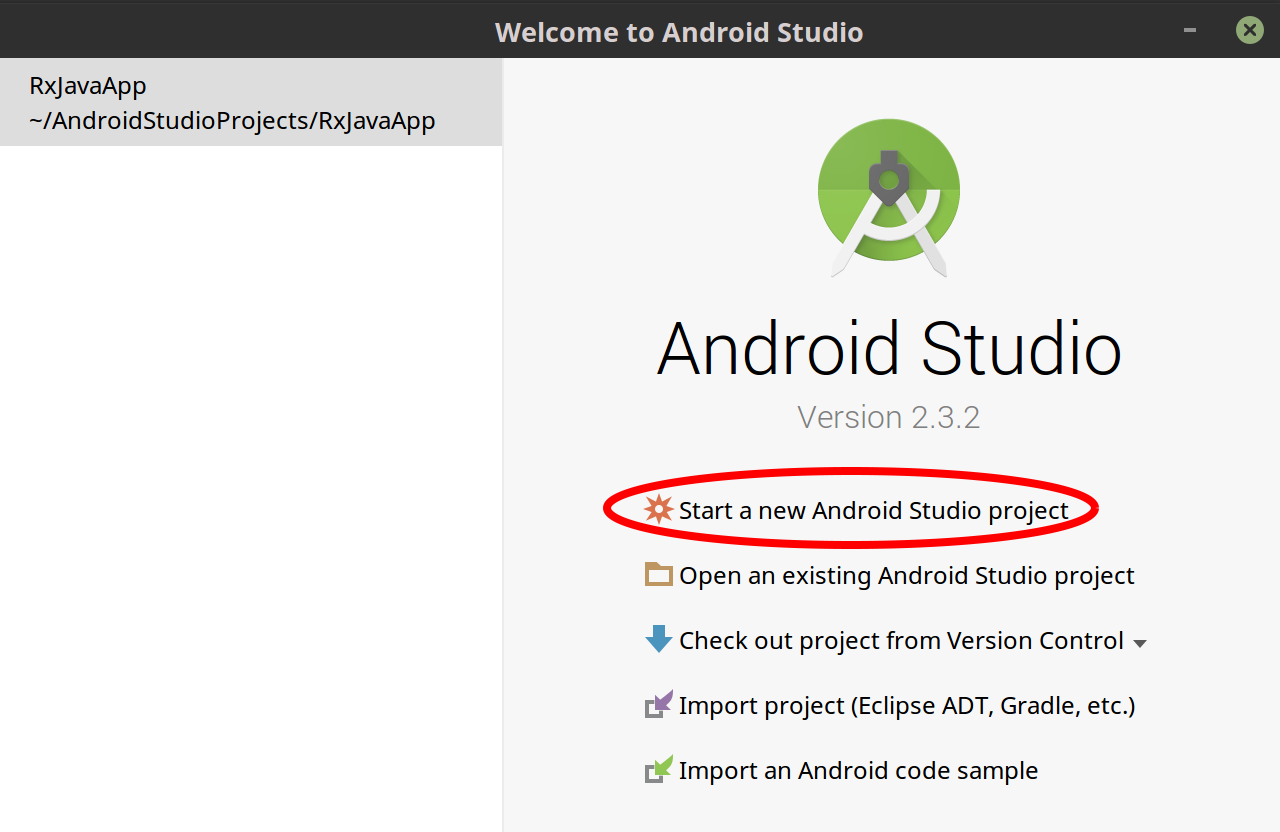
  1. Click on the Start a new Android Studio project, as shown in the following screenshot:
  1. On the next screen, choose Empty Activity as your template, as shown in the following screenshot:
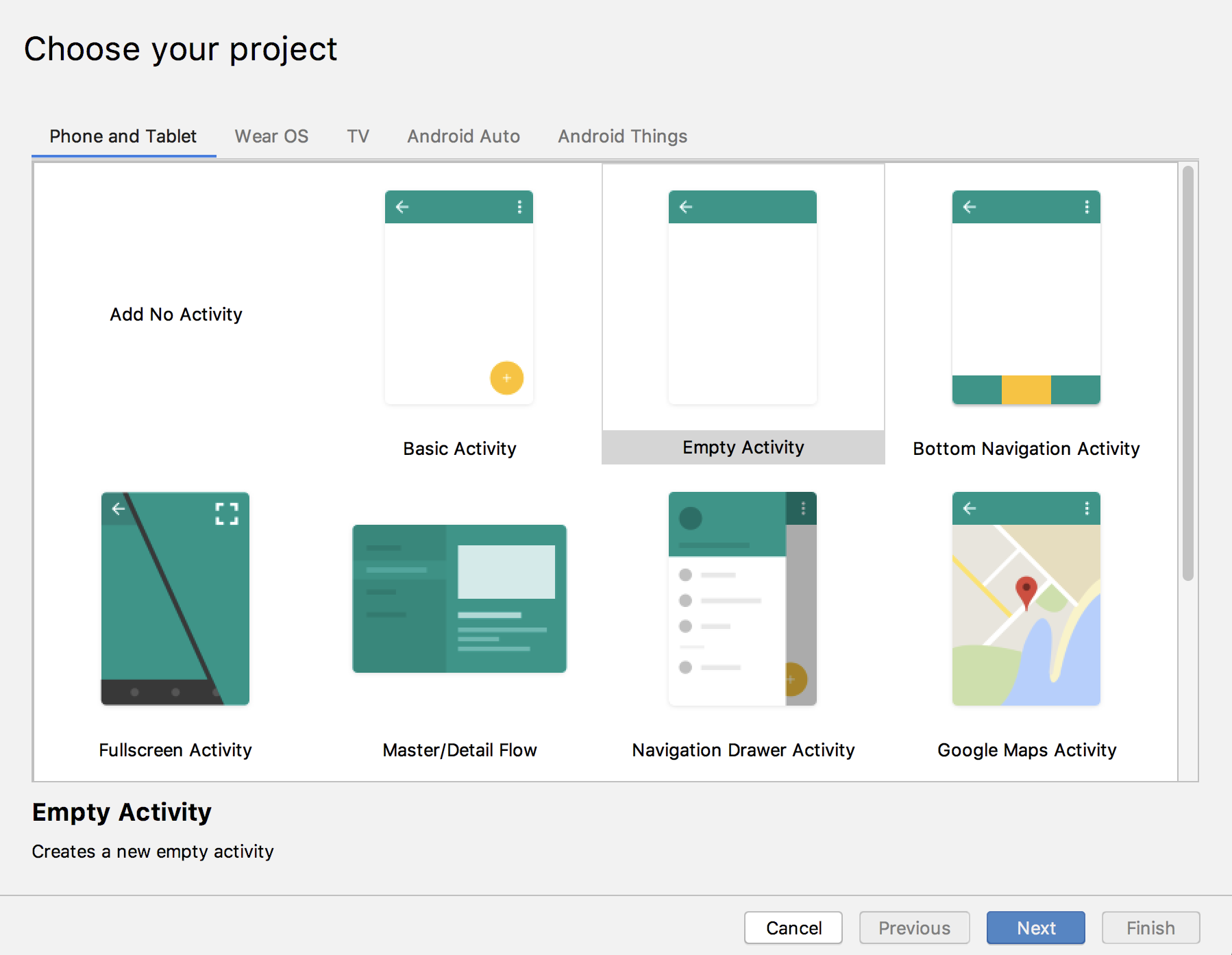
As you probably know, an activity is an interactive screen that includes controls.

  1. Click on Next.
  1. In the next screen (shown in the...
CONTINUE READING
83
Tech Concepts
36
Programming languages
73
Tech Tools
Icon Unlimited access to the largest independent learning library in tech of over 8,000 expert-authored tech books and videos.
Icon Innovative learning tools, including AI book assistants, code context explainers, and text-to-speech.
Icon 50+ new titles added per month and exclusive early access to books as they are being written.
Learning RxJava
notes
bookmark Notes and Bookmarks search Search in title playlist Add to playlist download Download options font-size Font size

Change the font size

margin-width Margin width

Change margin width

day-mode Day/Sepia/Night Modes

Change background colour

Close icon Search
Country selected

Close icon Your notes and bookmarks

Confirmation

Modal Close icon
claim successful

Buy this book with your credits?

Modal Close icon
Are you sure you want to buy this book with one of your credits?
Close
YES, BUY

Submit Your Feedback

Modal Close icon
Modal Close icon
Modal Close icon