Sign In Start Free Trial
Account

Add to playlist

Create a Playlist

Modal Close icon
You need to login to use this feature.
  • Book Overview & Buying 3D Printing with SketchUp
  • Table Of Contents Toc
  • Feedback & Rating feedback
3D Printing with SketchUp

3D Printing with SketchUp - Second Edition

By : Aaron Dietzen aka 'The SketchUp Guy'
4.9 (10)
close
close
3D Printing with SketchUp

3D Printing with SketchUp

4.9 (10)
By: Aaron Dietzen aka 'The SketchUp Guy'

Overview of this book

Working with the amazing 3D printing technology and getting access to the printing hardware is now easier than ever before. While there are many other resources that cover the general process of 3D printing, this book is the ultimate guide to creating models for 3D printing using SketchUp. You’ll start with a basic understanding of how SketchUp is used in the 3D printing workflow and jump into the steps to create a print-ready model using only SketchUp. This 3D printing book will guide you in using SketchUp to modify existing 3D files and cover additional tools that make SketchUp an even more powerful modeling tool. As you advance, you’ll learn how to transform 2D images into 3D printable solids, how to create multi-part prints that can be assembled without the use of fasteners or glue, and how to make sure your model, whether designed from scratch or assembled from preexisting geometry, is ready to be made real via your 3D printer. By the end of this book, you’ll have the confidence to bring your design ideas to life by generating your own 3D print-ready models with SketchUp.
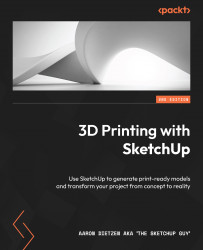
Table of Contents (13 chapters)
close
close
1
Part 1: Getting Prepared to Print
6
Part 2: Modeling for 3D Printing

Summary

Hopefully, having done everything in this chapter, you not only picked up a tip or two about modeling in SketchUp but also saw how easy it is to work with existing files. We covered the process of repairing and scaling imported geometry, as well as the process of using the native SketchUp tools and Solid Tools to modify and add to imported geometry.

At this point, we are ready to put it all together with one final 3D print. Let’s tackle that in Chapter 8, Assembling the Pieces Post-Printing.

Visually different images
CONTINUE READING
83
Tech Concepts
36
Programming languages
73
Tech Tools
Icon Unlimited access to the largest independent learning library in tech of over 8,000 expert-authored tech books and videos.
Icon Innovative learning tools, including AI book assistants, code context explainers, and text-to-speech.
Icon 50+ new titles added per month and exclusive early access to books as they are being written.
3D Printing with SketchUp
notes
bookmark Notes and Bookmarks search Search in title playlist Add to playlist font-size Font size

Change the font size

margin-width Margin width

Change margin width

day-mode Day/Sepia/Night Modes

Change background colour

Close icon Search
Country selected

Close icon Your notes and bookmarks

Confirmation

Modal Close icon
claim successful

Buy this book with your credits?

Modal Close icon
Are you sure you want to buy this book with one of your credits?
Close
YES, BUY

Submit Your Feedback

Modal Close icon
Modal Close icon
Modal Close icon