Sign In Start Free Trial
Account

Add to playlist

Create a Playlist

Modal Close icon
You need to login to use this feature.
  • Book Overview & Buying A Developer's Guide to .NET in Azure
  • Table Of Contents Toc
A Developer's Guide to .NET in Azure

A Developer's Guide to .NET in Azure

By : Parameswaran, Tamir Al Balkhi
5 (5)
close
close
A Developer's Guide to .NET in Azure

A Developer's Guide to .NET in Azure

5 (5)
By: Parameswaran, Tamir Al Balkhi

Overview of this book

A Developer’s Guide to .NET in Azure helps you embark on a transformative journey through Microsoft Azure that is tailored to .NET developers. This book is a curated compendium that’ll enable you to master the creation of resilient, scalable, and highly available applications. The book is divided into four parts, with Part 1 demystifying Azure for you and emphasizing the portal's utility and seamless integration. The chapters in this section help you configure your workspace for optimal Azure synergy. You’ll then move on to Part 2, where you’ll explore serverless computing, microservices, containerization, Dapr, and Azure Kubernetes Service for scalability, and build pragmatic, cost-effective applications using Azure Functions and Container apps. Part 3 delves into data and storage, showing you how to utilize Azure Blob Storage for unstructured data, Azure SQL Database for structured data, and Azure Cosmos DB for document-oriented data. The final part teaches you about messaging and security, utilizing Azure App Configuration, Event Hubs, Service Bus, Key Vault, and Azure AD B2C for robust, secure applications. By the end of this book, you’ll have mastered Azure's responsive infrastructure for exceptional applications.
Table of Contents (20 chapters)
close
close
1
Part 1: An Introduction to Your Environment
3
Part 2: Serverless and Microservices
8
Part 3: Data and Storage
12
Part 4: Messaging Mechanisms and Security

Creating your first project

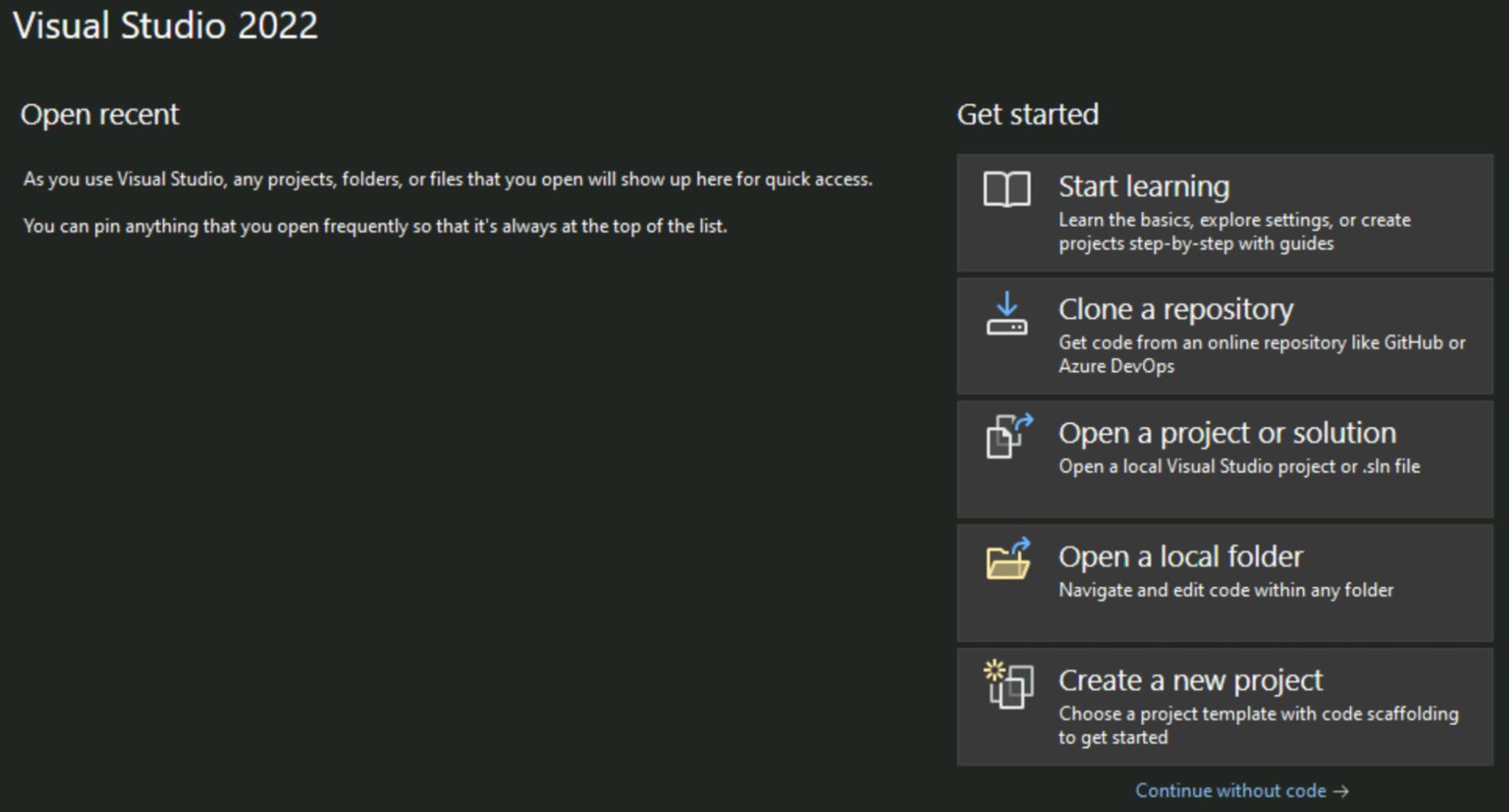
After installing all of the prerequisite software listed in step 2, under the Installing Visual Studio Community 2022 section, you should be able to begin building them without the need for any extra settings. To get things going, we’ll write a straightforward function that we’ll attempt to execute to make sure everything is set up and prepared. Start up Visual Studio 2022 Community Edition and select Create a new project to get started.

Figure 1.40 – Visual Studio – welcome screen

Figure 1.40 – Visual Studio – welcome screen

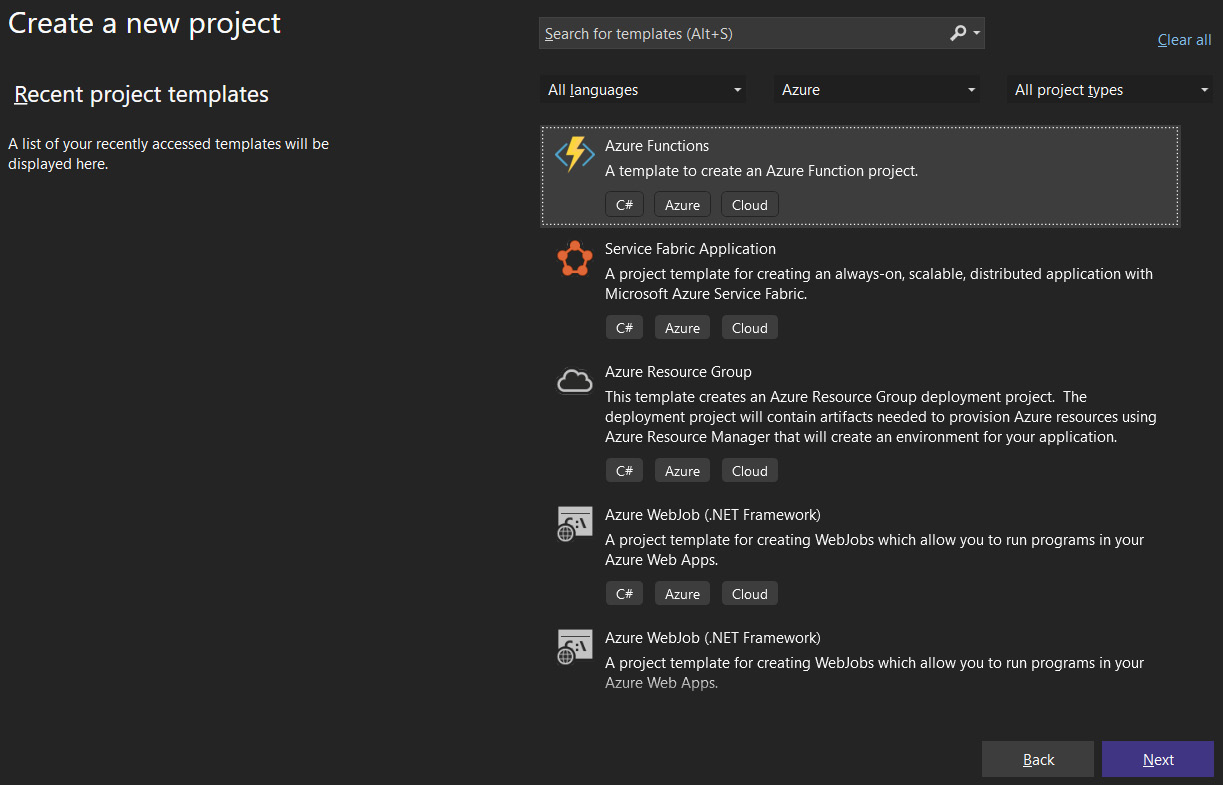
Now you can select an Azure Function from the list of choices and follow the steps to get started with the project. On the first screen, configure your new project screen. We need to set the project name, project location, and solution name. On the Additional information screen, we need to configure the framework, function trigger, and authorization level. Please see the following configuration values:

Figure 1.41 – Visual Studio – creating an Azure Functions app

Figure 1.41 – Visual Studio – creating an Azure Functions app

Project Name: FunctionApp1

Project Location: C:\USER\PROJECTFOLDER

Solution Name: FunctionApp1

Functions Worker: .NET 6.0

Function: http trigger

Authorization Level: Function

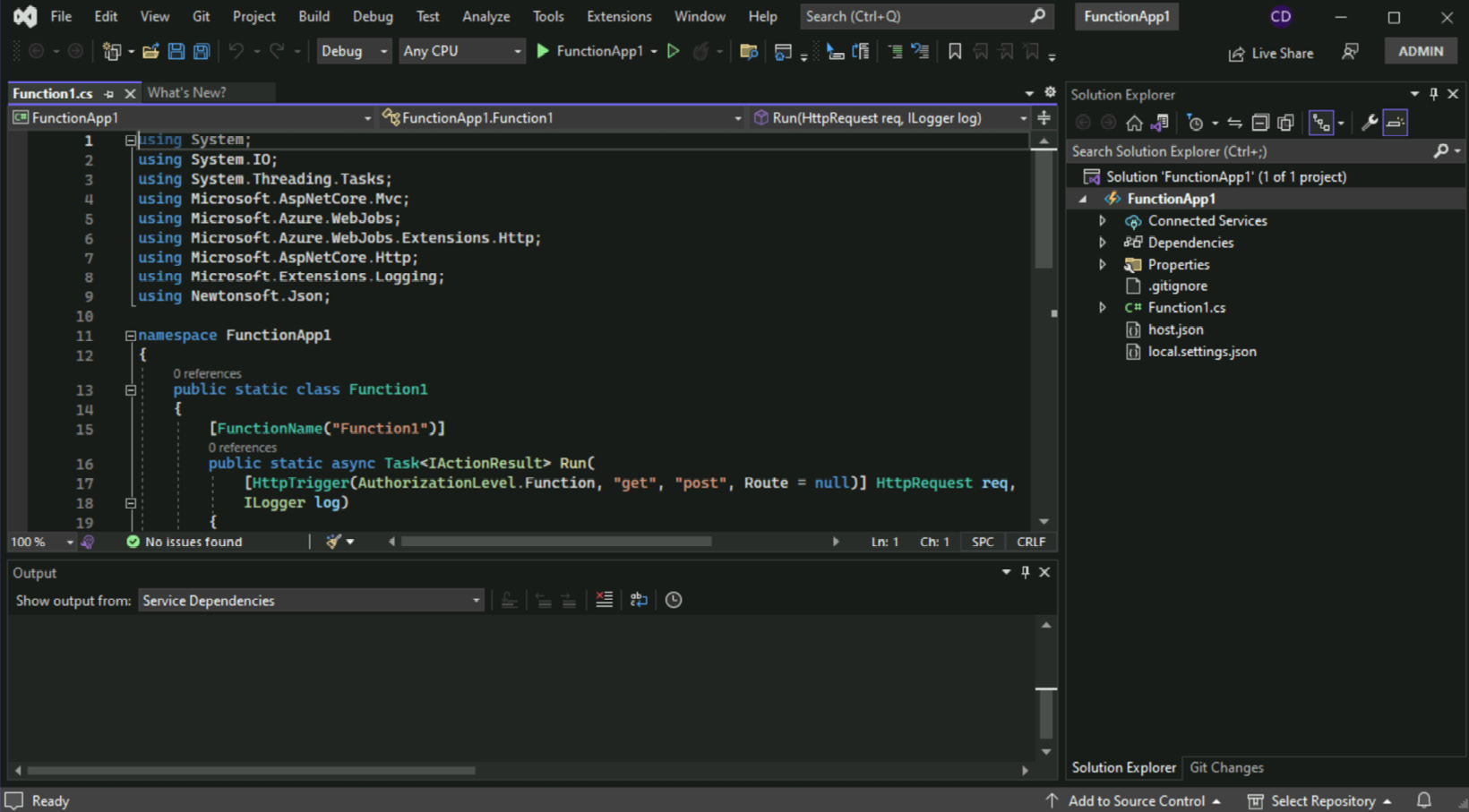
After you click the OK button, you should see a screen similar to the following screenshot (see Figure 1.42). This indicates that a new function file has been created, and some standard code has already been added as a starting point. We will discuss how to create a function and its properties in the chapter of this book specifically related to Azure Functions (Chapter 5). For now, we won’t go into too much detail.

Figure 1.42 – Azure Functions project in Visual Studio

Figure 1.42 – Azure Functions project in Visual Studio

This is how, we can create an Azure Function using Visual Studio. We can other project types such as ASP.NET Core MVC, Blazor, and ASP.NET Core Web APIs. We will explore other project types in the upcoming chapters. Visual Studio will also help us to debug, deploy, and monitor the applications in Azure.

CONTINUE READING
83
Tech Concepts
36
Programming languages
73
Tech Tools
Icon Unlimited access to the largest independent learning library in tech of over 8,000 expert-authored tech books and videos.
Icon Innovative learning tools, including AI book assistants, code context explainers, and text-to-speech.
Icon 50+ new titles added per month and exclusive early access to books as they are being written.
A Developer's Guide to .NET in Azure
notes
bookmark Notes and Bookmarks search Search in title playlist Add to playlist download Download options font-size Font size

Change the font size

margin-width Margin width

Change margin width

day-mode Day/Sepia/Night Modes

Change background colour

Close icon Search
Country selected

Close icon Your notes and bookmarks

Confirmation

Modal Close icon
claim successful

Buy this book with your credits?

Modal Close icon
Are you sure you want to buy this book with one of your credits?
Close
YES, BUY

Submit Your Feedback

Modal Close icon
Modal Close icon
Modal Close icon