Sign In Start Free Trial
Account

Add to playlist

Create a Playlist

Modal Close icon
You need to login to use this feature.
  • Book Overview & Buying Tableau 2019.x Cookbook
  • Table Of Contents Toc
Tableau 2019.x Cookbook

Tableau 2019.x Cookbook

By : Dmitry Anoshin, Rintaro Sugimura, Matic, Bogdanovic, Lincoln, Shirokov
3.4 (5)
close
close
Tableau 2019.x Cookbook

Tableau 2019.x Cookbook

3.4 (5)
By: Dmitry Anoshin, Rintaro Sugimura, Matic, Bogdanovic, Lincoln, Shirokov

Overview of this book

Tableau has been one of the most popular business intelligence solutions in recent times, thanks to its powerful and interactive data visualization capabilities. Tableau 2019.x Cookbook is full of useful recipes from industry experts, who will help you master Tableau skills and learn each aspect of Tableau's ecosystem. This book is enriched with features such as Tableau extracts, Tableau advanced calculations, geospatial analysis, and building dashboards. It will guide you with exciting data manipulation, storytelling, advanced filtering, expert visualization, and forecasting techniques using real-world examples. From basic functionalities of Tableau to complex deployment on Linux, you will cover it all. Moreover, you will learn advanced features of Tableau using R, Python, and various APIs. You will learn how to prepare data for analysis using the latest Tableau Prep. In the concluding chapters, you will learn how Tableau fits the modern world of analytics and works with modern data platforms such as Snowflake and Redshift. In addition, you will learn about the best practices of integrating Tableau with ETL using Matillion ETL. By the end of the book, you will be ready to tackle business intelligence challenges using Tableau's features.
Table of Contents (18 chapters)
close
close

Adding filters

This chapter will get you familiar with basic filtering functionality in Tableau. We will create a chart that shows name frequency across years, but we will then filter one name to see how its popularity has been changing over the years, and also narrow our view down to one state.

Getting ready

Connect to the Baby_names.csv dataset, and open a new worksheet.

How to do it...

  1. Drag and drop Year from Dimensions into the Columns shelf.
  2. Drag and drop Frequency from Measures into the Rows shelf.
  3. Drag and drop Name into the Filters shelf.
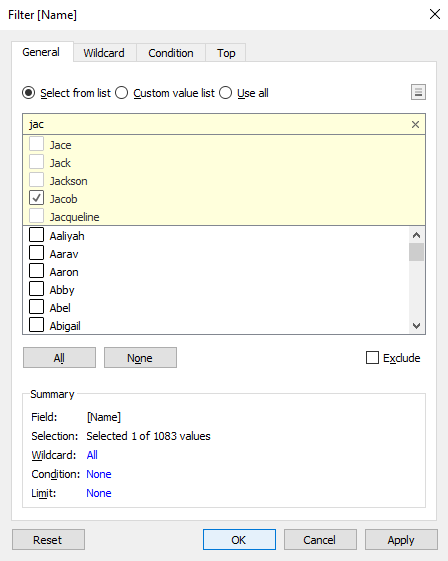
  4. In the search bar at the top of the list, start typing jac.
  1. Select Jacob, and click OK:
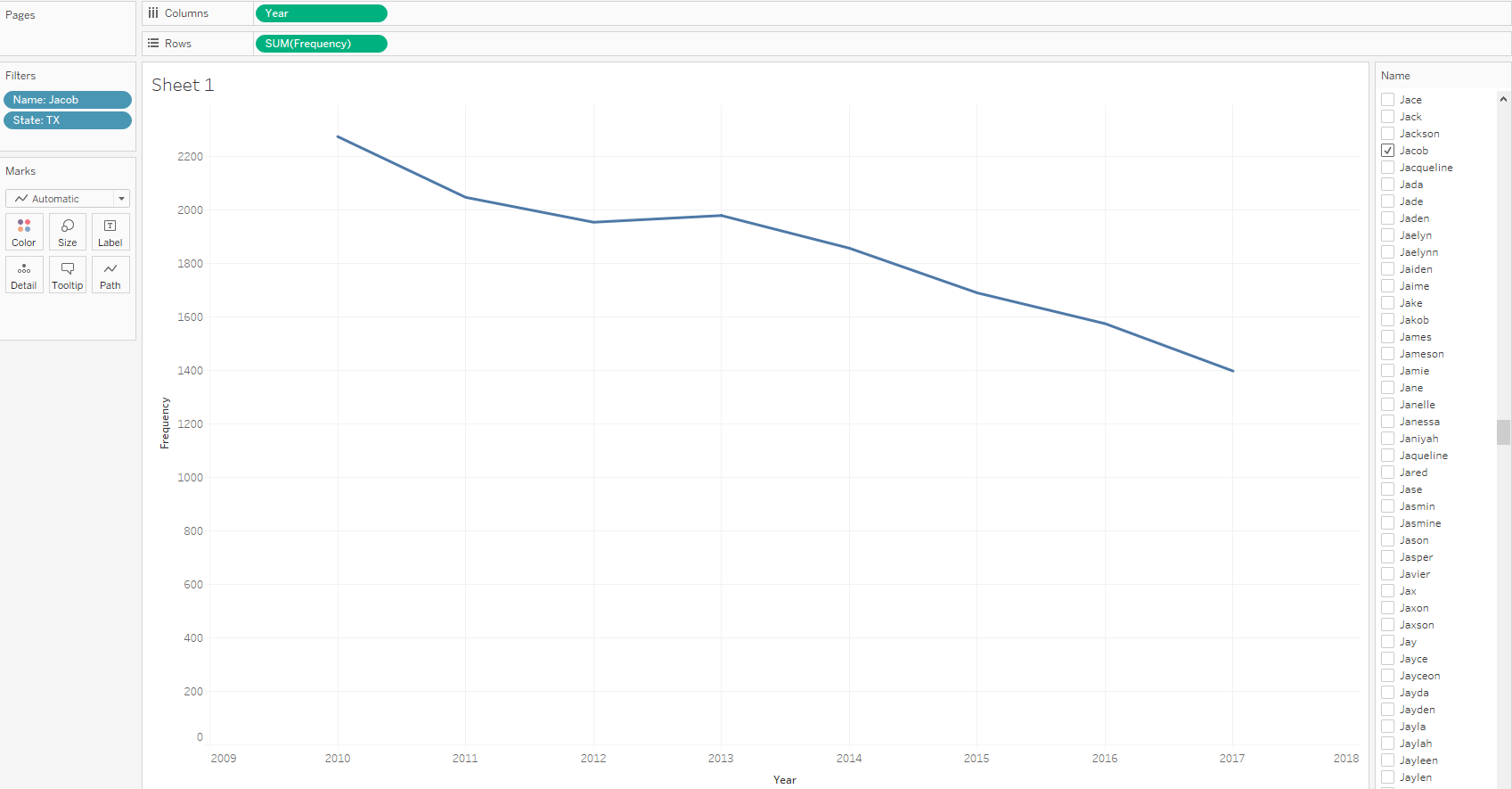
  1. We can see that the name Jacob has been gradually decreasing in popularity since 2010. Let's see how it has fared in Texas specifically. Drag and drop State from Dimensions into the Filters card.
  2. In the search box in the Filter [State] window, type tx.

  1. Select TX, click OK, and you will see the following results:

How it works...

Filters exclude rows from your dataset. When you select the name Jacob using a filter, only rows that contain the Jacob value from your dataset are analyzed, while all the other rows are excluded. You can also filter multiple values and select two, three, or 50 names to show in your view.

There's more...

One of the main advantages of Tableau filters is their interactivity. Let's execute the following steps to see how the Filter option works:

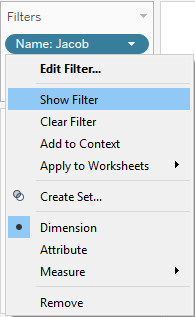
  1. If you hover over the Name: Jacob pill in the Filters shelf, a small white arrow will appear on it.
  2. Click on the arrow, and in the drop-down menu, click on Show Filter.

  1. A list of all the names will appear in the top-right corner of the worksheet. Only Jacob is selected, because that's how we set our filter. However, you can select and deselect any name(s) to change your visualization:
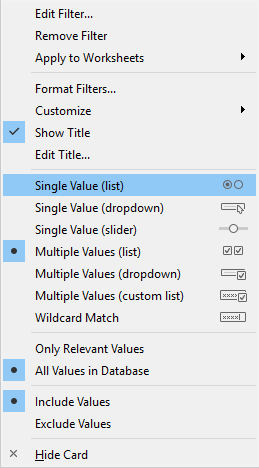
  1. If you hover over the filter control and click on the small black arrow that appears in the top-right corner, you can change the mode of the filter. You can choose whether you would like the filter to allow single or multiple values. You can also decide whether to implement the filter control as a drop-down list, checkboxes, or slider, as shown in the following screenshot:

See also

CONTINUE READING
83
Tech Concepts
36
Programming languages
73
Tech Tools
Icon Unlimited access to the largest independent learning library in tech of over 8,000 expert-authored tech books and videos.
Icon Innovative learning tools, including AI book assistants, code context explainers, and text-to-speech.
Icon 50+ new titles added per month and exclusive early access to books as they are being written.
Tableau 2019.x Cookbook
notes
bookmark Notes and Bookmarks search Search in title playlist Add to playlist download Download options font-size Font size

Change the font size

margin-width Margin width

Change margin width

day-mode Day/Sepia/Night Modes

Change background colour

Close icon Search
Country selected

Close icon Your notes and bookmarks

Confirmation

Modal Close icon
claim successful

Buy this book with your credits?

Modal Close icon
Are you sure you want to buy this book with one of your credits?
Close
YES, BUY

Submit Your Feedback

Modal Close icon
Modal Close icon
Modal Close icon