-
Book Overview & Buying
-
Table Of Contents
Advanced Deep Learning with TensorFlow 2 and Keras - Second Edition
By :
In the Sequential model API that we first introduced in Chapter 1, Introducing Advanced Deep Learning with Keras, a layer is stacked on top of another layer. Generally, the model will be accessed through its input and output layers. We also learned that there is no simple mechanism if we find ourselves wanting to add an auxiliary input at the middle of the network, or even to extract an auxiliary output before the last layer.
That model also had its downsides; for example, it doesn't support graph-like models or models that behave like Python functions. In addition, it's also difficult to share layers between the two models. Such limitations are addressed by the Functional API and are the reason why it's a vital tool for anyone wanting to work with deep learning models.
The Functional API is guided by the following two concepts:
After you've completed building the Functional API model, the training and evaluation are then performed by the same functions used in the Sequential model. To illustrate, in a Functional API, a two dimensional convolutional layer, Conv2D, with 32 filters and with x as the layer input tensor and y as the layer output tensor can be written as:
y = Conv2D(32)(x)
We're also able to stack multiple layers to build our models. For example, we can rewrite the Convolutional Neural Network (CNN) on MNIST cnn-mnist-1.4.1.py using the Functional API as shown in the following listing:
Listing 2.1.1: cnn-functional-2.1.1.py
import numpy as np
from tensorflow.keras.layers import Dense, Dropout, Input
from tensorflow.keras.layers import Conv2D, MaxPooling2D, Flatten
from tensorflow.keras.models import Model
from tensorflow.keras.datasets import mnist
from tensorflow.keras.utils import to_categorical
# load MNIST dataset
(x_train, y_train), (x_test, y_test) = mnist.load_data()
# from sparse label to categorical
num_labels = len(np.unique(y_train))
y_train = to_categorical(y_train)
y_test = to_categorical(y_test)
# reshape and normalize input images
image_size = x_train.shape[1]
x_train = np.reshape(x_train,[-1, image_size, image_size, 1])
x_test = np.reshape(x_test,[-1, image_size, image_size, 1])
x_train = x_train.astype('float32') / 255
x_test = x_test.astype('float32') / 255
# network parameters
input_shape = (image_size, image_size, 1)
batch_size = 128
kernel_size = 3
filters = 64
dropout = 0.3
# use functional API to build cnn layers
inputs = Input(shape=input_shape)
y = Conv2D(filters=filters,
kernel_size=kernel_size,
activation='relu')(inputs)
y = MaxPooling2D()(y)
y = Conv2D(filters=filters,
kernel_size=kernel_size,
activation='relu')(y)
y = MaxPooling2D()(y)
y = Conv2D(filters=filters,
kernel_size=kernel_size,
activation='relu')(y)
# image to vector before connecting to dense layer
y = Flatten()(y)
# dropout regularization
y = Dropout(dropout)(y)
outputs = Dense(num_labels, activation='softmax')(y)
# build the model by supplying inputs/outputs
model = Model(inputs=inputs, outputs=outputs)
# network model in text
model.summary()
# classifier loss, Adam optimizer, classifier accuracy
model.compile(loss='categorical_crossentropy',
optimizer='adam',
metrics=['accuracy'])
# train the model with input images and labels
model.fit(x_train,
y_train,
validation_data=(x_test, y_test),
epochs=20,
batch_size=batch_size)
# model accuracy on test dataset
score = model.evaluate(x_test,
y_test,
batch_size=batch_size,
verbose=0)
print("\nTest accuracy: %.1f%%" % (100.0 * score[1]))
By default, MaxPooling2D uses pool_size=2, so the argument has been removed.
In the preceding listing, every layer is a function of a tensor. Each layer generates a tensor as an output which becomes the input to the next layer. To create this model, we can call Model() and supply both the inputs and outputs tensors, or alternatively the lists of tensors. Everything else remains the same.
The same listing can also be trained and evaluated using the fit() and evaluate() functions, similar to the Sequential model. The Sequential class is, in fact, a subclass of the Model class. We need to remember that we inserted the validation_data argument in the fit() function to see the progress of validation accuracy during training. The accuracy ranges from 99.3% to 99.4% in 20 epochs.
We're now going to do something really exciting, creating an advanced model with two inputs and one output. Before we start, it's important to know that the Sequential model API is designed for building 1-input and 1-output models only.
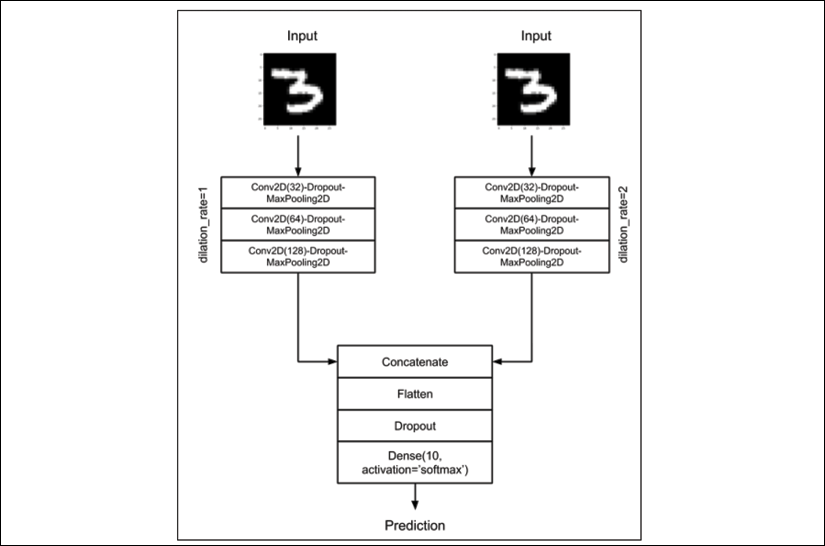
Let's suppose a new model for the MNIST digit classification is invented, and it's called the Y-Network, as shown in Figure 2.1.1. The Y-Network uses the same input twice, both on the left and right CNN branches. The network combines the results using a concatenate layer. The merge operation concatenate is similar to stacking two tensors of the same shape along the concatenation axis to form one tensor. For example, concatenating two tensors of shape (3, 3, 16) along the last axis will result in a tensor of shape (3, 3, 32).
Everything else after the concatenate layer will remain the same as the previous chapter's CNN MNIST classifier model: Flatten, then Dropout, and then Dense:

Figure 2.1.1: The Y-Network accepts the same input twice but processes the input in two branches of convolutional networks. The outputs of the branches are combined using the concatenate layer.The last layer prediction is going to be similar to the previous chapter's CNN MNIST classifier model.
To improve the performance of the model in Listing 2.1.1, we can propose several changes. Firstly, the branches of the Y-Network are doubling the number of filters to compensate for the halving of the feature maps size after MaxPooling2D(). For example, if the output of the first convolution is (28, 28, 32), after max pooling the new shape is (14, 14, 32). The next convolution will have a filter size of 64 and output dimensions of (14, 14, 64).
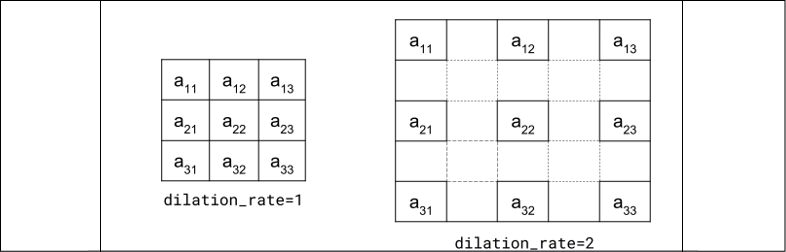
Second, although both branches have the same kernel size of 3, the right branch uses a dilation rate of 2. Figure 2.1.2 shows the effect of different dilation rates on a kernel with size 3. The idea is that by increasing the effective receptive field size of the kernel using dilation rate, the CNN will enable the right branch to learn different feature maps. Using a dilation rate greater than 1 is a computationally efficient approximate method to increase receptive field size. It is approximate since the kernel is not actually a full-blown kernel. It is efficient since we use the same number of operations as with a dilation rate equal to 1.
To appreciate the concept of the receptive field, notice that when the kernel computes each point of a feature map, its input is a patch in the previous layer feature map which is also dependent on its previous layer feature map. If we continue tracking this dependency down to the input image, the kernel depends on an image patch called the receptive field.
We'll use the option padding='same' to ensure that we will not have negative tensor dimensions when the dilated CNN is used. By using padding='same', we'll keep the dimensions of the input the same as the output feature maps. This is accomplished by padding the input with zeros to make sure that the output has the same size.

Figure 2.1.2: By increasing the dilation rate from 1, the effective kernel receptive field size also increases
Listing 2.1.2 for cnn-y-network-2.1.2.py shows the implementation of the Y-Network using the Functional API. The two branches are created by the two for loops. Both branches expect the same input shape. The two for loops will create two 3-layer stacks of Conv2D-Dropout-MaxPooling2D. While we used the concatenate layer to combine the outputs of the left and right branches, we could also utilize the other merge functions of tf.keras, such as add, dot, and multiply. The choice of the merge function is not purely arbitrary but must be based on a sound model design decision.
In the Y-Network, concatenate will not discard any portion of the feature maps. Instead, we'll let the Dense layer figure out what to do with the concatenated feature maps.
Listing 2.1.2: cnn-y-network-2.1.2.py
import numpy as np
from tensorflow.keras.layers import Dense, Dropout, Input
from tensorflow.keras.layers import Conv2D, MaxPooling2D
from tensorflow.keras.layers import Flatten, concatenate
from tensorflow.keras.models import Model
from tensorflow.keras.datasets import mnist
from tensorflow.keras.utils import to_categorical
from tensorflow.keras.utils import plot_model
# load MNIST dataset
(x_train, y_train), (x_test, y_test) = mnist.load_data()
# from sparse label to categorical
num_labels = len(np.unique(y_train))
y_train = to_categorical(y_train)
y_test = to_categorical(y_test)
# reshape and normalize input images
image_size = x_train.shape[1]
x_train = np.reshape(x_train,[-1, image_size, image_size, 1])
x_test = np.reshape(x_test,[-1, image_size, image_size, 1])
x_train = x_train.astype('float32') / 255
x_test = x_test.astype('float32') / 255
# network parameters
input_shape = (image_size, image_size, 1)
batch_size = 32
kernel_size = 3
dropout = 0.4
n_filters = 32
# left branch of Y network
left_inputs = Input(shape=input_shape)
x = left_inputs
filters = n_filters
# 3 layers of Conv2D-Dropout-MaxPooling2D
# number of filters doubles after each layer (32-64-128)
for i in range(3):
x = Conv2D(filters=filters,
kernel_size=kernel_size,
padding='same',
activation='relu')(x)
x = Dropout(dropout)(x)
x = MaxPooling2D()(x)
filters *= 2
# right branch of Y network
right_inputs = Input(shape=input_shape)
y = right_inputs
filters = n_filters
# 3 layers of Conv2D-Dropout-MaxPooling2Do
# number of filters doubles after each layer (32-64-128)
for i in range(3):
y = Conv2D(filters=filters,
kernel_size=kernel_size,
padding='same',
activation='relu',
dilation_rate=2)(y)
y = Dropout(dropout)(y)
y = MaxPooling2D()(y)
filters *= 2
# merge left and right branches outputs
y = concatenate([x, y])
# feature maps to vector before connecting to Dense
y = Flatten()(y)
y = Dropout(dropout)(y)
outputs = Dense(num_labels, activation='softmax')(y)
# build the model in functional API
model = Model([left_inputs, right_inputs], outputs)
# verify the model using graph
plot_model(model, to_file='cnn-y-network.png', show_shapes=True)
# verify the model using layer text description
model.summary()
# classifier loss, Adam optimizer, classifier accuracy
model.compile(loss='categorical_crossentropy',
optimizer='adam',
metrics=['accuracy'])
# train the model with input images and labels
model.fit([x_train, x_train],
y_train,
validation_data=([x_test, x_test], y_test),
epochs=20,
batch_size=batch_size)
# model accuracy on test dataset
score = model.evaluate([x_test, x_test],
y_test,
batch_size=batch_size,
verbose=0)
print("\nTest accuracy: %.1f%%" % (100.0 * score[1]))
Taking a step back, we can note that the Y-Network is expecting two inputs for training and validation. The inputs are identical, so [x_train, x_train] is supplied.
Over the course of the 20 epochs, the accuracy of the Y-Network ranges from 99.4% to 99.5%. This is a slight improvement over the 3-stack CNN which achieved a range between 99.3% and 99.4% accuracy. However, this was at the cost of both higher complexity and more than double the number of parameters.
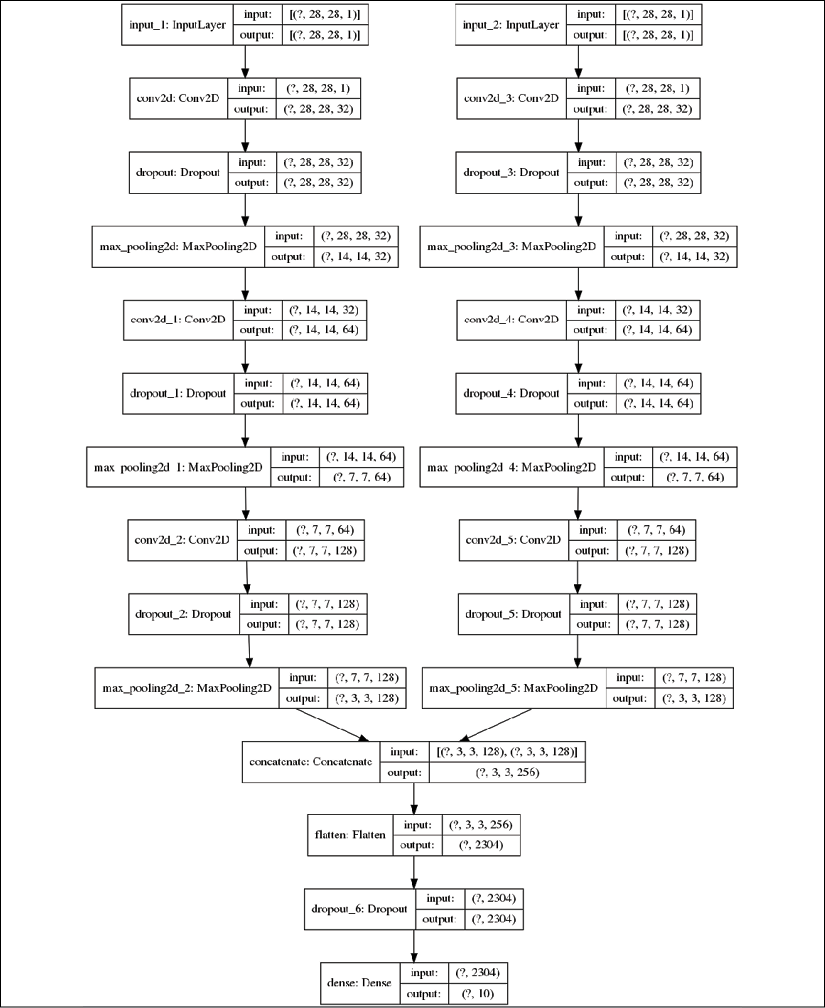
The following figure, Figure 2.1.3, shows the architecture of the Y-Network as understood by Keras and generated by the plot_model() function:

Figure 2.1.3: The CNN Y-Network as implemented in Listing 2.1.2
This concludes our look at the Functional API. We should take this time to remember that the focus of this chapter is building deep neural networks, specifically ResNet and DenseNet. Therefore, we're only covering the Functional API materials needed to build them, as covering the entire API would be beyond the scope of this book. With that said, let's move on to discussing ResNet.
The reader is referred to https://keras.io/ for additional information on the Functional API.
Change the font size
Change margin width
Change background colour