Sign In Start Free Trial
Account

Add to playlist

Create a Playlist

Modal Close icon
You need to login to use this feature.
  • Book Overview & Buying History Teaching with Moodle 2
  • Table Of Contents Toc
  • Feedback & Rating feedback
History Teaching with Moodle 2

History Teaching with Moodle 2

4.5 (4)
close
close
History Teaching with Moodle 2

History Teaching with Moodle 2

4.5 (4)

Overview of this book

Moodle is an open source virtual learning environment that is coming to be used in more and more schools worldwide. History and Moodle complement each other perfectly in terms of content and delivery. This book will show you how to set up tasks and activities that will enable your students to forge a greater understanding of complex issues, bringing History into the 21st century.History Teaching with Moodle 2 presents new and exciting ideas for the delivery of History content making use of tried-and-trusted methods of teaching the subject. By following a sample course, you will find it easy to transform your existing lesson plans into a Moodle course that will become even more efficient, attractive, and useful over time. Make the past come to life using a range of tasks and activities that can consolidate learning for some, enhance understanding for others, and enthuse all. Learn how to add an RSS feed to your home page to display daily 'On this day in history' posts. Create a one-minute quiz about how the Second World War began. Post video footage of a trip to a castle and set some questions for students in anticipation of their next visit. Set up a wiki so that student groups can create their own story about 'murder at a monastery'. Moodle's built-in features allow students to get a better grasp of historical concepts and will rejuvenate their interest in the subject.
Table of Contents (16 chapters)
close
close

Xerte


Created by a team at Nottingham University, Xerte is a piece of open source software that can be used as an alternative to creating lessons in Moodle. The software is freely available to download at the Nottingham University website.
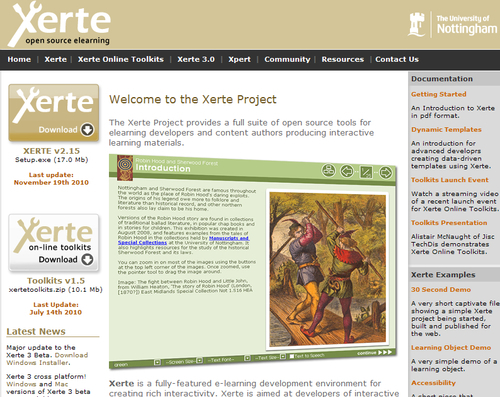
Xerte takes the Moodle lesson a stage further, providing a dynamic multimedia learning experience. Time invested early on produces rich pages with a wide variety of templates including drag-and-drop quizzes and image hot spots.

If the Moodle lesson whetted your appetite then take the bait and download Xerte onto your machine. It will be a rewarding journey. A once hidden gem is now an important tool being employed effectively by more and more educators.

Downloading Xerte

Full installation of Xerte Online Toolkits on a server requires administrator's permissions. That may require some negotiation so a logical first step would be to install the latest Xerte download from the Nottingham University website onto a standalone machine. After creating some learning...

Visually different images
CONTINUE READING
83
Tech Concepts
36
Programming languages
73
Tech Tools
Icon Unlimited access to the largest independent learning library in tech of over 8,000 expert-authored tech books and videos.
Icon Innovative learning tools, including AI book assistants, code context explainers, and text-to-speech.
Icon 50+ new titles added per month and exclusive early access to books as they are being written.
History Teaching with Moodle 2
notes
bookmark Notes and Bookmarks search Search in title playlist Add to playlist font-size Font size

Change the font size

margin-width Margin width

Change margin width

day-mode Day/Sepia/Night Modes

Change background colour

Close icon Search
Country selected

Close icon Your notes and bookmarks

Confirmation

Modal Close icon
claim successful

Buy this book with your credits?

Modal Close icon
Are you sure you want to buy this book with one of your credits?
Close
YES, BUY

Submit Your Feedback

Modal Close icon
Modal Close icon
Modal Close icon