

Google Workspace licensing models
Google Workspace is offered in three license tiers: Education, Business, and Enterprise.
Each of these tiers has further editions of licenses that best serve different types of customers. We will talk about each of these tiers in detail in the following subsections.
Google Workspace Education editions
Google Workspace has been an integral part of educational institutions. More than 170 million users within educational domains are currently relying on Google Workspace tools and services. By introducing Google Workspace for schools and universities, Google has answered the diverse needs of K-12 institutions. Teachers and students were able to quickly adopt G Suite, and now Google Workspace. These students are evolving into the new workforce, already stepping into their careers with knowledge of Google Workspace, and this alleviates the need for extra training during new hire onboarding.
The Education tier has four license editions:
- Google Workspace for Education Fundamentals: This is the upgraded name for G Suite for Education. This edition has historically been offered for free and will continue to be free. Only schools and universities that qualify for a .edu domain are eligible for this license edition.
- Google Workspace for Education Standard: This was recently introduced, building upon the Fundamentals edition with enhanced security.
- Google Workspace for Education Teaching and Learning Upgrade: This provides additional video communication capabilities and an enhanced classroom feature that can be provisioned to the domain with the Fundamentals or Standard licenses.
- Google Workspace for Education Plus: This is the rebranded edition of G Suite Enterprise for Education. This secure edition is comparable to Google Workspace Enterprise Plus, including Security Center, Admin Logs in BigQuery, and so on.
There are some common features between the four Education license editions:
- Gmail
- Google Calendar
- Google Docs, Sheet, Slides, and Forms
- Google Classroom
- Google Assignments
- Google Tasks
- Google Meet (limits on the number of participants differ for each edition):
- Features such as call-in for audio, moderator controls, hand-raising, and digital whiteboarding are available for all license editions.
- Google Sites
- Google Groups
- Security:
- Google Vault
Pooled Storage
Google Drive storage differs for each edition, depending on whether it is pooled or individually assigned for each user.
For example, if you have 10 users in Google Workspace Business Plus, this gives the entire domain a total of 50 TB storage (because 10 x 5 TB = 50 TB). However, this does not limit a user to 5 TB, and it allows you to have shared Google Drive files that are available to your group of users collaborating on a common task or project.
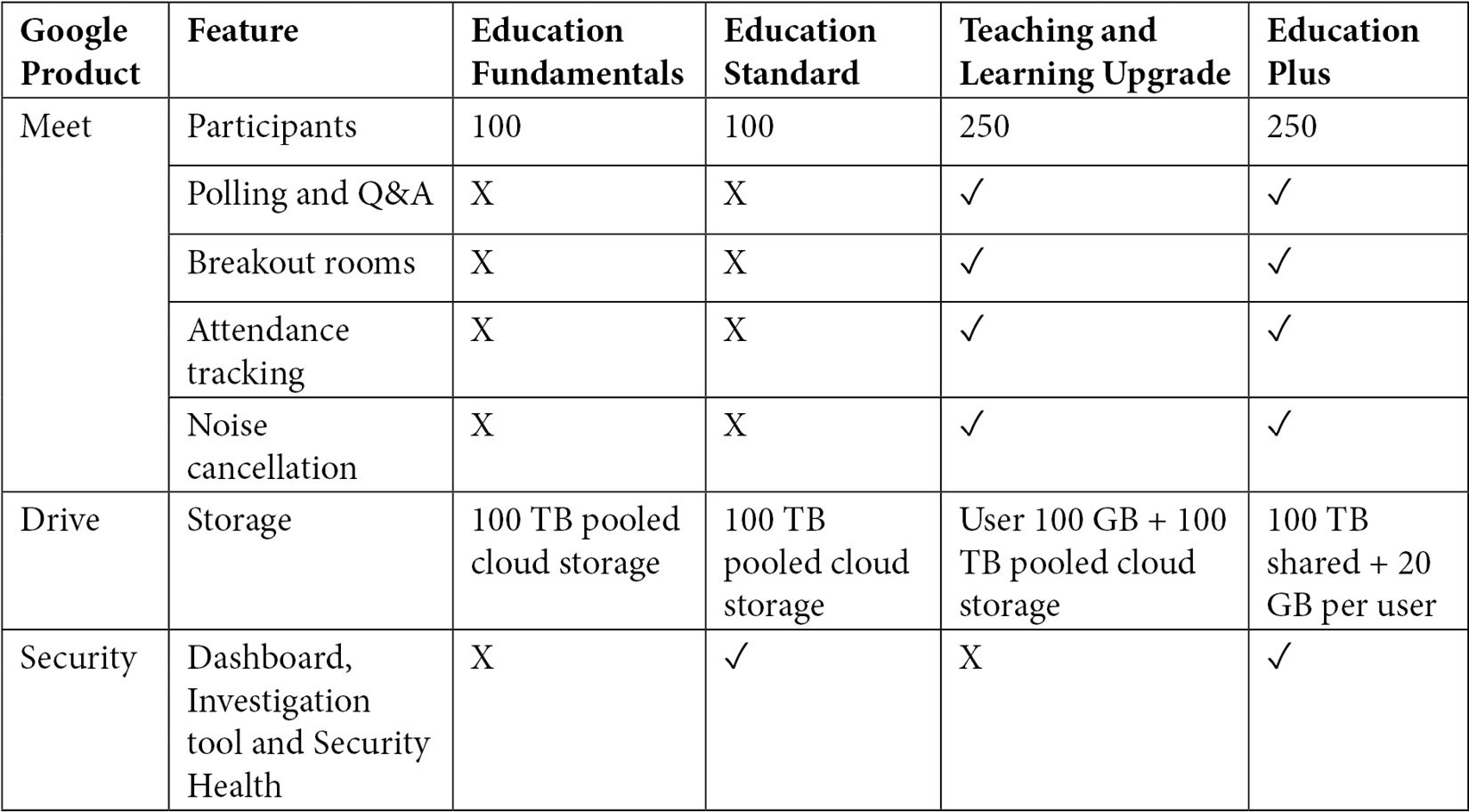
There are some differences between the four Education license editions, which are shown in the following table:
Google Chromebooks
Google Chromebooks are a new breed of laptops that have come into existence thanks to the power of Google Workspace. Chromebooks are powered by Chrome OS, which is a platform built around Google's cloud applications. Chromebooks have done extraordinarily well in the education sector due to their competitive pricing and the simplicity of the machines. Chromebooks require very little training, and their cost is small compared to other laptops.
Chromebooks work well with Google Classroom, which serve as a hub for classroom activities, including classroom discussions, attendance, and communication between parents and teachers.
Along with Google Workspace, Chromebooks have made modern operating systems accessible and easily provisioned for users. Teachers and educational systems are constantly looking for new ways to creatively engage students. With the move away from classic textbook based learning, several digital programs are being introduced globally for learning – schools are increasingly using Chromebooks as part of their teaching and learning programs. Chromebooks have rich feature sets and are affordable and secure with the Chrome Enterprise Management license.
Chromebooks also enable teachers and students to create new apps for immersive learning. Seeing the impressive adoption of Chromebooks in education, businesses have also gained confidence in issuing Chromebooks for their employees. Instead of spending $2,000 or more for each employee for devices, it has been economical to issue $500 worth of Chromebooks, which comes with great management capabilities for both users and administrators.
Google Workspace Business editions
The following list shows the available Google Workspace Business editions:
- Business Starter: This is the first tier of the professional productivity suite of licenses, which allows users to have 30 GB of storage.
- Business Standard: This is the enhanced productivity suite of licenses, which allows users to have 2 TB of storage pooled for the domain.
- Business Plus: This is the advanced productivity suite of licenses. It has the most valuable set of features within this tier and allows users to have 5 TB of storage pooled for the domain.
Besides storage, each of these license editions comes with specific features and limitations. Companies can assess their needs and usage before selecting their ideal license edition.
The Business Standard and Business Plus licenses give you the option of having pooled storage across this domain.
There are some common features between the three Business license editions:
- Gmail
- Google Calendar
- Google Drive
- Google Chat and Chat rooms
- Google Meet
- Google Groups for businesses
- Google Tasks
- Google Sites
- Directory management/shared contacts
- Two-step verification for user identities
- IMAP/POP3 compatibility mode
- Offline access for Gmail and Google Drive
- Reports and audit logs
There are some differences between the three Business license editions, which are shown in the following table:

Google Workspace Enterprise editions
This tier is offered for larger organizations with more than 300 users. It includes enterprise-grade features with additional security and compliance features to manage the users:
- Enterprise Essentials: This gives you the flexibility to use the full collaboration apps in Google Workspace while still retaining the existing mail infrastructure. Users can use Google Drive for content management and Google Meet for their communications. Users are allocated 1 TB of storage space.
- Frontline: This license extends collaboration tools for frontline workers who require productivity apps – it has a limit of 2 GB storage per user.
- Enterprise Standard: This offers solutions for large organizations with flexible storage and advanced video conferencing features.
- Enterprise Plus: This is the most valuable productivity and collaboration suite, with enterprise-grade functionality and security features to stay compliant with your organization's legal standards.
Organizations that are on a path to larger growth can investigate upgrading to the Google Workspace Enterprise editions.
Google gives you the flexibility of having multiple license editions from the Enterprise tier within the same domain, thereby allowing administrators to provide the relevant licenses for each subset of user groups.
Enterprise tier licenses also give you the flexibility to have the storage space needed for your domain. Users receive a scalable, reliable platform to have a large amount of content, which is required for a truly collaborative work environment.
There are some common features between the four Enterprise license editions:
- Google Drive:
- Google Sites:
- Unlimited web pages that can be published for domain users or externally for the public
- Google Meet:
- Video conferencing
- Recording meetings and saving to Google Drive
- Enterprise features such as low-light mode, phone dial-in, real-time captions, background blur, and digital whiteboarding
- Security:
- The Google Meet quality tool in the Admin console for troubleshooting
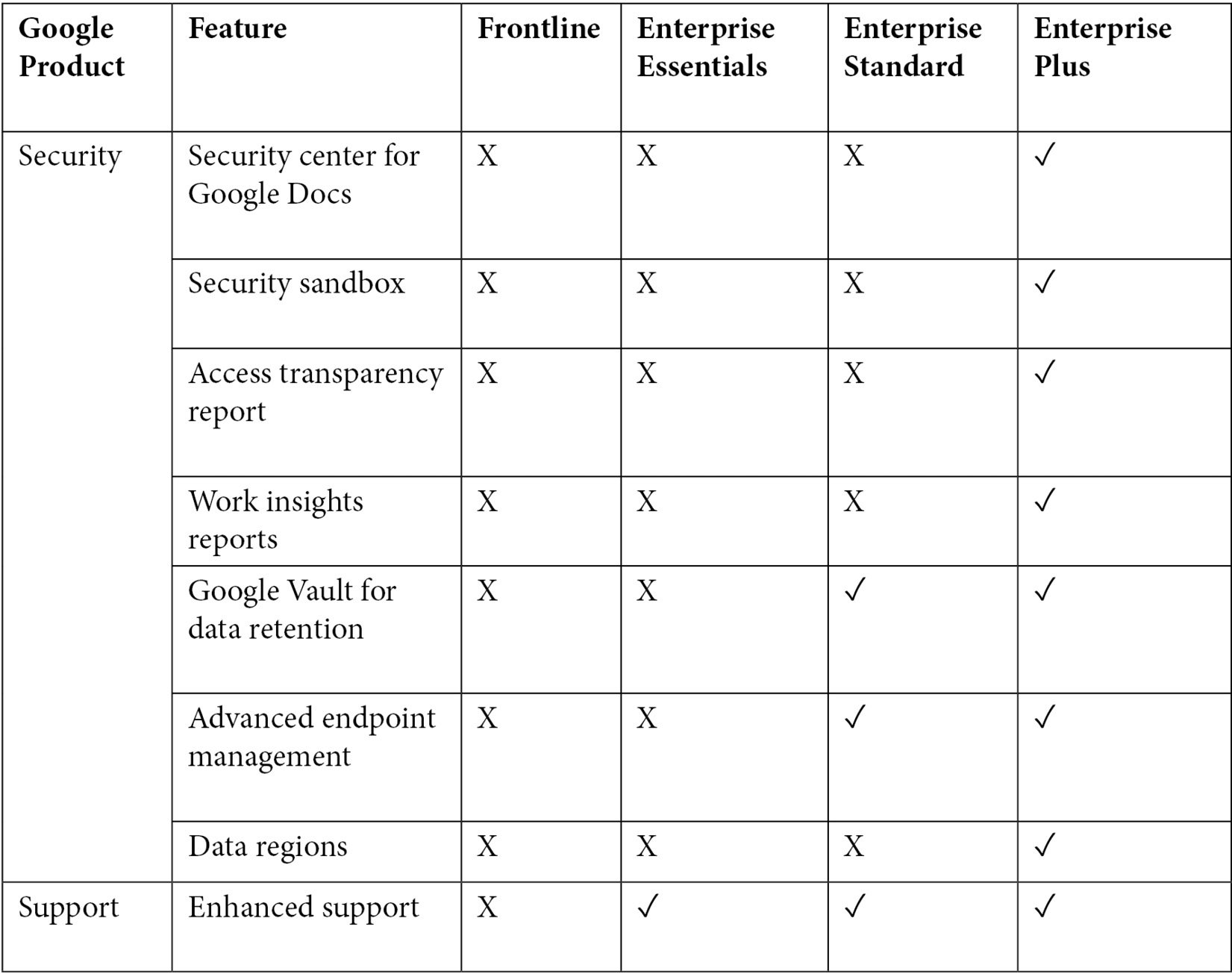
There are some differences between the four Enterprise license editions, which are shown in the following table:

Now that we've reviewed the various features within each tier and each edition of the Google Workspace licenses, let's discuss how to decide on the best edition for your organization.