Sign In Start Free Trial
Account

Add to playlist

Create a Playlist

Modal Close icon
You need to login to use this feature.
  • Book Overview & Buying Unreal Engine 4 Scripting with C++ Cookbook
  • Table Of Contents Toc
Unreal Engine 4 Scripting with C++ Cookbook

Unreal Engine 4 Scripting with C++ Cookbook

By : Stephen Whittle, William Sherif
3.1 (7)
close
close
Unreal Engine 4 Scripting with C++ Cookbook

Unreal Engine 4 Scripting with C++ Cookbook

3.1 (7)
By: Stephen Whittle, William Sherif

Overview of this book

Unreal Engine 4 (UE4) is a complete suite of game development tools made by game developers, for game developers. With more than 100 practical recipes, this book is a guide showcasing techniques to use the power of C++ scripting while developing games with UE4. It will start with adding and editing C++ classes from within the Unreal Editor. It will delve into one of Unreal's primary strengths, the ability for designers to customize programmer-developed actors and components. It will help you understand the benefits of when and how to use C++ as the scripting tool. With a blend of task-oriented recipes, this book will provide actionable information about scripting games with UE4, and manipulating the game and the development environment using C++. Towards the end of the book, you will be empowered to become a top-notch developer with Unreal Engine 4 using C++ as the scripting language.
Table of Contents (14 chapters)
close
close
13
Index

Formatting your code (Autocomplete settings) in Visual Studio

Code-writing formatting with Visual Studio is a pleasure. In this recipe, we'll discuss how to control the way Visual Studio lays out the text of your code.

Getting ready

Code has to be formatted correctly. You and your co-programmers will be able to better understand, grok, and keep your code bug-free if it is consistently formatted. This is why Visual Studio includes a number of auto-formatting tools inside the editor.

How to do it...

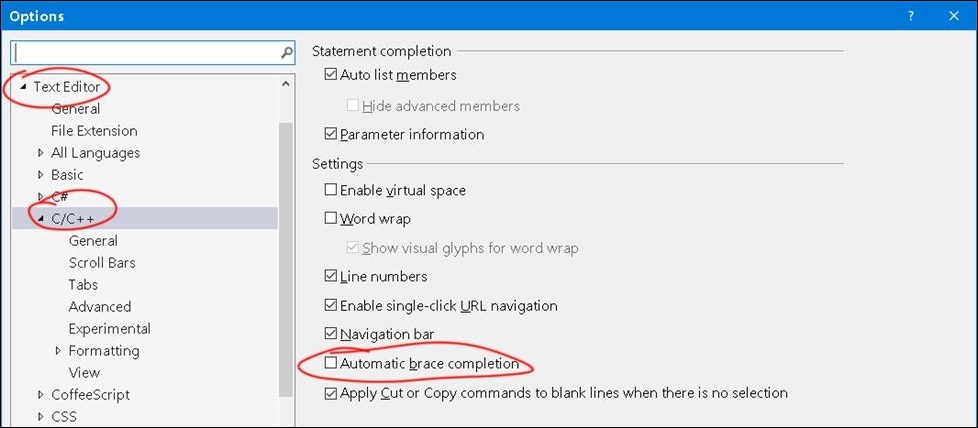
  1. Go to Tools | Options | Text Editor | C/C++. This dialog displays a window that allows you to toggle Automatic brace completion.
    How to do it...

    Automatic brace completion is the feature where, when you type { , a corresponding } is automatically typed for you. This feature may irk you if you don't like the text editor inserting characters for you unexpectedly.

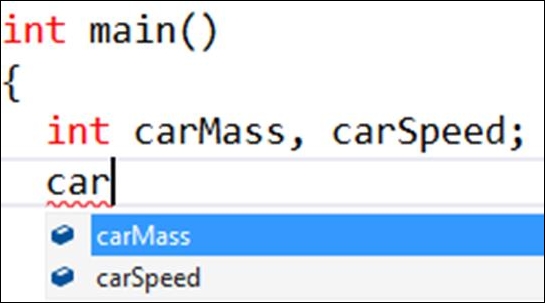
    You generally want Auto list members on, as that displays a nice dialog with the complete names of data members listed for you as soon as you start typing. This makes it easy to remember variable names, so you don't have to memorize them:

    How to do it...

    Tip

    If you press Ctrl + Spacebar inside the code editor at any time, the auto list pops up.

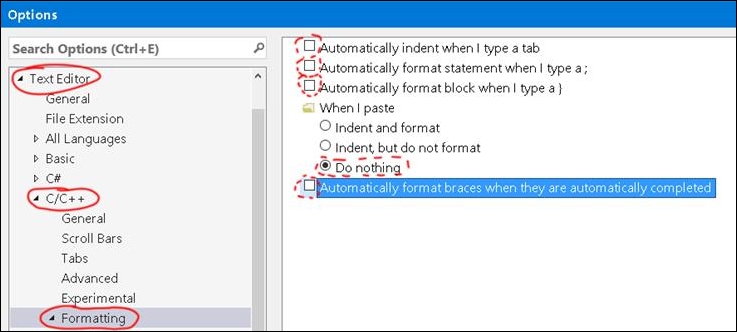
  2. Some more autocomplete behavior options are located under Text Editor | C/C++ | Formatting:
    How to do it...

Autoformat section: Highlight a section of text and select Edit | Advanced | Format Selection (Ctrl + K, Ctrl + F).

How it works...

The default autocomplete and autoformat behaviors may irk you. You need to converse with your team on how you want your code formatted (spaces or tab indents, size of indent, and so on), and then configure your Visual Studio settings accordingly.

CONTINUE READING
83
Tech Concepts
36
Programming languages
73
Tech Tools
Icon Unlimited access to the largest independent learning library in tech of over 8,000 expert-authored tech books and videos.
Icon Innovative learning tools, including AI book assistants, code context explainers, and text-to-speech.
Icon 50+ new titles added per month and exclusive early access to books as they are being written.
Unreal Engine 4 Scripting with C++ Cookbook
notes
bookmark Notes and Bookmarks search Search in title playlist Add to playlist font-size Font size

Change the font size

margin-width Margin width

Change margin width

day-mode Day/Sepia/Night Modes

Change background colour

Close icon Search
Country selected

Close icon Your notes and bookmarks

Confirmation

Modal Close icon
claim successful

Buy this book with your credits?

Modal Close icon
Are you sure you want to buy this book with one of your credits?
Close
YES, BUY

Submit Your Feedback

Modal Close icon
Modal Close icon
Modal Close icon