Sign In Start Free Trial
Account

Add to playlist

Create a Playlist

Modal Close icon
You need to login to use this feature.
  • Book Overview & Buying Unreal Engine 4 Scripting with C++ Cookbook
  • Table Of Contents Toc
Unreal Engine 4 Scripting with C++ Cookbook

Unreal Engine 4 Scripting with C++ Cookbook

By : Stephen Whittle, William Sherif
3.1 (7)
close
close
Unreal Engine 4 Scripting with C++ Cookbook

Unreal Engine 4 Scripting with C++ Cookbook

3.1 (7)
By: Stephen Whittle, William Sherif

Overview of this book

Unreal Engine 4 (UE4) is a complete suite of game development tools made by game developers, for game developers. With more than 100 practical recipes, this book is a guide showcasing techniques to use the power of C++ scripting while developing games with UE4. It will start with adding and editing C++ classes from within the Unreal Editor. It will delve into one of Unreal's primary strengths, the ability for designers to customize programmer-developed actors and components. It will help you understand the benefits of when and how to use C++ as the scripting tool. With a blend of task-oriented recipes, this book will provide actionable information about scripting games with UE4, and manipulating the game and the development environment using C++. Towards the end of the book, you will be empowered to become a top-notch developer with Unreal Engine 4 using C++ as the scripting language.
Table of Contents (14 chapters)
close
close
13
Index

Project management on GitHub – using the Issue Tracker

Keeping track of you project's progress, features, and bugs is extremely important. The GitHub Issue Tracker will enable you to do this.

Getting ready

Keeping track of your project's planned features and running issues is important. GitHub's Issue Tracker can be used to create lists of features you'd like to add to your project as well as bugs you need to fix at some time in the future.

How to do it...

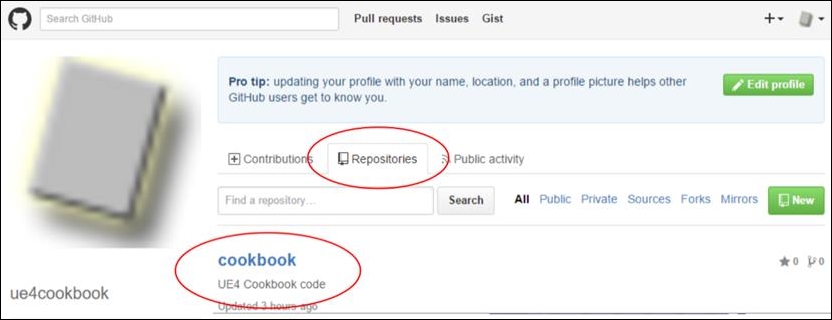
  1. To add an issue to your Issue Tracker, first select the repository that you'd like to edit by going to the front page of GitHub and selecting the Repositories tab:
    How to do it...
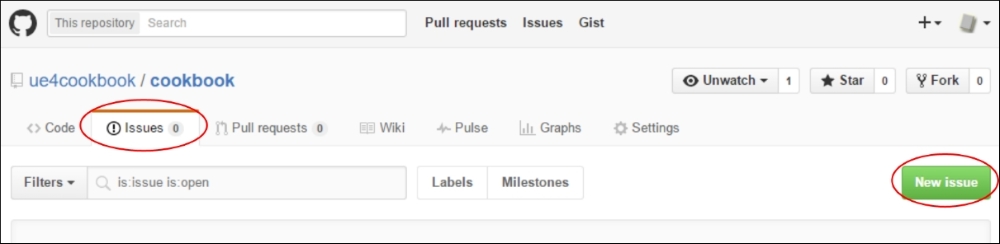
  2. From your repository's homepage, select the Issues tab under your repository. To add an issue to track, click the New Issue button in the lower-right corner of the screen, as seen in the following screenshot:
    How to do it...
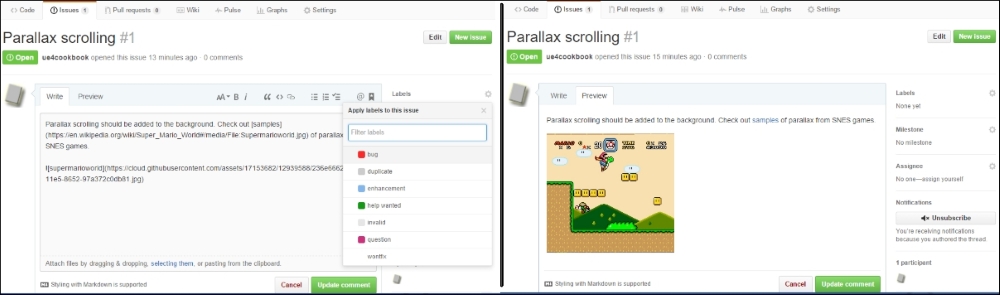
  3. When adding your issue, it is good practice to detail it as much as possible. Including screenshots and diagrams in the features or bugs you post is highly recommended, as it documents the issue much better, and parks important information and a good description into your Issue Tracker. Dragging and dropping images into the text editor window automatically uploads a copy of the image to GitHub's own cloud server, and the image will appear inline in the issue, as shown in the following screenshot:
    How to do it...
  4. The box into which you enter the description of your bug or feature supports Markdown. Markdown is a simplified HTML-like markup language that lets you quickly write HTML-like syntax with ease. Examples of some markdown syntax are as follows:
    # headings
    ## sub-headings
    ### sub-sub-headings
    _italics_, __bold__, ___bold-italics___
    [hyperlinks](http://towebsites.com/)
    
    code (indented by 4 spaces), preceded by a blank line
    
    * bulleted
    * lists
      - sub bullets
        - sub sub bullets
    
    >quotations

    Tip

    If you want to learn more about Markdown's syntax, check out https://daringfireball.net/projects/markdown/syntax.

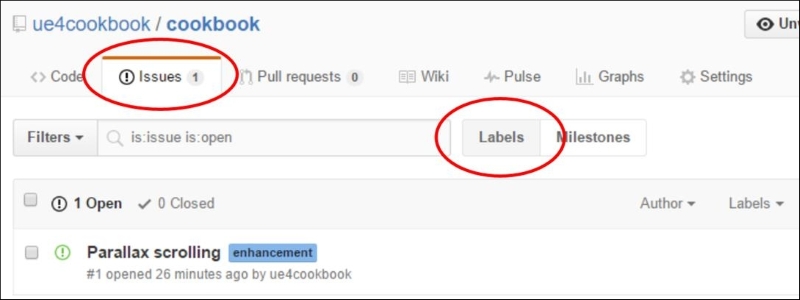
  5. You can further mark the issue as either a bug, enhancement (feature), or any other label you like. Customizing labels is possible via the Issues | Labels link:
    How to do it...
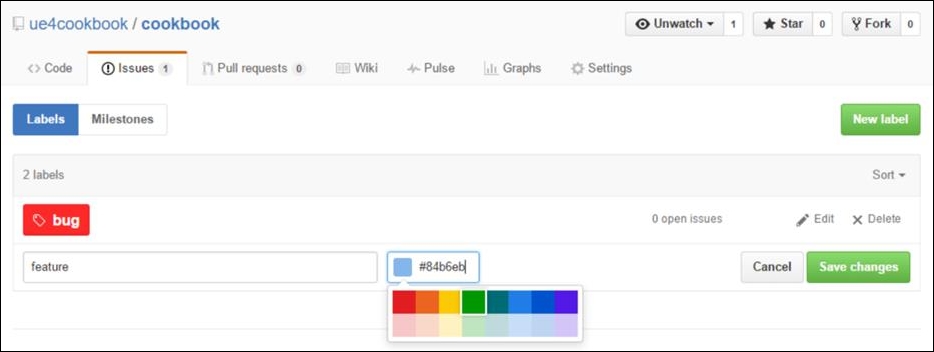
  6. From there, you can edit, change the color of, or delete your labels. I deleted all the stock labels, and replaced the word enhancement with feature, as seen in the following two screenshots:
    How to do it...
    How to do it...
  7. Once you've fully customized your labels, your GitHub Issue Tracker is much easier to navigate. Prioritize issues by tagging with the appropriate labels.

How it works...

GitHub's Issue Tracker is a fantastic way to track bugs and features in your project. Using it not only organizes your workflow, but also maintains an excellent history of the work done on the project.

See also

  • You should also check out the Wiki feature, which allows you to document your source code
CONTINUE READING
83
Tech Concepts
36
Programming languages
73
Tech Tools
Icon Unlimited access to the largest independent learning library in tech of over 8,000 expert-authored tech books and videos.
Icon Innovative learning tools, including AI book assistants, code context explainers, and text-to-speech.
Icon 50+ new titles added per month and exclusive early access to books as they are being written.
Unreal Engine 4 Scripting with C++ Cookbook
notes
bookmark Notes and Bookmarks search Search in title playlist Add to playlist font-size Font size

Change the font size

margin-width Margin width

Change margin width

day-mode Day/Sepia/Night Modes

Change background colour

Close icon Search
Country selected

Close icon Your notes and bookmarks

Confirmation

Modal Close icon
claim successful

Buy this book with your credits?

Modal Close icon
Are you sure you want to buy this book with one of your credits?
Close
YES, BUY

Submit Your Feedback

Modal Close icon
Modal Close icon
Modal Close icon