Sign In Start Free Trial
Account

Add to playlist

Create a Playlist

Modal Close icon
You need to login to use this feature.
  • Book Overview & Buying Unreal Engine 4 Scripting with C++ Cookbook
  • Table Of Contents Toc
Unreal Engine 4 Scripting with C++ Cookbook

Unreal Engine 4 Scripting with C++ Cookbook

By : Stephen Whittle, William Sherif
3.1 (7)
close
close
Unreal Engine 4 Scripting with C++ Cookbook

Unreal Engine 4 Scripting with C++ Cookbook

3.1 (7)
By: Stephen Whittle, William Sherif

Overview of this book

Unreal Engine 4 (UE4) is a complete suite of game development tools made by game developers, for game developers. With more than 100 practical recipes, this book is a guide showcasing techniques to use the power of C++ scripting while developing games with UE4. It will start with adding and editing C++ classes from within the Unreal Editor. It will delve into one of Unreal's primary strengths, the ability for designers to customize programmer-developed actors and components. It will help you understand the benefits of when and how to use C++ as the scripting tool. With a blend of task-oriented recipes, this book will provide actionable information about scripting games with UE4, and manipulating the game and the development environment using C++. Towards the end of the book, you will be empowered to become a top-notch developer with Unreal Engine 4 using C++ as the scripting language.
Table of Contents (14 chapters)
close
close
13
Index

Modifying position using a Material

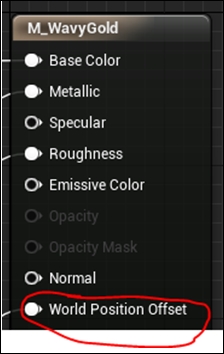
A less common thing to do is to use a Material to modify an object's position. This is commonly done in things such as water shaders. We do it using the World Position Offset node inside the Material's output.

Modifying position using a Material

We can modulate the output position of a vertex using some GPU math. This lightens the load of rendering realistic water on the CPU by a significant amount.

Getting ready

Create a piece of geometry in your world. Construct a new shader called Bob, which we'll edit to produce a simple bobbing motion for objects rendered with the material.

How to do it...

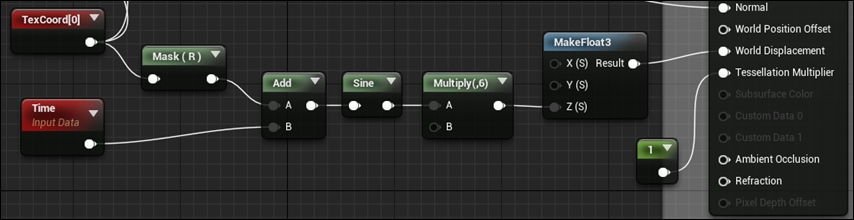
  1. In your new Material (named Bob), right-click and add Texcoord and Time Input nodes.
  2. Cascade the sum of the Texcoord (for spatial) and Time Input nodes through a sin() function call to create some wavy displacement. Multiply the output of the sin() function, and pass as Z-inputs to World Displacement.
    How to do it...

    Note

    Part of the simple water shader given in the code of Chapter11 that produces the displacement...

CONTINUE READING
83
Tech Concepts
36
Programming languages
73
Tech Tools
Icon Unlimited access to the largest independent learning library in tech of over 8,000 expert-authored tech books and videos.
Icon Innovative learning tools, including AI book assistants, code context explainers, and text-to-speech.
Icon 50+ new titles added per month and exclusive early access to books as they are being written.
Unreal Engine 4 Scripting with C++ Cookbook
notes
bookmark Notes and Bookmarks search Search in title playlist Add to playlist font-size Font size

Change the font size

margin-width Margin width

Change margin width

day-mode Day/Sepia/Night Modes

Change background colour

Close icon Search
Country selected

Close icon Your notes and bookmarks

Confirmation

Modal Close icon
claim successful

Buy this book with your credits?

Modal Close icon
Are you sure you want to buy this book with one of your credits?
Close
YES, BUY

Submit Your Feedback

Modal Close icon
Modal Close icon
Modal Close icon