You can use any text editor to write code, because, ultimately, code is just text. To write code, you are free to choose between simple text editors such as Vim, or an advanced integrated development environment (IDE) such as MS Visual Studio. The only difference between a love letter and source code is that the latter might be interpreted by a special program called a compiler (while the love letter cannot be compiled into a program, it might give you butterflies in your stomach).
To mark the difference between a plain text file and source code, a special file extension is used. C++ operates with the .cpp and .h extensions (you may also occasionally encounter .cxx and .hpp as well). Before getting into the details, think of the compiler as a tool that translates the source code into a runnable program, known as an executable file or just an executable. The process of making an executable from the source code is called compilation. Compiling a C++ program is a sequence of complex tasks that results in machine code generation. Machine code is the native language of the computer— that's why it's called machine code.
Typically, a C++ compiler parses and analyzes the source code, then generates intermediate code, optimizes it, and finally, generates machine code in a file called an object file. You may have already encountered object files; they have individual extensions – .o in Linux and .obj in Windows. The created object file contains more than just machine code that can be run by the computer. Compilation usually involves several source files, and compiling each source file produces a separate object file. These object files are then linked together by a tool called the linker to form a single executable file. The linker uses additional information stored in object files to link them properly (linking will be discussed later in this chapter).
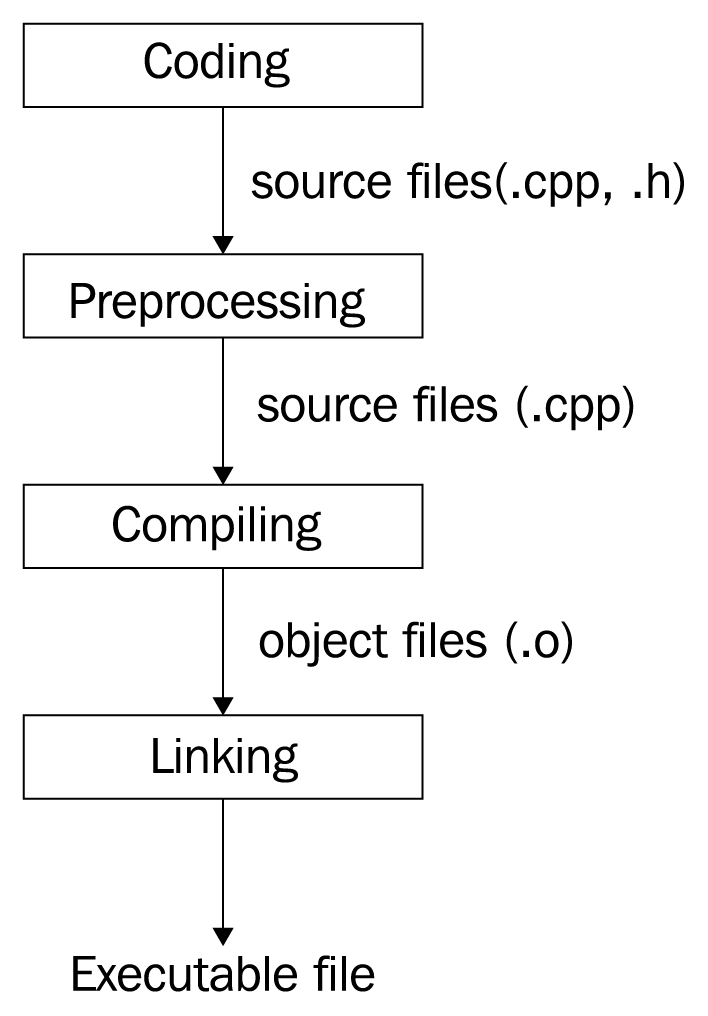
The following diagram depicts the program-building phases:
The C++ application-building process consists of three major steps: preprocessing, compiling, and linking. All of these steps are done using different tools, but modern compilers encapsulate them in a single tool, thereby providing a single and more straightforward interface for programmers.
The generated executable file persists on the hard drive of the computer. In order to run it, it should be copied to the main memory, the RAM. The copying is done by another tool, named the loader. The loader is a part of the operating system that knows what and where should be copied from the contents of the executable file. After loading the executable file to the main memory, the original executable file won't be deleted from the hard drive.
The loading and running of a program is done by the operating system (OS). The OS manages the execution of the program, prioritizes it over other programs, unloads it when it's done, and so on. The running copy of the program is called a process. A process is an instance of an executable file.