Sign In Start Free Trial
Account

Add to playlist

Create a Playlist

Modal Close icon
You need to login to use this feature.
  • Book Overview & Buying Expert C++
  • Table Of Contents Toc
Expert C++

Expert C++

By : Vardan Grigoryan, Shunguang Wu
3.1 (9)
close
close
Expert C++

Expert C++

3.1 (9)
By: Vardan Grigoryan, Shunguang Wu

Overview of this book

C++ has evolved over the years and the latest release – C++20 – is now available. Since C++11, C++ has been constantly enhancing the language feature set. With the new version, you’ll explore an array of features such as concepts, modules, ranges, and coroutines. This book will be your guide to learning the intricacies of the language, techniques, C++ tools, and the new features introduced in C++20, while also helping you apply these when building modern and resilient software. You’ll start by exploring the latest features of C++, and then move on to advanced techniques such as multithreading, concurrency, debugging, monitoring, and high-performance programming. The book will delve into object-oriented programming principles and the C++ Standard Template Library, and even show you how to create custom templates. After this, you’ll learn about different approaches such as test-driven development (TDD), behavior-driven development (BDD), and domain-driven design (DDD), before taking a look at the coding best practices and design patterns essential for building professional-grade applications. Toward the end of the book, you will gain useful insights into the recent C++ advancements in AI and machine learning. By the end of this C++ programming book, you’ll have gained expertise in real-world application development, including the process of designing complex software.
Table of Contents (22 chapters)
close
close
1
Section 1: Under the Hood of C++ Programming
7
Section 2: Designing Robust and Efficient Applications
17
Section 3: C++ in the AI World

Understanding Compiling

The C++ compilation process consists of several phases. Some of the phases are intended to analyze the source code, and others generate and optimize the target machine code. The following diagram shows the phases of compilation:

Let's look at each of these phases in detail.

Tokenization

The analysis phase of the compiler aims to split the source code into small units called tokens. A token may be a word or just a single symbol, such as = (the equals sign). A token is the smallest unit of the source code that carries meaningful value for the compiler. For example, the expression int a = 42; will be divided into the tokens int, a, =, 42, and ;. The expression isn't just split by spaces, because the following expression is being split into the same tokens (though it is advisable not to forget the spaces between operands):

int a=42;

The splitting of the source code into tokens is done using sophisticated methods using regular expressions. It is known as lexical analysis, or tokenization (dividing into tokens). For compilers, using a tokenized input presents a better way to construct internal data structures used to analyze the syntax of the code. Let's see how.

Syntax analysis

When speaking about programming language compilation, we usually differentiate two terms: syntax and semantics. The syntax is the structure of the code; it defines the rules by which tokens combined make structural sense. For example, day nice is a syntactically correct phrase in English because it doesn't contain errors in either of the tokens. Semantics, on the other hand, concerns the actual meaning of the code. That is, day nice is semantically incorrect and should be corrected as a nice day.

Syntax analysis is a crucial part of source analysis, because tokens will be analyzed syntactically and semantically, that is, as to whether they bear any meaning that conforms to the general grammar rules. Take the following, for example:

int b = a + 0;

It may not make sense for us, because adding zero to the variable won't change its value, but the compiler doesn't look on logical meaning here—it looks for the syntactic correctness of the code (a missing semicolon, a missing closing parenthesis, and more). Checking the syntactic correctness of the code is done in the syntax analysis phase of compilation. The lexical analysis divides the code into tokens; syntax analysis checks for syntactic correctness, which means that the aforementioned expression will produce a syntax error if we have missed a semicolon:

int b = a + 0

g++ will complain with the expected ';' at end of declaration error.

Semantic analysis

If the previous expression was something like it b = a + 0; , the compiler would divide it into the tokens it, b, =, and others. We already see that it is something unknown, but for the compiler, it is fine at this point. This would lead to the compilation error unknown type name "it" in g++. Finding the meaning behind expressions is the task of semantic analysis (parsing).

Intermediate code generation

After all the analysis is completed, the compiler generates intermediate code that is a light version of C++ mostly C. A simple example would be the following:

class A { 
public:
int get_member() { return mem_; }
private:
int mem_;
};

After analyzing the code, intermediate code will be generated (this is an abstract example meant to show the idea of the intermediate code generation; compilers may differ in implementation):

struct A { 
int mem_;
};
int A_get_member(A* this) { return this->mem_; }

Optimization

Generating intermediate code helps the compiler to make optimizations in the code. Compilers try to optimize code a lot. Optimizations are done in more than one pass. For example, take the following code:

int a = 41; 
int b = a + 1;

This will be optimized into this during compilation:

int a = 41; 
int b = 41 + 1;

This again will be optimized into the following:

int a = 41; 
int b = 42;

Some programmers have no doubt that, nowadays, compilers code better than programmers.

Machine code generation

Compiler optimizations are done in both intermediate code and generated machine code. So what is it like when we compile the project? Earlier in the chapter, when we discussed the preprocessing of the source code, we looked at a simple structure containing several source files, including two headers, rect.h and square.h, each with its .cpp files, and main.cpp, which contained the program entry point (the main() function). After the preprocessing, the following units are left as input for the compiler: main.cpp, rect.cpp, and square.cpp, as depicted in the following diagram:
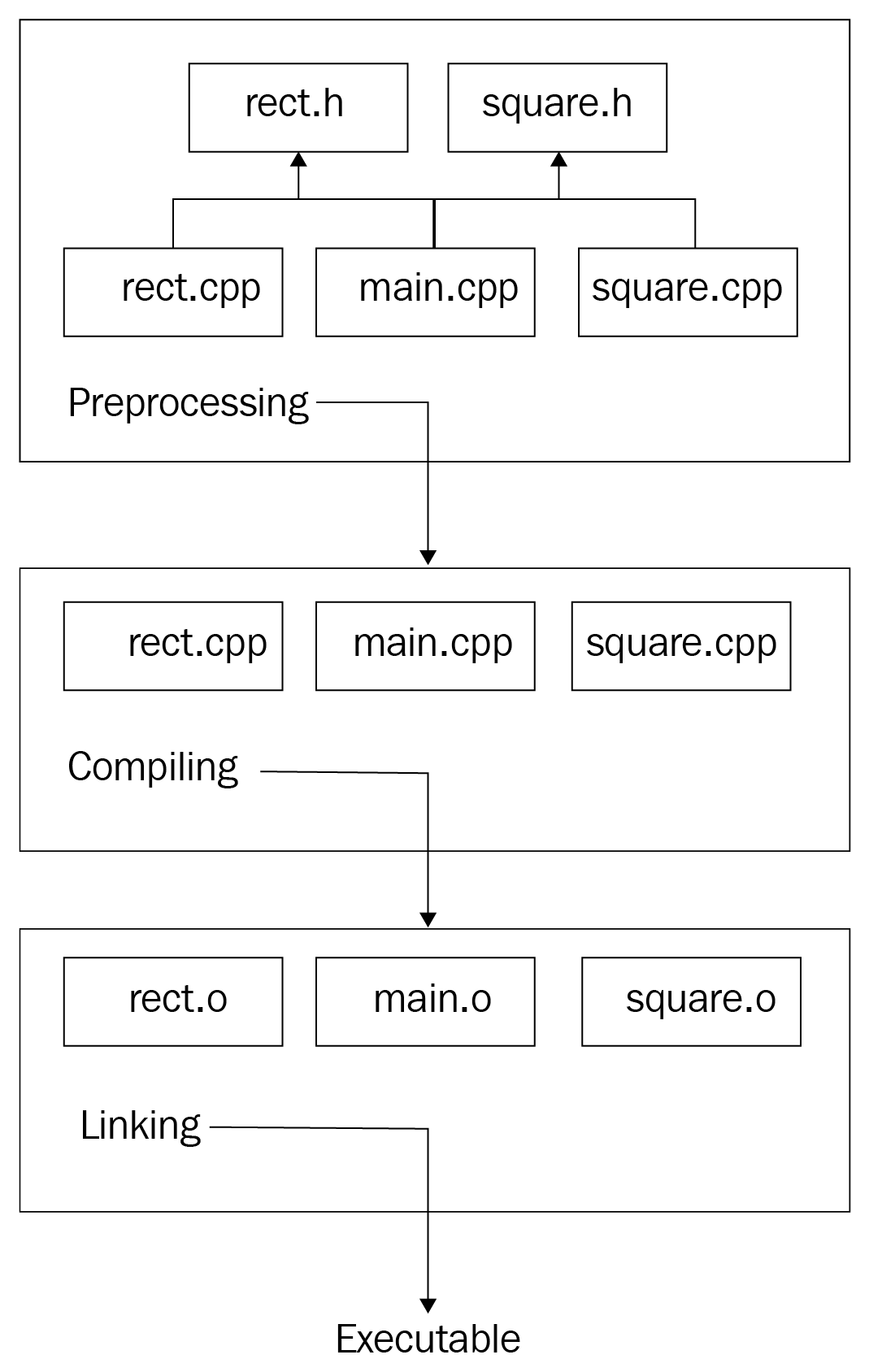
The compiler will compile each separately. Compilation units, also known as source files, are independent of each other in some way. When the compiler compiles main.cpp, which has a call to the get_area() function in Rect, it does not include the get_area() implementation in main.cpp. Instead, it is just sure that the function is implemented somewhere in the project. When the compiler gets to rect.cpp, it does not know that the get_area() function is used somewhere.

Here's what the compiler gets after main.cpp passes the preprocessing phase:

// contents of the iostream 
struct Rect {
private:
double side1_;
double side2_;
public:
Rect(double s1, double s2);
const double get_area() const;
};

struct Square : Rect {
Square(double s);
};

int main() {
Rect r(3.1, 4.05);
std::cout << r.get_area() << std::endl;
return 0;
}

After analyzing main.cpp, the compiler generates the following intermediate code (many details are omitted to simply express the idea behind compilation):

struct Rect { 
double side1_;
double side2_;
};
void _Rect_init_(Rect* this, double s1, double s2);
double _Rect_get_area_(Rect* this);

struct Square {
Rect _subobject_;
};
void _Square_init_(Square* this, double s);

int main() {
Rect r;
_Rect_init_(&r, 3.1, 4.05);
printf("%d\n", _Rect_get_area(&r));
// we've intentionally replace cout with printf for brevity and
// supposing the compiler generates a C intermediate code
return 0;
}

The compiler will remove the Square struct with its constructor function (we named it _Square_init_) while optimizing the code because it was never used in the source code.

At this point, the compiler operates with main.cpp only, so it sees that we called the _Rect_init_ and _Rect_get_area_ functions but did not provide their implementation in the same file. However, as we did provide their declarations beforehand, the compiler trusts us and believes that those functions are implemented in other compilation units. Based on this trust and the minimum information regarding the function signature (its return type, name, and the number and types of its parameters), the compiler generates an object file that contains the working code in main.cpp and somehow marks the functions that have no implementation but are trusted to be resolved later. The resolving is done by the linker.

In the following example, we have the simplified variant of the generated object file, which contains two sections—code and information. The code section has addresses for each instruction (the hexadecimal values):

code: 
0x00 main
0x01 Rect r;
0x02 _Rect_init_(&r, 3.1, 4.05);
0x03 printf("%d\n", _Rect_get_area(&r));
information:
main: 0x00
_Rect_init_: ????
printf: ????
_Rect_get_area_: ????

Take a look at the information section. The compiler marks all the functions used in the code section that were not found in the same compilation unit with ????. These question marks will be replaced by the actual addresses of the functions found in other units by the linker. Finishing with main.cpp, the compiler starts to compile the rect.cpp file:

// file: rect.cpp 
struct Rect {
// #include "rect.h" replaced with the contents
// of the rect.h file in the preprocessing phase
// code omitted for brevity
};
Rect::Rect(double s1, double s2)
: side1_(s1), side2_(s2)
{}
const double Rect::get_area() const {
return side1_ * side2_;
}

Following the same logic here, the compilation of this unit produces the following output (don't forget, we're still providing abstract examples):

code:  
0x00 _Rect_init_
0x01 side1_ = s1
0x02 side2_ = s2
0x03 return
0x04 _Rect_get_area_
0x05 register = side1_
0x06 reg_multiply side2_
0x07 return
information:
_Rect_init_: 0x00
_Rect_get_area_: 0x04

This output has all the addresses of the functions in it, so there is no need to wait for some functions to be resolved later.

Platforms and object files

The abstract output that we just saw is somewhat similar to the actual object file structure that the compiler produces after the compilation of a unit. The structure of an object file depends on the platform; for example, in Linux, it is represented in ELF format (ELF stands for Executable and Linkable Format). A platform is an environment in which a program is executed. In this context, by platform, we mean the combination of the computer architecture (more specifically, the instruction set architecture) and operating system. Hardware and operating systems are designed and created by different teams and companies. Each of them has different solutions to design problems, which leads to major differences between platforms. Platforms differ in many ways, and those differences are projected onto the executable file format and structure as well. For example, the executable file format in Windows systems is Portable Executable (PE), which has a different structure, number, and sequence of sections than the ELF format in Linux.

An object file is divided into sections. Most important for us are the code sections (marked as .text) and the data section (.data). The .text section holds the program instructions and the .data section holds the data used by instructions. Data itself may be split into several sections, such as initialized, uninitialized, and read-only data.

An important part of the object files in addition to the .text and .data sections is the symbol table. The symbol table stores the mappings of strings (symbols) to locations in the object file. In the preceding example, the compiler-generated output had two portions, the second portion of which was marked as information:, which holds the names of the functions used in the code and their relative addresses. This information: is the abstract version of the actual symbol table of the object file. The symbol table holds both symbols defined in the code and symbols used in the code that need to be resolved. This information is then used by the linker in order to link the object files together to form the final executable file.

CONTINUE READING
83
Tech Concepts
36
Programming languages
73
Tech Tools
Icon Unlimited access to the largest independent learning library in tech of over 8,000 expert-authored tech books and videos.
Icon Innovative learning tools, including AI book assistants, code context explainers, and text-to-speech.
Icon 50+ new titles added per month and exclusive early access to books as they are being written.
Expert C++
notes
bookmark Notes and Bookmarks search Search in title playlist Add to playlist download Download options font-size Font size

Change the font size

margin-width Margin width

Change margin width

day-mode Day/Sepia/Night Modes

Change background colour

Close icon Search
Country selected

Close icon Your notes and bookmarks

Confirmation

Modal Close icon
claim successful

Buy this book with your credits?

Modal Close icon
Are you sure you want to buy this book with one of your credits?
Close
YES, BUY

Submit Your Feedback

Modal Close icon
Modal Close icon
Modal Close icon