
Sign In Start Free Trial
Account

Add to playlist

Create a Playlist

Modal Close icon
You need to login to use this feature.
  • Book Overview & Buying Visualize Complex Processes with Microsoft Visio
  • Table Of Contents Toc
Visualize Complex Processes with Microsoft Visio

Visualize Complex Processes with Microsoft Visio

By : David Parker, Senaj Lelic
4.8 (12)
close
close
Visualize Complex Processes with Microsoft Visio

Visualize Complex Processes with Microsoft Visio

4.8 (12)
By: David Parker, Senaj Lelic

Overview of this book

Every business has process flows, but not all of them are fully described to or verified for accuracy with each stakeholder. This not only presents a risk for business continuity but also removes the ability to make insightful improvements. To make these complex interactions easy to grasp, it’s important to describe these processes visually using symbology that everybody understands. Different parts of these flows should be collaboratively developed and stored securely as commercial collateral. Visualize Complex Processes with Microsoft Visio helps you understand why it is crucial to use a common, systematic approach to document the steps needed to meet each business requirement. This book explores the various process flow templates available in each edition of Microsoft Visio, including BPMN. It also shows you how to use them effectively with the help of tips and techniques and examples to reduce the time required for creating them, as well as how you can improve their integration and presentation. By the end of this book, you’ll have mastered the skills needed to create data-integrated business flowcharts with Microsoft Visio, learned how to effectively use these diagrams collaboratively, but securely, and understood how to integrate them with other M365 apps, including Excel, Word, PowerPoint, and Power Automate.
Table of Contents (14 chapters)
close
close

Reviewing existing selected process master shapes

If we click the Edit Master Shape … option in the right-click menu of the Process master in our Document Stencil area, we will see that the Shape Data section looks like this:
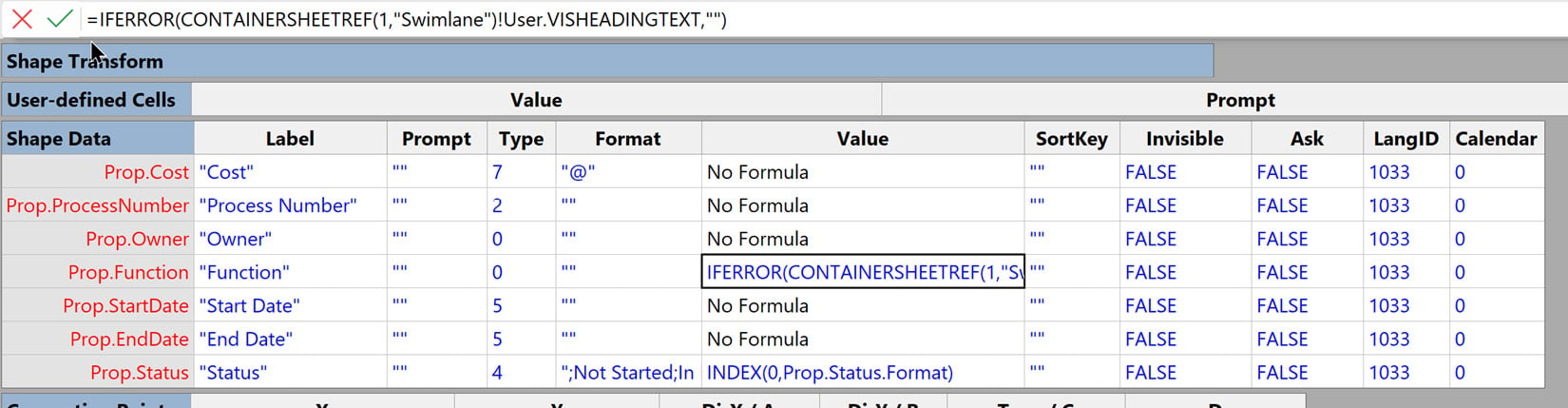
Figure 10.10 – The Shape Data section of a Process shape

Figure 10.10 – The Shape Data section of a Process shape

The first thing we should notice is that the formulas are all blue text, whereas they were black in Figure 10.10. This is because inherited formulas and values are colored black but those that are not inherited are colored blue.

Hopefully, you have noticed that this section defines what is displayed in the Shape Data window. This is an optional section of the ShapeSheet, which means that it does not exist on all shapes, unlike some other sections that need to exist for Visio to work and cannot be deleted. The Shape Data section used to be called Custom Properties originally (and referred to as Prop in formulas) and can have many rows, which can be named for...

CONTINUE READING
83
Tech Concepts
36
Programming languages
73
Tech Tools
Icon Unlimited access to the largest independent learning library in tech of over 8,000 expert-authored tech books and videos.
Icon Innovative learning tools, including AI book assistants, code context explainers, and text-to-speech.
Icon 50+ new titles added per month and exclusive early access to books as they are being written.
Visualize Complex Processes with Microsoft Visio
notes
bookmark Notes and Bookmarks search Search in title playlist Add to playlist download Download options font-size Font size

Change the font size

margin-width Margin width

Change margin width

day-mode Day/Sepia/Night Modes

Change background colour

Close icon Search
Country selected

Close icon Your notes and bookmarks

Confirmation

Modal Close icon
claim successful

Buy this book with your credits?

Modal Close icon
Are you sure you want to buy this book with one of your credits?
Close
YES, BUY

Submit Your Feedback

Modal Close icon
Modal Close icon
Modal Close icon