

Horizon Workspace supports distributing updates to ThinApp packages. Horizon Workspace uses the package.ini parameters, AppID= and VersionID=, to identify a new version of a package. When deploying the new version of a package, you should place it in a new folder on the ThinApp share. The connector-va appliance will pick it up during synchronization, and the new version will be automatically distributed to the end users.
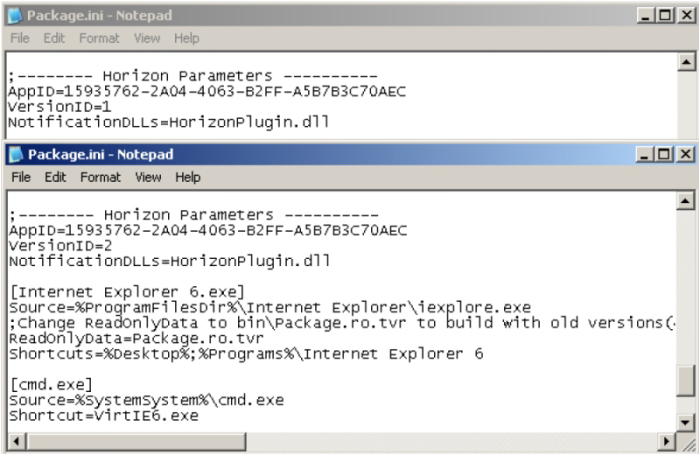
The following screenshot shows an example of two package.ini files: one is the original version, VersionID=1, and the second is the updated package, VersionID=2. You must use an integer as the VersionID value.
Another method to create an updated ThinApp package is to use relink.exe. You can run relink.exe -h -VersionID + to increment VersionID automatically. For a full list of supported relink.exe parameters, simply run relink.exe without any parameters.