Sign In Start Free Trial
Account

Add to playlist

Create a Playlist

Modal Close icon
You need to login to use this feature.
  • Book Overview & Buying Computer Programming for Absolute Beginners
  • Table Of Contents Toc
Computer Programming for Absolute Beginners

Computer Programming for Absolute Beginners

By : Joakim Wassberg
4.3 (8)
close
close
Computer Programming for Absolute Beginners

Computer Programming for Absolute Beginners

4.3 (8)
By: Joakim Wassberg

Overview of this book

Learning how to code has many advantages, and gaining the right programming skills can have a massive impact on what you can do with your current skill set and the way you advance in your career. This book will be your guide to learning computer programming easily, helping you overcome the difficulties in understanding the major constructs in any mainstream programming language. Computer Programming for Absolute Beginners starts by taking you through the building blocks of any programming language with thorough explanations and relevant examples in pseudocode. You'll understand the relationship between computer programs and programming languages and how code is executed on the computer. The book then focuses on the different types of applications that you can create with your programming knowledge. You'll delve into programming constructs, learning all about statements, operators, variables, and data types. As you advance, you'll see how to control the flow of your programs using control structures and reuse your code using functions. Finally, you'll explore best practices that will help you write code like a pro. By the end of this book, you'll be prepared to learn any programming language and take control of your career by adding coding to your skill set.
Table of Contents (19 chapters)
close
close
1
Section 1: Introduction to Computer Programs and Computer Programming
6
Section 2: Constructs of a Programming Language
7
Chapter 5: Sequence – The Basic Building Block of a Computer Program
14
Section 3: Best Practices for Writing High-Quality Code
2
Appendix B: Dictionary
Icon
A
Icon
B
Icon
C
Icon
D
Icon
E
Icon
F
Icon
G
Icon
H
Icon
I
Icon
J
Icon
K
Icon
L
Icon
M
Icon
N
Icon
O
Icon
P
Icon
R
Icon
S
Icon
T
Icon
U
Icon
V
Icon
W

What is a program?

A computer is dumb in the sense that, without programs, it can't do anything. A computer program is a set of instructions that the computer can execute, and it is our job, as programmers, to write these programs using one or more programming languages.

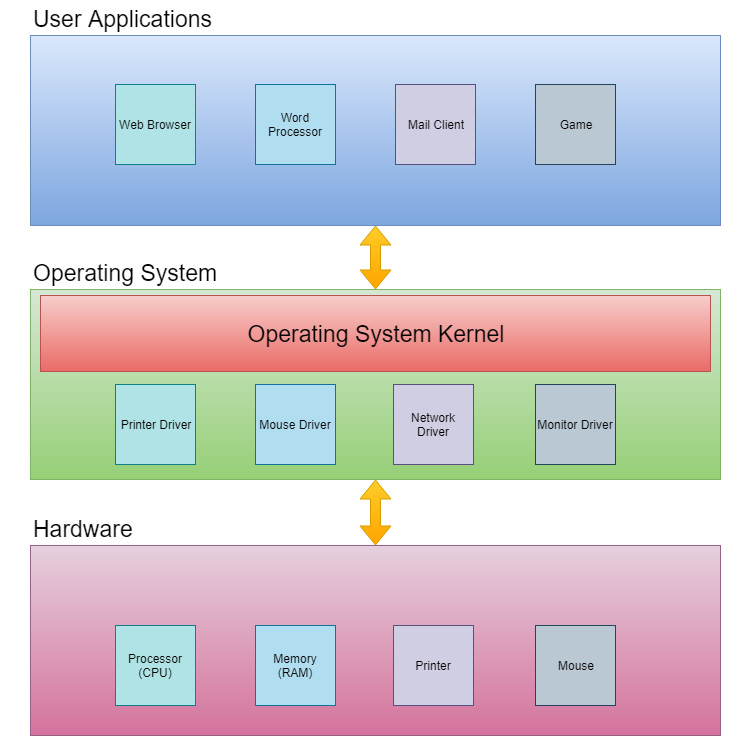
Most applications that we run, such as a web browser, word processor, or mail client, can't communicate with the computer hardware directly. They require a layer in between that takes care of this. This layer is called the operating system. Windows and Linux are two examples of well-known operating systems. The main purpose of an operating system is to take care of the direct communication between the applications that we use and the hardware, such as the processor, memory, hard drives, keyboards, and printers. To be able to perform this communication, the operating system requires special programs that are designed to communicate with a particular device. These programs are called device drivers. A somewhat simplified diagram of how this works is shown here:

Figure 1.4: The system architecture

Figure 1.4: The system architecture

Programmers will write the user applications, the operating system, and the device drivers, but the user applications category is by far the most common. The programs we write will communicate with the system kernel, which is the core of the operating system. The operating system will take care of the direct communication with the underlying hardware. The good thing about this structure is that we only need to talk to the operating system, so we don't need to think about what kind of mouse the user has or how to send a line of text to a particular printer model. The operating system will talk to the device drivers for the mouse and the printer, and the driver will know precisely how to communicate with that device.

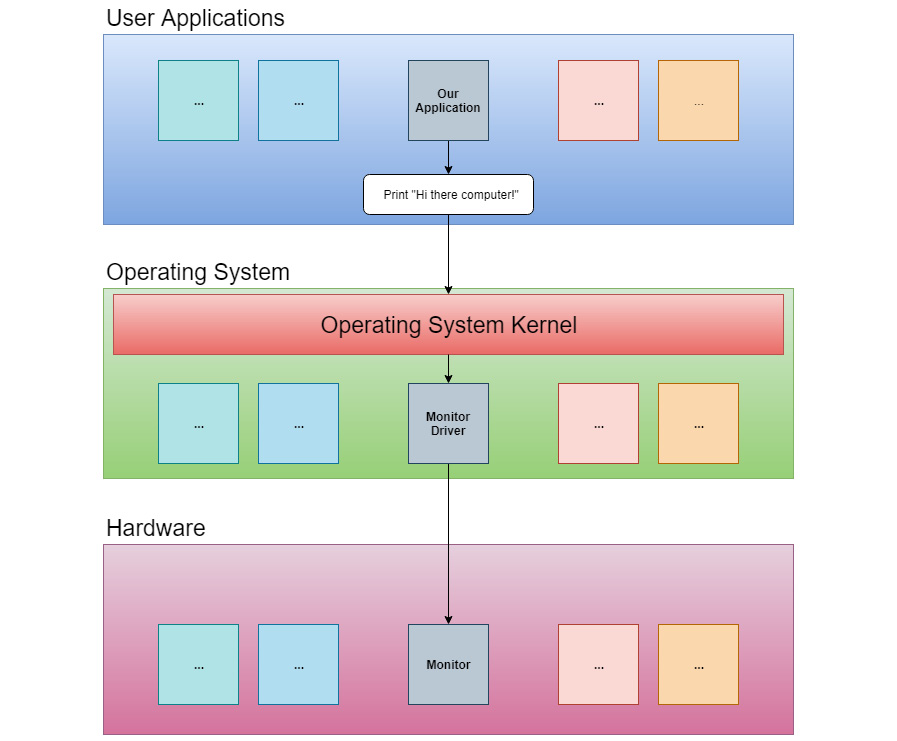
If we write a program and that program wants to print the text Hi there computer! to the screen, then this request will be sent to the operating system. The operating system will pass this on to the device driver for the monitor, and this driver will know how to send this to the monitor connected to this computer:

Figure 1.5: How instructions flow from the application to the hardware

The text entered will not magically appear on the screen, though. It will pass through several layers inside the computer. In 1945, the Hungarian-American mathematician and physicist John Von Neumann, and others, created a document titled First Draft of a Report to the EDVAC. In this 101-page document, the first logical design of a computer using the concept of a stored program was presented. Additionally, the design of an electronic digital computer was described. This design is today known as the Von Neumann Architecture, and it defines four different components that can be used to construct a computer. These components are as follows:

  • A processing unit that has an arithmetic logic unit and registers for the processing unit to use.
  • A control unit that contains an instruction register and a program counter. These are used to execute programs.
  • Memory that stores data and instructions. This memory is volatile, meaning that its content will be erased when the power is turned off or the computer is restarted.
  • External mass storage. This is long-time storage for programs and data that can also be preserved after a computer restarts.
  • Input and output mechanisms. Today, this is typically a keyboard, a mouse, and a monitor.

All of these components, except external mass storage, come into play when text is entered on the keyboard and displayed on the screen.

As mentioned in the previous section, the computer can only understand one thing, and that is machine code. The machine code is a set of numerical values that the computer interprets as different instructions. The computer only works with numbers in the binary form, also known as base 2, and that is why we often hear that a computer only understands zeros and ones.

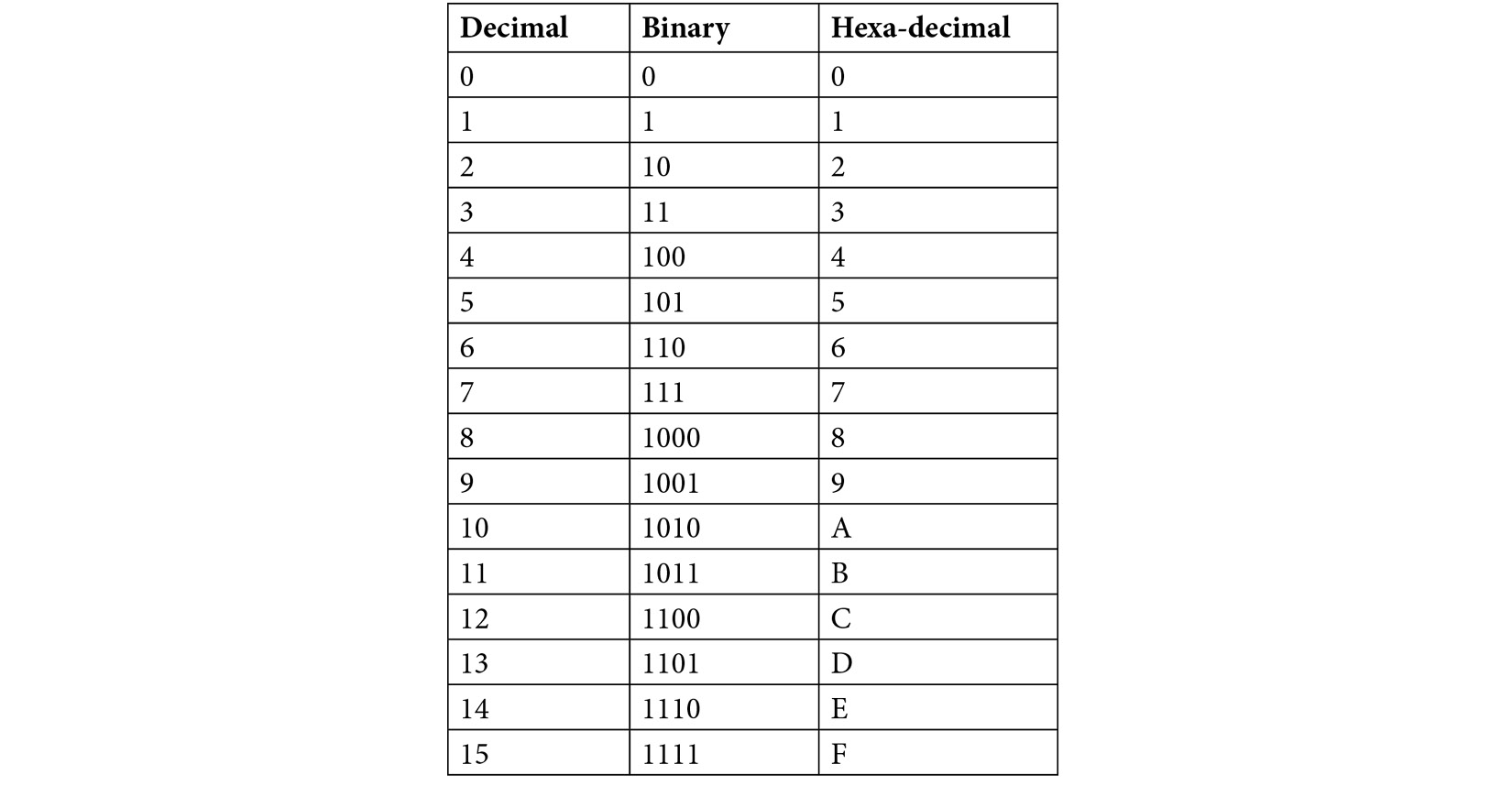
To understand the different bases, let's consider how many digits they have. In our daily life, we use the decimal system, called base 10, because we have 10 digits, from 0 to 9 (we assume the reason for this is that we started counting on our fingers). In the base 2 binary system, we only have two digits, 0 and 1. In base 16, the hexadecimal system, we have 16 digits. As we only have digits for 0 to 9, we must use some letters in the hexadecimal system to represent the values between 10 and 15. Those letters are A to F. We do this because we must understand the difference between digits and numbers: a digit is a single symbol representing a value, whereas a number is a sequence of one or more digits. So, for example, we can talk about the digit 7, but not the digit 12 (as it is a number made up of 2 digits). In the hexadecimal system, we need to represent 16 values; therefore, we need 16 digits. Since we only have 10 digits in our decimal system, we need to use something else. In this case, it is the letters A to F.

Refer to the following table for a comparison between decimal, binary, and hexadecimal numbers:

Table 1.1: The numbers 1-15 in the decimal, binary, and hexadecimal format

How does a computer program work?

All the tools that we, as humans, have created have helped us with physical labor. Finally, we reached a point where we could invent a tool that would help us with mental labor: the computer.

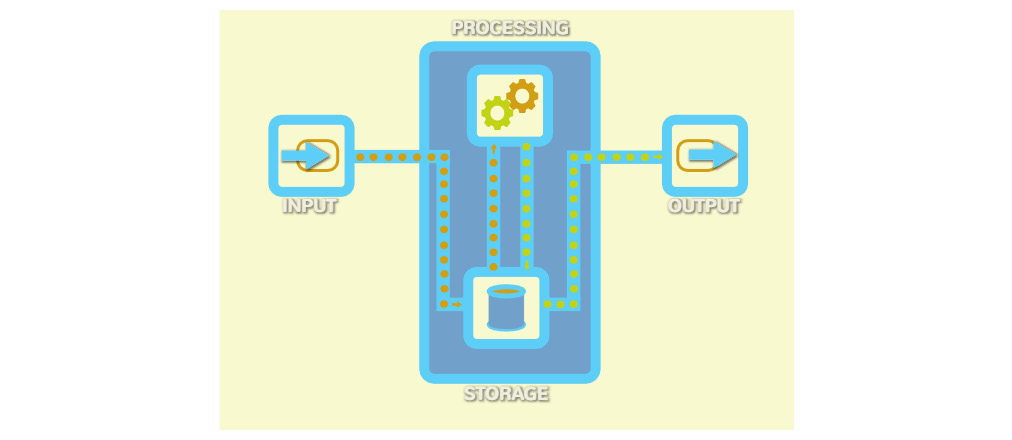
When planning the design of such a machine, the inventors discovered that it must perform four different tasks. The computer would need to take data as input, store that data, process the data, and then output the result.

These four tasks are common to all the computers we have ever built. Let's take a closer look at these tasks:

  1. We can provide input to the computer in many ways, such as with a keyboard, a mouse, voice commands, and touch screens.
  2. The input data is sent to the computer's storage: the internal memory.
  3. The CPU (which is the central processing unit) retrieves the data from storage and performs operations on it.
  4. The result of these operations is then sent back to be stored in memory again before it is sent out as output.

Just as different devices can be used to send input to the computer, so too can the output be in different forms, and we can use various appliances to present the result, such as text to a printer, music through the speakers, or video to a screen. The output from one computer can even be inputted to another computer:

Figure 1.6: The four tasks of a computer

Figure 1.6: The four tasks of a computer

All four steps – input, storage, process, and output – handle data. Let's explore what this data is and what form it takes.

CONTINUE READING
83
Tech Concepts
36
Programming languages
73
Tech Tools
Icon Unlimited access to the largest independent learning library in tech of over 8,000 expert-authored tech books and videos.
Icon Innovative learning tools, including AI book assistants, code context explainers, and text-to-speech.
Icon 50+ new titles added per month and exclusive early access to books as they are being written.
Computer Programming for Absolute Beginners
notes
bookmark Notes and Bookmarks search Search in title playlist Add to playlist font-size Font size

Change the font size

margin-width Margin width

Change margin width

day-mode Day/Sepia/Night Modes

Change background colour

Close icon Search
Country selected

Close icon Your notes and bookmarks

Confirmation

Modal Close icon
claim successful

Buy this book with your credits?

Modal Close icon
Are you sure you want to buy this book with one of your credits?
Close
YES, BUY

Submit Your Feedback

Modal Close icon
Modal Close icon
Modal Close icon