Sign In Start Free Trial
Account

Add to playlist

Create a Playlist

Modal Close icon
You need to login to use this feature.
  • Book Overview & Buying Final Cut Pro Efficient Editing
  • Table Of Contents Toc
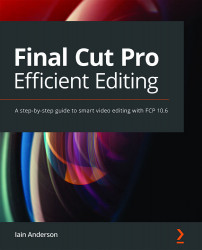
Final Cut Pro Efficient Editing

Final Cut Pro Efficient Editing

By : Iain Anderson
4.3 (13)
close
close
Final Cut Pro Efficient Editing

Final Cut Pro Efficient Editing

4.3 (13)
By: Iain Anderson

Overview of this book

Final Cut Pro (also known as FCP, previously Final Cut Pro X) is Apple’s efficient and accessible video editing software for everyone, offering powerful features that experienced editors and novices will find useful. FCP is the quickest way to transform your raw clips into a finished piece, so if speed is important, make this a key tool in your editing arsenal. Final Cut Pro Efficient Editing is a comprehensive best practice guide for all editors. You’ll not only learn how to use the features but also find out which ones are the most important and when you should use them. With the help of practical examples, the book will show you how typical footage can be assembled, trimmed, colored, and finessed to produce a finished edit, exploring a variety of techniques. As you progress through the book, you’ll follow a standard editing workflow to get the feel of working on real-world projects and answer self-assessment questions to make sure that you’re on track. By the end of this Final Cut Pro book, you’ll be well versed with the key features of this app and have all the tools you need to create impressive edits.
Table of Contents (20 chapters)
close
close
1
Section 1: Importing and Organizing
7
Section 2: Rough Cut to Fine Cut
13
Section 3: Finishing and Exporting

Summary

This chapter covered several important features. By now, you should know all kinds of shortcuts for moving around your footage instantly, know how to deal with the Viewer, how to manipulate the Browser, understand what metadata is and how to find it, and all about how to plan for, apply, and search with Keywords. If you've been working along with your own footage, and especially if you've never worked this way before, I hope you're seeing the power of Keywords for yourself. You might want to jump straight into a timeline now!

But don't start editing just yet. There's one more thing you should do first, and it's just as useful as keywording. In the next chapter, we're going to mark the best parts of our best clips as our Favorites. It's going to be great.

CONTINUE READING
83
Tech Concepts
36
Programming languages
73
Tech Tools
Icon Unlimited access to the largest independent learning library in tech of over 8,000 expert-authored tech books and videos.
Icon Innovative learning tools, including AI book assistants, code context explainers, and text-to-speech.
Icon 50+ new titles added per month and exclusive early access to books as they are being written.
Final Cut Pro Efficient Editing
notes
bookmark Notes and Bookmarks search Search in title playlist Add to playlist font-size Font size

Change the font size

margin-width Margin width

Change margin width

day-mode Day/Sepia/Night Modes

Change background colour

Close icon Search
Country selected

Close icon Your notes and bookmarks

Confirmation

Modal Close icon
claim successful

Buy this book with your credits?

Modal Close icon
Are you sure you want to buy this book with one of your credits?
Close
YES, BUY

Submit Your Feedback

Modal Close icon
Modal Close icon
Modal Close icon