Sign In Start Free Trial
Account

Add to playlist

Create a Playlist

Modal Close icon
You need to login to use this feature.
  • Book Overview & Buying Salesforce CRM Admin Cookbook
  • Table Of Contents Toc
  • Feedback & Rating feedback
Salesforce CRM Admin Cookbook

Salesforce CRM Admin Cookbook - Second Edition

By : Paul Goodey
2.8 (5)
close
close
Salesforce CRM Admin Cookbook

Salesforce CRM Admin Cookbook

2.8 (5)
By: Paul Goodey

Overview of this book

Salesforce CRM is a market-leading customer relationship management (CRM) application that is accessed over the internet. This application greatly enhances a company's sales performance, improves customer satisfaction, and provides a robust customer relationship management system for an organization. Salesforce CRM Admin Cookbook, Second Edition enables you to instantly extend and unleash the power of Salesforce CRM and its Lightning Experience framework. It provides clear, comprehensive instructions along with detailed screenshots and code. Whether you are looking for solutions to enhance the core features, such as data management, process automation, data validation, and home page administration, or are looking for ideas on advanced customization techniques, this book will provide you with immediate, practical, and exciting real-world recipes. This book guides you through interesting topics spanning a variety of functional areas. Recipes are provided that allow you to configure, build and extend the capability of Salesforce CRM using the Lightning Experience framework.
Table of Contents (9 chapters)
close
close

Creating an Opportunity close date reminder email using a workflow


As a best practice in any CRM system, when creating sales opportunities there should always be a close date with which to forecast, report, and monitor the progress of the potential sale.

In Salesforce CRM, the close date can be referenced to automatically trigger an email to remind the opportunity owner that the sales opportunity is nearing the scheduled closed date.

In this recipe, we will automate the sending of a close date email reminder with the use of a Salesforce workflow rule and email alert.

Getting ready

In order to send an email alert within Salesforce workflow, we will first need to create an email template using the following steps:

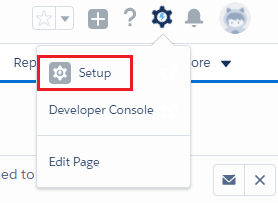
  1. Click on the setup gear icon in the top right-hand corner of the main Home page, as shown in the following screenshot:
  1. Click on Setup, as shown in the following screenshot:
  1. Navigate to the new email template creation page as follows: Email | Email Templates.
  2. Select the Unfiled Public Email...
Visually different images
CONTINUE READING
83
Tech Concepts
36
Programming languages
73
Tech Tools
Icon Unlimited access to the largest independent learning library in tech of over 8,000 expert-authored tech books and videos.
Icon Innovative learning tools, including AI book assistants, code context explainers, and text-to-speech.
Icon 50+ new titles added per month and exclusive early access to books as they are being written.
Salesforce CRM Admin Cookbook
notes
bookmark Notes and Bookmarks search Search in title playlist Add to playlist font-size Font size

Change the font size

margin-width Margin width

Change margin width

day-mode Day/Sepia/Night Modes

Change background colour

Close icon Search
Country selected

Close icon Your notes and bookmarks

Confirmation

Modal Close icon
claim successful

Buy this book with your credits?

Modal Close icon
Are you sure you want to buy this book with one of your credits?
Close
YES, BUY

Submit Your Feedback

Modal Close icon
Modal Close icon
Modal Close icon