Sign In Start Free Trial
Account

Add to playlist

Create a Playlist

Modal Close icon
You need to login to use this feature.
  • Book Overview & Buying Moodle 2 for Teaching 7-14 Year Olds Beginner's Guide
  • Table Of Contents Toc
Moodle 2 for Teaching 7-14 Year Olds Beginner's Guide

Moodle 2 for Teaching 7-14 Year Olds Beginner's Guide

By : Mary Cooch
4.7 (3)
close
close
Moodle 2 for Teaching 7-14 Year Olds Beginner's Guide

Moodle 2 for Teaching 7-14 Year Olds Beginner's Guide

4.7 (3)
By: Mary Cooch

Overview of this book

Moodle is a very popular e-learning tool in universities and high schools. But what does it have to offer younger students who want a fun, interesting, interactive, and informative learning experience? Moodle empowers teachers to achieve all this and more and this book will show you how!Moodle 2 For Teaching 7-14 Year Olds will show complete beginners in Moodle with no technical background how to make the most of its features to enhance the learning and teaching of children aged around 7-14. The book focuses on the unique needs of young learners to create a fun, interesting, interactive, and informative learning environment your students will want to go to day after day.This is a practical book for teachers, written by a teacher with two decades of practical experience, latterly in using Moodle to motivate younger students. Learn how to put your lessons online in minutes; how to set creative homework that Moodle will mark for you and how to get your students working together to build up their knowledge. Throughout the book we will build a course from scratch, adaptable for ages 7 to 14, on Rivers and Flooding. You can adapt this to any topic, as Moodle lends itself to all subjects and ages.
Table of Contents (15 chapters)
close
close
Moodle 2 for Teaching 7-14 Year Olds
Credits
About the Author
About the Reviewers
www.PacktPub.com
Preface

Time for action — uploading and displaying our game on Moodle


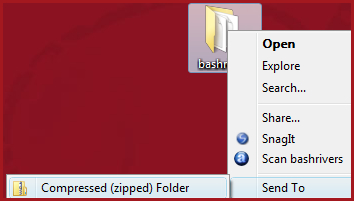
As you may recall, Moodle won't let you upload folders in the way that they are normally stored on your PC. You have to zip or compress them first. Then, once you have uploaded them into Moodle, you have to unzip them again and select the main file to play the game.

  1. 1. Right-click on our game folder and choose Send To | Compressed (zipped) Folder:

  2. 2. From your Moodle course page, with the editing turned on and in the section you want the game to be, click on Add a resource | File, and then upload this zipped folder (the file should have an extension of .zip).

    Note

    Make sure you choose File and not Folder. Odd though it seems, we aren't uploading our folder to the Folder section. We have to add it to the File section because all our game files are linked together. You can add folders to the File option in Moodle.

  3. 3. Once the file has been uploaded, click the little icon to the right of the zipped folder and then choose Unzip.

  4. 4. You...

CONTINUE READING
83
Tech Concepts
36
Programming languages
73
Tech Tools
Icon Unlimited access to the largest independent learning library in tech of over 8,000 expert-authored tech books and videos.
Icon Innovative learning tools, including AI book assistants, code context explainers, and text-to-speech.
Icon 50+ new titles added per month and exclusive early access to books as they are being written.
Moodle 2 for Teaching 7-14 Year Olds Beginner's Guide
notes
bookmark Notes and Bookmarks search Search in title playlist Add to playlist font-size Font size

Change the font size

margin-width Margin width

Change margin width

day-mode Day/Sepia/Night Modes

Change background colour

Close icon Search
Country selected

Close icon Your notes and bookmarks

Confirmation

Modal Close icon
claim successful

Buy this book with your credits?

Modal Close icon
Are you sure you want to buy this book with one of your credits?
Close
YES, BUY

Submit Your Feedback

Modal Close icon
Modal Close icon
Modal Close icon