
Sign In Start Free Trial
Account

Add to playlist

Create a Playlist

Modal Close icon
You need to login to use this feature.
  • Book Overview & Buying AWS Tools for PowerShell 6
  • Table Of Contents Toc
AWS Tools for PowerShell 6

AWS Tools for PowerShell 6

By : Ramesh Waghmare
4.5 (2)
close
close
AWS Tools for PowerShell 6

AWS Tools for PowerShell 6

4.5 (2)
By: Ramesh Waghmare

Overview of this book

AWS Tools for PowerShell 6 shows you exactly how to automate all the aspects of AWS. You can take advantage of the amazing power of the cloud, yet add powerful scripts and mechanisms to perform common tasks faster than ever before. This book expands on the Amazon documentation with real-world, useful examples and production-ready scripts to automate all the aspects of your new cloud platform. It will cover topics such as managing Windows with PowerShell, setting up security services, administering database services, and deploying and managing networking. You will also explore advanced topics such as PowerShell authoring techniques, and configuring and managing storage and content delivery. By the end of this book, you will be able to use Amazon Web Services to automate and manage Windows servers. You will also have gained a good understanding of automating the AWS infrastructure using simple coding.
Table of Contents (17 chapters)
close
close

Learning cmdlets

There are thousands of cmdlets available. Don't worry. It's not very scary. Don't think that you need to remember all those cmdlets to be a good IT admin or a developer. I do not know anybody who claims that he knows all the cmdlets. As I said earlier, the number of cmdlets are increasing day by day; what is important to know is how to get help on those cmdlets, discover the cmdlets, and learn the properties associated with specific cmdlets. Let's dive a little deeper into one cmdlet called Get-Service. Now, if you run this cmdlet in the PowerShell command prompt, you find that it returned just three columns.

Does that mean that it has just got three columns? The answer is NO. There are methods and properties associated with each cmdlet. You can learn more about those methods and properties using the Get-Member cmdlet with Get-Service.
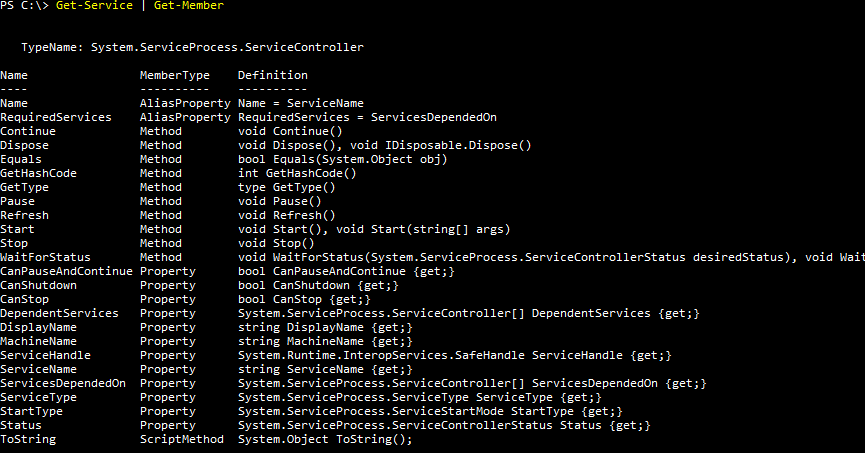
This way you can learn about the cmdlet that you plan to use in your scripting. You can now see that there are several properties and methods that you can make use of instead of the default output. Usually, if you are a developer, you will love to know more about the methods so that you can interact with the service using code.

Let's assume that you are interested in Name, Status, and StartType. You can tweak the output now using Format-List or Format-Table cmdlet as follows:

PS C:\>Get-Service | Format-List Name, Status, StartType
PS C:\>Get-Service | Format-Table Name, Status, StartType
CONTINUE READING
83
Tech Concepts
36
Programming languages
73
Tech Tools
Icon Unlimited access to the largest independent learning library in tech of over 8,000 expert-authored tech books and videos.
Icon Innovative learning tools, including AI book assistants, code context explainers, and text-to-speech.
Icon 50+ new titles added per month and exclusive early access to books as they are being written.
AWS Tools for PowerShell 6
notes
bookmark Notes and Bookmarks search Search in title playlist Add to playlist font-size Font size

Change the font size

margin-width Margin width

Change margin width

day-mode Day/Sepia/Night Modes

Change background colour

Close icon Search
Country selected

Close icon Your notes and bookmarks

Confirmation

Modal Close icon
claim successful

Buy this book with your credits?

Modal Close icon
Are you sure you want to buy this book with one of your credits?
Close
YES, BUY

Submit Your Feedback

Modal Close icon
Modal Close icon
Modal Close icon