Sign In Start Free Trial
Account

Add to playlist

Create a Playlist

Modal Close icon
You need to login to use this feature.
  • Book Overview & Buying The C++ Workshop
  • Table Of Contents Toc
The C++ Workshop

The C++ Workshop

By : Dale Green , Kurt Guntheroth , Shaun Ross Mitchell
5 (8)
close
close
The C++ Workshop

The C++ Workshop

5 (8)
By: Dale Green , Kurt Guntheroth , Shaun Ross Mitchell

Overview of this book

C++ is the backbone of many games, GUI-based applications, and operating systems. Learning C++ effectively is more than a matter of simply reading through theory, as the real challenge is understanding the fundamentals in depth and being able to use them in the real world. If you're looking to learn C++ programming efficiently, this Workshop is a comprehensive guide that covers all the core features of C++ and how to apply them. It will help you take the next big step toward writing efficient, reliable C++ programs. The C++ Workshop begins by explaining the basic structure of a C++ application, showing you how to write and run your first program to understand data types, operators, variables and the flow of control structures. You'll also see how to make smarter decisions when it comes to using storage space by declaring dynamic variables during program runtime. Moving ahead, you'll use object-oriented programming (OOP) techniques such as inheritance, polymorphism, and class hierarchies to make your code structure organized and efficient. Finally, you'll use the C++ standard library?s built-in functions and templates to speed up different programming tasks. By the end of this C++ book, you will have the knowledge and skills to confidently tackle your own ambitious projects and advance your career as a C++ developer.
Table of Contents (15 chapters)
close
close

if/else

One of the most basic, yet most important, control flow statements is if. This simple keyword is at the heart of all logic, allowing us to perform a given action only if a specified condition is true. By chaining these if statements together in creative ways, we can model any logical system.

The syntax for an if statement is as follows:

    if (condition) { // do stuff. }

If the statement we use as our condition resolves to true, then the code within the curly braces will be executed. If the statement is false, then it will be skipped. Our condition can be anything that can be either true or false. This can be something simple, such as checking the value of a Boolean, or something more complex, such as the result of another operation or function.

We also have the else statement. This allows code to be executed if, and only if, a preceding if statement's condition evaluates to false. If the condition evaluates to true, however, and the if statement is thereby executed, the code within the else statement will not be executed. Here's an example:

    if (MyBool1)
    {
        // Do something.
    }
    else
    {
        // Do something else.
    }

In this example, if MyBool1 was true, then we'd execute the // Do something code but not // Do something else. If MyBool1 evaluated to false, however, we'd execute the // Do something else code but not // Do something.

An else statement can also be used together with an if statement. With an else/if block in place, should the first if check fail, then the second will be evaluated. Here is an example:

    if (MyBool1)
    {
        // Do something.
    }
    else if (MyBool2)
    {
        // Do something else.
    }

In this example, MyBool1 will be checked first. If that returns true, then the // Do Something code will be executed but // Do something else will not. If MyBool1 was false, however, MyBool2 would then be checked, and the same rules would apply: if MyBool2 was true, then // Do something else would execute. So, if MyBool1 and MyBool2 were both false, then neither code would be executed.

It's also possible to place if statements inside one another. This practice is referred to as nesting. Here's an example:

    if (MyBool1)
    {
        if (MyBool2)
        {
            // Do something
        }
    }

In this example, if MyBool1 returns true, then the second if statement will be evaluated. If MyBool2 is also true, then // Do Something will be executed; otherwise, nothing will get executed. C++ allows us to nest many levels deep. The standard suggests 256 (although this isn't enforced), but the more levels deep you go, generally, the more confusing the code. It's good practice to minimize nesting where possible.

Now, let's get some code written and see these if / else statements in action.

Exercise 5: Implementing if/else Statements

In this exercise, we will write a simple application that will output a certain string based on an input value. The user will input a number, and the application will use if/else statements to determine whether it's either above or below 10.

Follows these steps to complete the exercise:

Note

The complete code can be found here: https://packt.live/2qnQHRV.

  1. Enter the main() function and then define a variable called number:
    // if/else example 1.
    #include <iostream>
    #include <string>
    int main()
    {
        std::string input;
        int number;
  2. Write code that prints the Please enter a number: string, gets the user input, and then assigns it to the number variable:
        std::cout << "Please enter a number: ";
        getline (std::cin, input);
        number = std::stoi(input);

    Note

    We've used the std::stoi function here, which we first saw in Chapter 1, Your First C++ Application. This function converts a string value into its integer equivalent. For example, the string 1 would be returned as int 1. Combining it with getline, as we did previously, is a good way to parse integer inputs.

  3. Use if/else statements to evaluate the condition based on the user input and then print either The number you've entered was less than 10! or The number you've entered was greater than 10!:
        if (number < 10)
        {
            std::cout << "The number you entered was less than 10!\n";
        }
        else if (number > 10) 
        {
            std::cout << "The number you entered was greater than 10!\n";
        }
        return 0;
    }
  4. The complete code looks like this:
    // if/else example 1.
    #include <iostream>
    #include <string>
    int main() 
    {
        std::string input;
        int number;
        std::cout << "Please enter a number: ";
        getline(std::cin, input);
        number = std::stoi(input);
        if (number < 10) 
        {
            std::cout << "The number you entered was less than 10!\n";
        } 
        else if (number > 10) 
        {
            std::cout << "The number you entered was greater than 10!\n";
        }
        return 0;
    }
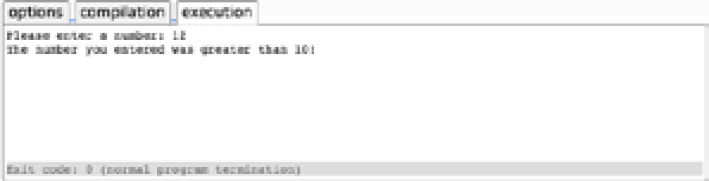
  5. Run the complete code in your editor. You will see that it evaluates the statements and outputs the correct string, as shown in the following screenshot:
    Figure 2.1: The if/else statement allows us to execute certain code based on conditions

Figure 2.1: The if/else statement allows us to execute certain code based on conditions

In this preceding exercise, we used two if statements that both evaluate a condition, but what if we want a default action if neither condition is true? We can achieve this by using an else statement on its own:

    if (condition1)
    {
        // Do stuff.
    }
    else if (condition2)
    {
        // Do different stuff.
    }
    else
    {
        // Do default stuff.
    }

In this case, if neither condition1 nor condition2 proves to be true, then the code in the else block will be executed as a default. This is because there's no if statement, so nothing has to be true to enter it.

Applying this to our simple number example, we currently check whether the number is less than or greater than 10, but not if it's exactly 10. We could handle this with an else statement, as follows:

    if (number < 10)
    {
        std::cout << "The number you entered was less than 10!\n";
    }
    else if (number > 10) 
    {
        std::cout << "The number you entered was greater than 10!\n";
    }
    else
    {
        std::cout << "The number you entered was exactly 10!\n";
    }

Ternary Operator

The ternary operator is a neat feature that allows us to quickly assign a value based on the outcome of an if statement. This is best shown with an example. Perhaps we have a float variable, the value of which depends on a Boolean. Without using the ternary operator, we could write this as follows:

    if (MyBool == true)
    {
        MyFloat = 10.f;
    }
    else
    {
        MyFloat = 5.f;
    }

Note

Here, we've used == instead of just =. The = operator assigns a value to a variable, whereas the == operator checks whether two values are equal, returning true if they are, and false otherwise. This will be covered in more detail in a later chapter on operators.

Using the ternary operator, we could also write this same code as follows:

    MyFloat = MyBool ? 10.f : 5.f;

That's much more concise. Let's break down the syntax here and see what's happening. A ternary statement is written as follows:

    variable = condition ? value_if_true : value_if_false;

Note

While ternary statements can be nested as we saw earlier with if statements, it's probably best to avoid it. They can be a real pain to read and understand at a glance.

We start by specifying the condition that we want to evaluate and follow it with the ? character. This sets our ternary statement in motion. We then define the different values we want to use if the value is true or false. We always start with the true value, followed by the false value, with them separated by the : character. This is a great way to concisely handle an if/else scenario.

Exercise 6: Creating a Simple Menu Program Using an if/else Statement

In this exercise, we're going to write a simple program that provides menu options for a food outlet. Users will be able to select multiple options from a menu, and we will present the price information based on that choice.

Here are the steps to complete the exercise:

Note

The complete code for this exercise can be found here: https://packt.live/35wflPd.

  1. Create the template application, and output our three menu options to the user:
    // if/else exercise – Menu Program
    #include <iostream>
    #include <string>
    int main()
    {
        std::string input;
        int number;
        std::cout << "Menu\n";
        std::cout << "1: Fries\n";
        std::cout << "2: Burger\n";
        std::cout << "3: Shake\n";
  2. Next, we'll ask them to input their choice and store it:
        std::cout << "Please enter a number 1-3 to view an item price: ";
        getline (std::cin, input);
        number = std::stoi(input);
  3. Now, we can use our if/else statements to check the user input and output the correct information:
        if (number == 1)
        {
            std::cout << "Fries: $0.99\n";
        }
        else if (number == 2) 
        {
            std::cout << "Burger: $1.25\n";
        }
        else if (number == 3)
        {
            std::cout << "Shake: $1.50\n";
        }
        else
        {
            std::cout << "Invalid choice.";
        }
        return 0;
    }
  4. The complete code looks like this:
    // if/else exercise – Menu Program
    #include <iostream>
    #include <string>
    int main() 
    {
        std::string input;
        int number;
        std::cout << "Menu\n";
        std::cout << "1: Fries\n";
        std::cout << "2: Burger\n";
        std::cout << "3: Shake\n";
        std::cout << "Please enter a number 1-3 to view an item price: ";
        getline(std::cin, input);
        number = std::stoi(input);
        if (number == 1) 
        {
            std::cout << "Fries: $0.99\n";
        } 
        else if (number == 2) 
        {
            std::cout << "Burger: $1.25\n";
        } 
        else if (number == 3) 
        {
            std::cout << "Shake: $1.50\n";
        } 
        else 
        {
            std::cout << "Invalid choice.";
        }
        return 0;
    }
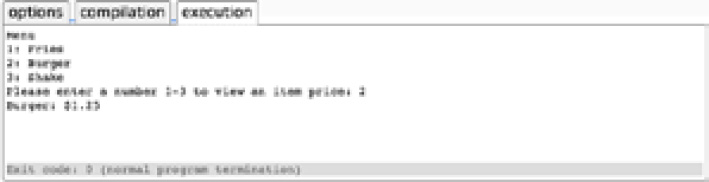
  5. Run the application. When we input our menu option, we're presented with the correct information for that item, as shown in the following screenshot:
Figure 2.2: We can make menu selections and output the correct information

Figure 2.2: We can make menu selections and output the correct information

This ability to perform an action if a given condition is true really is at the heart of all programming. If you break down any system far enough, it will comprise "if x is true, do y." With this covered, the possibilities are endless.

CONTINUE READING
83
Tech Concepts
36
Programming languages
73
Tech Tools
Icon Unlimited access to the largest independent learning library in tech of over 8,000 expert-authored tech books and videos.
Icon Innovative learning tools, including AI book assistants, code context explainers, and text-to-speech.
Icon 50+ new titles added per month and exclusive early access to books as they are being written.
The C++ Workshop
notes
bookmark Notes and Bookmarks search Search in title playlist Add to playlist download Download options font-size Font size

Change the font size

margin-width Margin width

Change margin width

day-mode Day/Sepia/Night Modes

Change background colour

Close icon Search
Country selected

Close icon Your notes and bookmarks

Confirmation

Modal Close icon
claim successful

Buy this book with your credits?

Modal Close icon
Are you sure you want to buy this book with one of your credits?
Close
YES, BUY

Submit Your Feedback

Modal Close icon
Modal Close icon
Modal Close icon