-
Book Overview & Buying
-
Table Of Contents
The C++ Workshop
By :
Having the ability to loop sections of code is very important, but it has to be used carefully. We've seen that it's possible to create loops that never end, and another concern is ensuring that they're used efficiently. So far, the loops we've looked at have been small, and we've been happy to see them run through in their entirety. But what if we needed more control over our loops, perhaps to end one early? Thankfully, we have two important keywords to help us with that—break and continue.
break is a C++ keyword that will exit the current loop, with execution jumping to the next section of code if there is any. This keyword works with the different types of loop that we've covered so far, and we can demonstrate it nicely using a simple counting application, as shown in the following snippet:
// Break example.
#include <iostream>
#include <string>
int main()
{
std::cout << "Loop Starting ...\n";
int count = 0;
while (count < 5)
{
++count;
std::cout << "\n" << count;
}
std::cout << "\n\nLoop finished.";
}
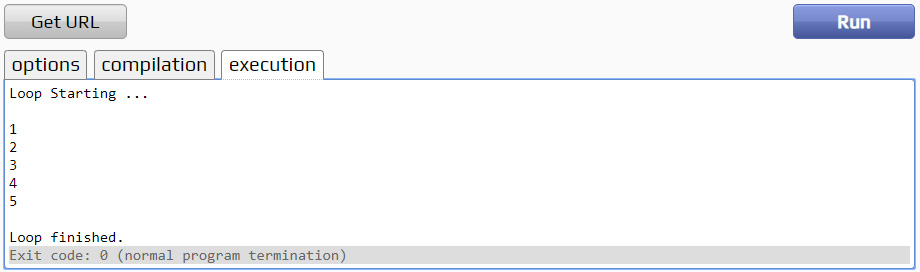
In this example, we're going to print out 5 numbers, 0-4. If we run this code as is, we can see that the loop runs in its entirety and gives us our expected outcome. We've also got statements at the start and end of the loop so we can see the flow execution more clearly:
Figure 2.12: Example counting application will print out numbers 0-4
Now, what if there was a condition that meant we wanted this loop to stop executing when the count was equal to 2? Well, we can put a break statement inside that check using an if statement:
#include <iostream>
using namespace std;
int main()
{
std::cout << "Loop Starting ...\n";
int count = 1; // init
while (count <= 5) // condition
{
std::cout << "\n" << count;
if (count == 2)
break;
++count; // increment
}
std::cout << "\n\nLoop finished.";
return 0;
}
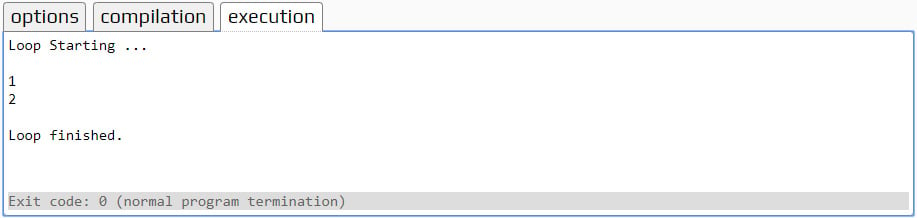
With that break condition in place, as soon as the count is equal to 2 (meaning we'll have had 2 iterations of the loop) then the break will be hit and we'll exit the loop. Now, let's run the application and see what we get:
Figure 2.13: With the break statement in place, we only execute 2 loop iterations
We can now see, as soon as that condition is met and the break statement is hit, that the loop stops iterating, and code execution picks up immediately after the loop. The outcome of this will be exactly the same if we write it as a do…while:
#include <iostream>
using namespace std;
int main()
{
std::cout << "Loop Starting ...\n";
int count = 1; // init
do
{
std::cout << "\n" << count;
if (count == 2)
break;
++count; // increment
}
while (count <= 5); // condition
std::cout << "\n\nLoop finished.";
return 0;
}
And it will be the same if we write it as a for loop:
#include <iostream>
using namespace std;
int main()
{
std::cout << "Loop Starting ...\n";
// init condition increment
for (int count = 1; count <= 5; ++count)
{
std::cout << "\n" << count;
if (count == 2)
break;
}
std::cout << "\n\nLoop finished.";
return 0;
}
Both these loops give the exact same behavior; two iterations before hitting the break statement and exiting the loop:
Figure 2.14: All loops give the same outcome: two iterations before exiting
This shows that these loops are sometimes interchangeable, though some are more suited to certain use cases than others. For instance, with the counting example we're using here, a for loop is probably most suitable since it comes with an integer value that increments each loop—something we have to do manually with while and do while loops. When an incrementing integer is not required, however, a range-based for loop is recommended.
The other keyword we have at our disposal is continue. This keyword allows us to skip over the current loop iteration but remain in the loop, in contrast with break. Again, the counting example will allow us to demonstrate this. In our example, we're printing the numbers 0-4; let's use the continue keyword to skip the printing of the number 3.
As we did with break, we can write a condition to check whether the count is equal to 3, and call count if so:
if (count == 3)
{
continue;
}
We also need to change the location of this within our function. The continue keyword will skip the rest of the loop's body. Currently, this code is at the end of that body, so we won't actually be skipping anything. In order for continue to work as expected, it needs to come before any code that we want to skip but after any code we want to execute.
For this example, we will place the continue keyword with the if statement:
// continue example.
#include <iostream>
#include <string>
int main()
{
std::cout << "Loop Starting ...\n";
int count = 0;
while (count < 5)
{
++count;
if (count == 3)
{
continue;
}
std::cout << "\n" << count;
}
std::cout << "\n\nLoop finished.";
}
Here, we're always going to increment our counter variable and then check whether we want to skip the current iteration. If we do skip it, we'll just go back to the start of the next loop, and if we don't, we'll execute the remainder of the loop as usual. Once you run this code, you will obtain the following output:
Figure 2.15: The printing of number 3 has been skipped
We've skipped the printing of number 3 as we wanted, but the loop continued to execute the rest of the way. This can be extremely useful when searching for something. Imagine we have a list of names, and we only want to do things with those that start with the letter D. We could iterate over all our names, first checking whether or not the first letter is D; if not, we continue. In this way, we efficiently skip the use cases that don't interest us.
In this exercise, we're going to make use of break and continue to make a loop more efficient. We'll create a loop that will run over the numbers 1-100, printing out only specific multiples of a given value.
Note
The complete code for this can be found here: https://packt.live/2KJrnN8.
Follow these steps to complete the exercise:
#include <iostream>
#include <string>
int main()
{
int multiple = 0;
int count = 0;
int numbersPrinted = 0;
std::string input = "";
std::cout << "Enter the value whose multiples will be printed: ";
getline(std::cin, input);
multiple = std::stoi(input);
std::cout << "Enter maximum amount of numbers to print: ";
getline(std::cin, input);
count = std::stoi(input);for loop to iterate over the numbers 1-100: for (int i = 1; i <= 100; ++i)
{
}for loop, we can write the logic for determining our multiples. First of all, we have a set amount of numbers that we're going to print, so we can check that and break if that number has been reached: if (numbersPrinted == count)
{
break;
}continue statement to jump straight to the next iteration: if (i % multiple != 0)
{
continue;
}numbersPrinted variable using the following snippet:std::cout << i << "\n"; ++numbersPrinted; }
#include <iostream>
#include <string>
int main()
{
int multiple = 0;
int count = 0;
int numbersPrinted = 0;
std::string input = "";
std::cout << "Enter the value whose multiples will be printed: ";
getline(std::cin, input);
multiple = std::stoi(input);
std::cout << "Enter maximum amount of numbers to print: ";
getline(std::cin, input);
count = std::stoi(input);
for (int i = 1; i <= 100; ++i)
{
if (numbersPrinted == count)
{
break;
}
if (i % multiple != 0)
{
continue;
}
std::cout << i << "\n";
++numbersPrinted;
}
}
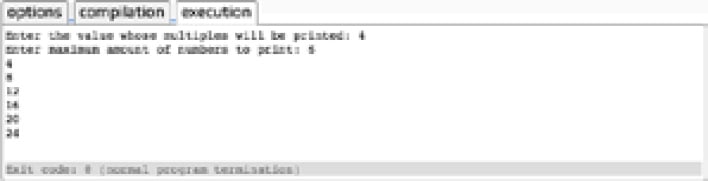
Figure 2.16: We use break and continue to control loop execution
By using the break and continue statements, we're able to control the execution of our loops, making them more efficient and controlled.
For this chapter's activity, we're going to write a small number-guessing game. This will allow us to utilize the techniques that we've covered in this chapter. Thus, before attempting this activity, ensure that you have completed all the previous exercises in this chapter.
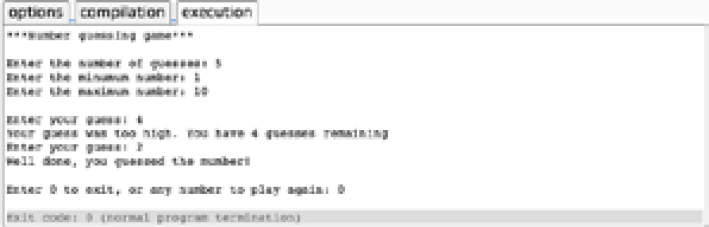
The program will allow the user to select a number of guesses: a minimum number and a maximum number. The application will generate a number within that range and then allow the user to guess the number. If they do so within the number of guesses they specified at the start, they win the game. Upon winning a game, the final output should be similar to the following:
Figure 2.17: Number-guessing game output
Note
The complete code for this activity can be found here: https://packt.live/2pBYnPT.
Here are the steps to complete the activity, along with a few hints:
guessCount, minNumber, maxNumber, and randomNumber."Enter the number of guesses") and get from them the following: a number of guesses, a minimum number, and a maximum number.Note
You can pass the user input for the number of guesses, the minimum number, and the maximum number, to the variables.
Note
In Exercise 11, Generating Random Numbers Using Loops, we've used rand() for generating random numbers between 0 to 9. Here, you can use a function similar to rand () % (maxNumber - minNumber + 1) to generate random numbers between two arbitrary limits.
count loop, fetch the user's guess.count loop, check whether the user's guess is correct or too high/low. We can use break here to exit when the correct value has been guessed.Hint: Refer to Exercise 7, Refactor an if/else Chain into switch/case, to see how we used break to exit loops early.
Note
The solution for this activity can be found via this link.
Within this application, we've used a number of techniques to control the flow of code to replicate a more complex scenario. We used a while loop for the main application loop, as we didn't know initially how many iterations were required. We then used a for loop to run the code a set number of times, and if/else statements to check the user's input and act accordingly.
Change the font size
Change margin width
Change background colour