-
Book Overview & Buying
-
Table Of Contents
The C++ Workshop
By :
As we've seen, we can use if/else to perform certain actions based on which conditions are true. This is great when you're evaluating multiple conditional statements to determine flow, such as the following:
if (checkThisCondition)
{
// Do something ...
}
else if (checkAnotherCondition)
{
// Do something else ...
}
When we're evaluating the different possibilities of a single variable, however, we have a different statement available to us: the switch statement. This allows us to branch in a similar way to an if/else statement, but each branch is based on a different possible value of a single variable that we're switching on.
A good example of where this would be suitable is the menu application we created in the previous exercise. Currently, we chain if/else statements to handle the different possible values, but since we're switching on a single variable (the menu index), it would be more suitable as a switch statement.
A basic implementation of a switch statement block is as follows:
switch (condition)
{
case value1:
// Do stuff.
break;
case value2:
// Do stuff.
break;
default:
// Do stuff.
break;
}
Applying this to the previous menu example, the condition would be the selected menu index that we read from our user, and the different values would be our supported possibilities (1-3). The default statement would then catch the cases where the user inputs an option that we're not handling. We could print an error message in those cases and have them select a different option.
A switch statement comprises a number of keywords:
Note
A default case is not required but is recommended. It allows us to handle all other values, perhaps throwing an exception.
An important limitation of switch statements is that they can only be used with certain types. These are whole numbers and enum values. This means that, for example, we couldn't use either string or float types within a switch statement.
Note
Enumerated type, or enum, is a user-generated data type in C++. A detailed discussion on this is beyond the scope of this book. However, you can refer to the following documentation for further details: https://packt.live/35l6QWT.
It's also worth noting that not every case needs a break statement. They are optional, though will likely be required in the vast majority of cases. If the break statement is omitted, however, then the flow of execution will continue to the next case statement until a break is hit. Be careful here because missing break statements is a common cause of hard-to-find bugs; ensuring each case has a break statement where needed could save you lots of potential debugging time down the line.
Perhaps the best way to see the use of a switch statement is to convert some if/else chains to switch statements. This will be the objective of the following exercise.
In this exercise, we will reuse the code from the previous exercise and refactor it into a switch statement. This will clearly show how we can represent the same functionality using either method. Since we're only checking the different possible values of a single variable, however, a switch statement is preferred.
Note
Ensure that you have copied the code from the previous exercise (steps 1-2) in the compiler window. The complete code can be found here: https://packt.live/32ZZ5Ek.
We will break this down into a number of simple steps:
number, so that's going to be the condition that we're switching on. Add that to a switch statement and open our curly brackets ready for the rest of the switch block: switch (number)
{if statement into a case statement. If we look at the first one, we're checking whether number is equal to 1. Add this as our first case value and copy the output into the case body: case 1: std::cout << "Fries: $0.99\n"; break;
if statements, apart from the last one. If you remember, this statement had no condition that it checked; it's simply the last option. This meant that if all other checks failed, execution would fall right through to that final default statement. This is exactly how the default case works, so we will end by moving that else statement into a default case. We should end up with the following switch statement, which will replace our if/else chain: switch (number)
{
case 1:
std::cout << "Fries: $0.99\n";
break;
case 2:
std::cout << "Burger: $1.25\n";
break;
case 3:
std::cout << "Shake: $1.50\n";
break;
default:
std::cout << "Invalid choice.";
break;
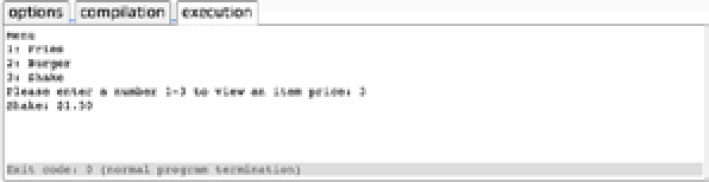
}This statement is functioning the same as the chained if/else, so you could use either; however, you generally see switch statements over long if chains. Now, let's run this code and check that it's behaving how we'd expect.
// if/else to switch/case
#include <iostream>
#include <string>
int main()
{
std::string input;
int number;
std::cout << "Menu\n";
std::cout << "1: Fries\n";
std::cout << "2: Burger\n";
std::cout << "3: Shake\n";
std::cout << "Please enter a number 1-3 to view an item price: ";
getline(std::cin, input);
number = std::stoi(input);
switch (number)
{
case 1:
std::cout << "Fries: $0.99\n";
break;
case 2:
std::cout << "Burger: $1.25\n";
break;
case 3:
std::cout << "Shake: $1.50\n";
break;
default:
std::cout << "Invalid choice.";
break;
}
}
Figure 2.3: The code works the same, but this time presented as a switch statement
The program behaves in the same way but is arguably neater and easier to follow. We can clearly see each possible behavior branch and the case that will let it execute.