Sign In Start Free Trial
Account

Add to playlist

Create a Playlist

Modal Close icon
You need to login to use this feature.
  • Book Overview & Buying TYPO3 4.2 E-Commerce
  • Table Of Contents Toc
  • Feedback & Rating feedback
TYPO3 4.2 E-Commerce

TYPO3 4.2 E-Commerce

close
close
TYPO3 4.2 E-Commerce

TYPO3 4.2 E-Commerce

Overview of this book

The popularity of online shopping has increased drastically over the past few years. TYPO3 is fully equipped to meet all the challenges of modern electronic commerce. TYPO3 can be enlarged afrom a pure content-based online catalog to a fully-grown shop system with a variety of extensions. It may be easy to plan a website but when it comes to implementing the design and developing a successful e-commerce site, you might come across a lot of difficulties.This book teaches all the aspects of quickly setting up a feature-packed, easy-to-build e-commerce site—from basic installation and configuration of TYPO3 through adding features step-by-step to an example website. It demonstrates the setting up of an online TYPO3 e-commerce site from scratch and walks you through lucrative tips on attracting customers and maximizing profit.This book takes you through the creation of an appealing online shop in steps. It starts with the basics of TYPO3 and TYPO3 installation and shows how to use its standard features to begin construction of an online shop. It will help you improve the selling interface and handling of orders with new modules and other customizations. It discusses various template configurations and plugins. You will learn how to build attractive product catalogs, profiles for registered and unregistered users, and online shop SEO. You will also learn to provide effective search facilities for systematic navigation of your site. Further, various modules for payment and delivery will be discussed. Finally, you will learn how to manage and market your site.
Table of Contents (15 chapters)
close
close
TYPO3 4.2 E-Commerce
Credits
About the Authors
About the Reviewers
Preface

Adding products to the online shop


For adding a new product to the online shop, you need to first prepare:

  • Accordant configuration for plugins (in our shop, it is tt_products). Also, you need to add plugins into the web shop.

  • Sysfolder—where you will store product records.

  • Created category and product records.

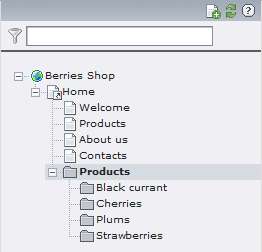
In our example we created records dividing each page like a separate category; categories read information from a separate sysfolder. The easiest way to do this dividing is to create a new folder in the site map where child folders will be stored, as in the following screenshot:
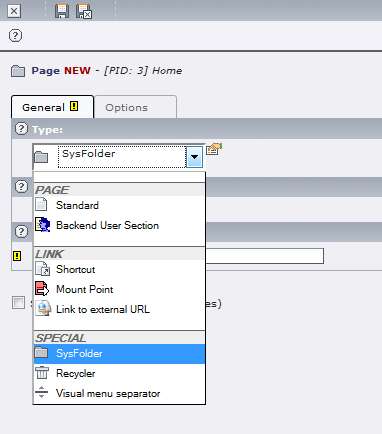
For creating a SysFolder, from the page module you need to click on the New page icon in the root page. SysFolder creation is similar to new page creation. You need to choose SysFolder in the drop-down menu, as you can see in the following screenshot:
Working with TYPO3, you will rarely be in a situation where you need to create special system folders. You can also store records for specific extensions on regular...

Visually different images
CONTINUE READING
83
Tech Concepts
36
Programming languages
73
Tech Tools
Icon Unlimited access to the largest independent learning library in tech of over 8,000 expert-authored tech books and videos.
Icon Innovative learning tools, including AI book assistants, code context explainers, and text-to-speech.
Icon 50+ new titles added per month and exclusive early access to books as they are being written.
TYPO3 4.2 E-Commerce
notes
bookmark Notes and Bookmarks search Search in title playlist Add to playlist font-size Font size

Change the font size

margin-width Margin width

Change margin width

day-mode Day/Sepia/Night Modes

Change background colour

Close icon Search
Country selected

Close icon Your notes and bookmarks

Confirmation

Modal Close icon
claim successful

Buy this book with your credits?

Modal Close icon
Are you sure you want to buy this book with one of your credits?
Close
YES, BUY

Submit Your Feedback

Modal Close icon
Modal Close icon
Modal Close icon