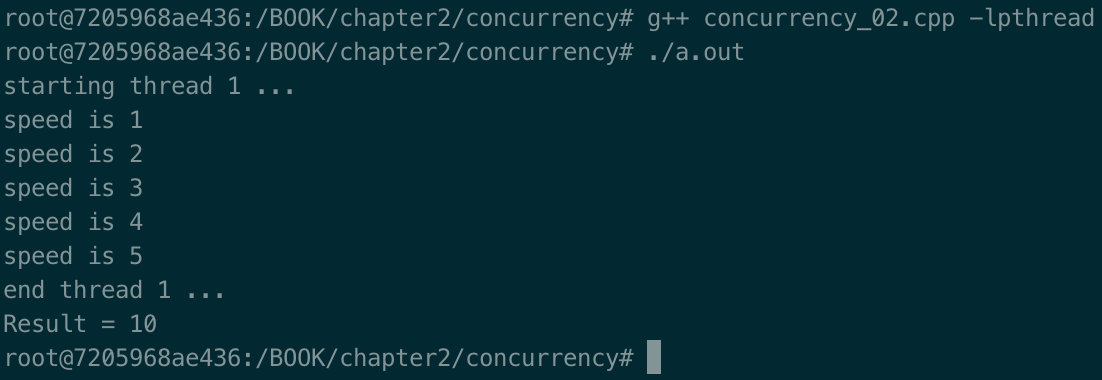
In the past, it was common for a C++ developer to write programs by using threading libraries or native threading mechanisms (for example pthread, a Windows thread). Since C++11, this has changed drastically and concurrency is another big feature that was added that goes in the direction of a self-consistent language. The two new features we'll look at in this recipe are std::thread and std::async.
-
Book Overview & Buying
-
Table Of Contents

C++ System Programming Cookbook
By :


C++ System Programming Cookbook
By:
Overview of this book
C++ is the preferred language for system programming due to its efficient low-level computation, data abstraction, and object-oriented features. System programming is about designing and writing computer programs that interact closely with the underlying operating system and allow computer hardware to interface with the programmer and the user. The C++ System Programming Cookbook will serve as a reference for developers who want to have ready-to-use solutions for the essential aspects of system programming using the latest C++ standards wherever possible.
This C++ book starts out by giving you an overview of system programming and refreshing your C++ knowledge. Moving ahead, you will learn how to deal with threads and processes, before going on to discover recipes for how to manage memory. The concluding chapters will then help you understand how processes communicate and how to interact with the console (console I/O). Finally, you will learn how to deal with time interfaces, signals, and CPU scheduling.
By the end of the book, you will become adept at developing robust systems applications using C++.
Table of Contents (13 chapters)
Preface

Getting Started with System Programming
 Free Chapter
Revisiting C++

Dealing with Processes and Threads
Deep Dive into Memory Management
Using Mutexes, Semaphores, and Condition Variables
Pipes, First-In First-Out (FIFO), Message Queues, and Shared Memory
Network Programming
Dealing with Console I/O and Files
Dealing with Time Interfaces
Managing Signals
Scheduling
Other Books You May Enjoy