Sign In Start Free Trial
Account

Add to playlist

Create a Playlist

Modal Close icon
You need to login to use this feature.
  • Book Overview & Buying C++ System Programming Cookbook
  • Table Of Contents Toc
  • Feedback & Rating feedback
C++ System Programming Cookbook

C++ System Programming Cookbook

By : Onorato Vaticone
3.8 (4)
close
close
C++ System Programming Cookbook

C++ System Programming Cookbook

3.8 (4)
By: Onorato Vaticone

Overview of this book

C++ is the preferred language for system programming due to its efficient low-level computation, data abstraction, and object-oriented features. System programming is about designing and writing computer programs that interact closely with the underlying operating system and allow computer hardware to interface with the programmer and the user. The C++ System Programming Cookbook will serve as a reference for developers who want to have ready-to-use solutions for the essential aspects of system programming using the latest C++ standards wherever possible. This C++ book starts out by giving you an overview of system programming and refreshing your C++ knowledge. Moving ahead, you will learn how to deal with threads and processes, before going on to discover recipes for how to manage memory. The concluding chapters will then help you understand how processes communicate and how to interact with the console (console I/O). Finally, you will learn how to deal with time interfaces, signals, and CPU scheduling. By the end of the book, you will become adept at developing robust systems applications using C++.
Table of Contents (13 chapters)
close
close

Understanding the filesystem

C++17 marks another huge milestone in terms of new features. The filesystem library provides a simpler way of interacting with the filesystem. It was inspired by Boost.Filesystem (available since 2003). This recipe will show its basics features.

How to do it...

In this section, we'll show two examples of the filesystem library by using directory_iterator and create_directories. Although there is definitely more under this namespace, the goal of these two snippets is to highlight their simplicity:

  1. std::filesystem::directory_iterator: Let's write the following code:
#include <iostream>
#include <filesystem>
int main()
{
for(auto& p: std::filesystem::directory_iterator("/"))
std::cout << p << std::endl;
}
  1. Now, compile it with g++ filesystem_01.cpp -std=c++17 -lstdc++fs, where -std=c++17 tells the compiler to use the C++17 standard and -lstdc++fs tells the compiler to use the filesystem library.

The second example is about creating a directory and a file:

  1. std::filesystem::create_directories: Write the following code:
#include <iostream>
#include <filesystem>
#include <fstream>
int main()
{
std::filesystem::create_directories("test/src/config");
std::ofstream("test/src/file.txt") << "This is an example!"
<< std::endl;
}
  1. The compilation is as the same as the previous example: g++ filesystem_02.cpp -std=c++17 -lstdc++fs.

With just two lines of code, we've created a folder structure, a file, and have also written on it! It's as simple (and portable) as that.

How it works...

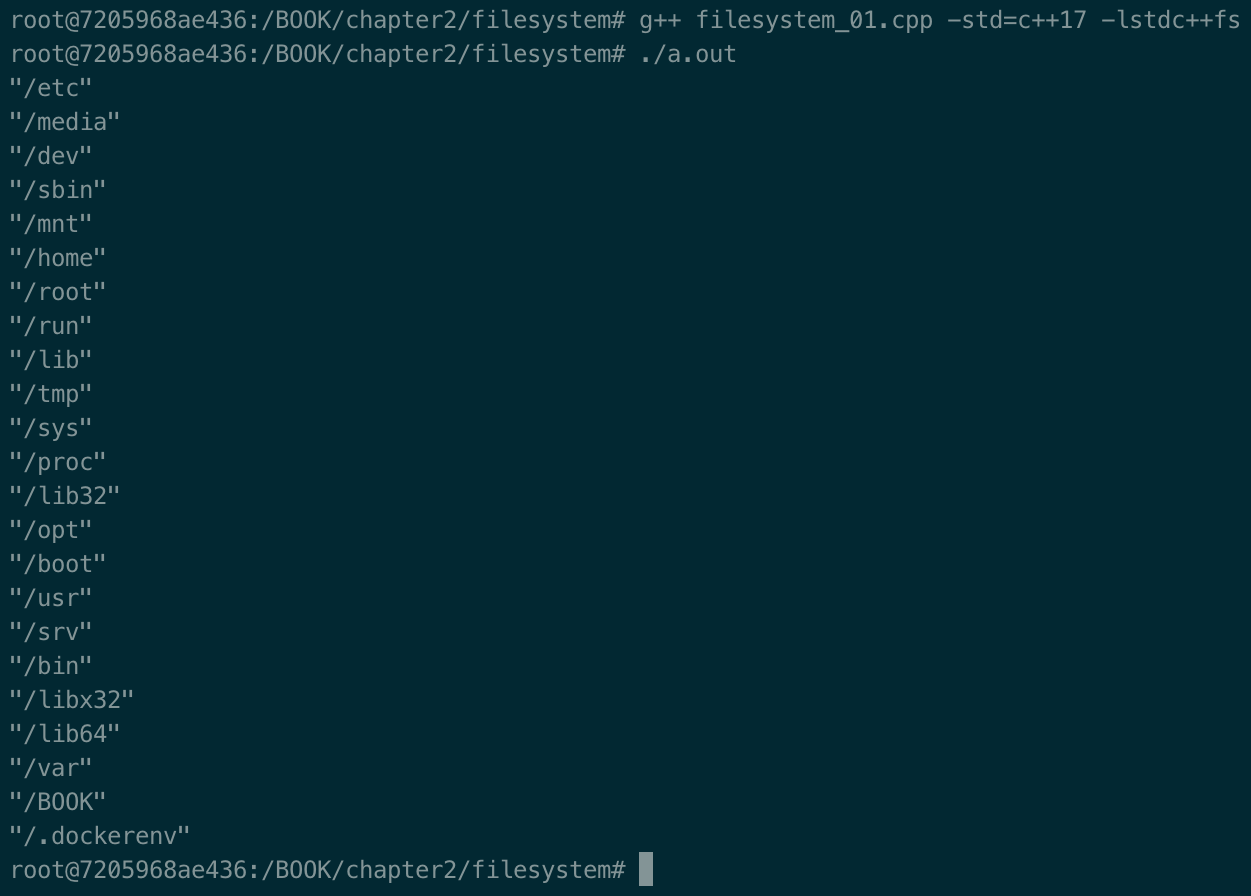
The filesystem library is located in the <filesystem> header under the std::filesystem namespace. These two tests, although pretty simple, were needed to show how powerful the filesystem library is. The output of the first program is as follows:

A complete list of std::filesystem methods can be found here: https://en.cppreference.com/w/cpp/header/filesystem.

std::filesystem::create_directories create a directory (recursively, if test/src does not exist) in the current folder, in this case. Of course, an absolute path is managed too and the current line would be perfectly valid, that is, std::filesystem::create_directories("/usr/local/test/config");.

The second line of the source code uses ofstream to create an output file stream named test/src/file.txt and appends << to the string: This is an example!.

There's more...

The filesystem library is heavily inspired by Boost.Filesystem, which has been available since 2003. If you want to experiment and debug a little, just add the -g option (add the debug symbols to the binary) to the compiler: g++ -g fs.cpp -std=c++17 -lstdc++fs.

See also

The books Effective Modern C++ by Scott Meyers and The C++ Programming Language by Bjarne Stroustrup cover these topics in great detail.

Visually different images
CONTINUE READING
83
Tech Concepts
36
Programming languages
73
Tech Tools
Icon Unlimited access to the largest independent learning library in tech of over 8,000 expert-authored tech books and videos.
Icon Innovative learning tools, including AI book assistants, code context explainers, and text-to-speech.
Icon 50+ new titles added per month and exclusive early access to books as they are being written.
C++ System Programming Cookbook
notes
bookmark Notes and Bookmarks search Search in title playlist Add to playlist download Download options font-size Font size

Change the font size

margin-width Margin width

Change margin width

day-mode Day/Sepia/Night Modes

Change background colour

Close icon Search
Country selected

Close icon Your notes and bookmarks

Confirmation

Modal Close icon
claim successful

Buy this book with your credits?

Modal Close icon
Are you sure you want to buy this book with one of your credits?
Close
YES, BUY

Submit Your Feedback

Modal Close icon
Modal Close icon
Modal Close icon