Sign In Start Free Trial
Account

Add to playlist

Create a Playlist

Modal Close icon
You need to login to use this feature.
  • Book Overview & Buying CryEngine Game Development Blueprints
  • Table Of Contents Toc
CryEngine Game Development Blueprints

CryEngine Game Development Blueprints

By : Goodswen, Toulan, Howels
close
close
CryEngine Game Development Blueprints

CryEngine Game Development Blueprints

By: Goodswen, Toulan, Howels

Overview of this book

CRYENGINE is a game engine developed by Crytek for PC, Playstation, Xbox, Android, and iOS. It can be used to create AAA games, movies, high-quality simulations, and interactive applications. It is most popularly used for game development. In this book, you will start off by exploring the CRYENGINE “Blank” Game Starter-kit, creating a completely playable character from scratch and controlling its movement. You will learn how to implement a weapon and ammo class, and will create complete “start” and “end” game menus using Scaleform and C++. Additionally, you will learn some key texturing techniques for PBR and how to create and bake maps to the lowpoly model. You will also explore how to get a static model from Maya and shaders setbup in the SDK to check the textures during creation, and create all the necessary engine files to export and see the game character's animations in your engine. In the final third of the book, you will learn how to create objectives, set up saved games, layer on audio polish to help immerse the player in the experience, and debug game issues.
Table of Contents (17 chapters)
close
close
16
Index

Adding the forms


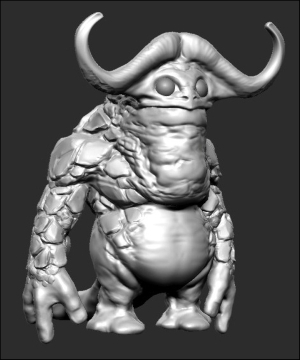
Taking the base mesh base, we start to find our major forms using the ClayTubes and the Move brush. As you build up the forms, use the Smooth brush to knock back the forms and keep repeating these steps in order to find the larger forms.

Basic forms added

When working with a fantasy character, keep in mind how your anatomy works. This is because keeping the model grounded towards this will help make the character more believable.

Blocking out the larger forms

Tip

For this, I would recommend keeping an anatomy book or reference handy at all times.

Once we have the major forms blocked out, we can look to add more details to the mesh. As we are using the DynaMesh function as we model, when the mesh starts to look broken, we can use the DynaMesh algorithm to recalculate the mesh by holding Shift and dragging it in the open area of the canvas.

This basic and simple workflow is what we use when developing the mesh. It allows us to be creative, while not getting overly bogged down in...

CONTINUE READING
83
Tech Concepts
36
Programming languages
73
Tech Tools
Icon Unlimited access to the largest independent learning library in tech of over 8,000 expert-authored tech books and videos.
Icon Innovative learning tools, including AI book assistants, code context explainers, and text-to-speech.
Icon 50+ new titles added per month and exclusive early access to books as they are being written.
CryEngine Game Development Blueprints
notes
bookmark Notes and Bookmarks search Search in title playlist Add to playlist font-size Font size

Change the font size

margin-width Margin width

Change margin width

day-mode Day/Sepia/Night Modes

Change background colour

Close icon Search
Country selected

Close icon Your notes and bookmarks

Confirmation

Modal Close icon
claim successful

Buy this book with your credits?

Modal Close icon
Are you sure you want to buy this book with one of your credits?
Close
YES, BUY

Submit Your Feedback

Modal Close icon
Modal Close icon
Modal Close icon