
Sign In Start Free Trial
Account

Add to playlist

Create a Playlist

Modal Close icon
You need to login to use this feature.
  • Book Overview & Buying Unity 2017 Mobile Game Development
  • Table Of Contents Toc
Unity 2017 Mobile Game Development

Unity 2017 Mobile Game Development

By : John P. Doran
2.5 (2)
close
close
Unity 2017 Mobile Game Development

Unity 2017 Mobile Game Development

2.5 (2)
By: John P. Doran

Overview of this book

Unity has established itself as an overpowering force for developing mobile games. If you love mobile games and want to learn how to make them but have no idea where to begin, then this book is just what you need. This book takes a clear, step-by-step approach to building an endless runner game using Unity with plenty of examples on how to create a game that is uniquely your own. Starting from scratch, you will build, set up, and deploy a simple game to a mobile device. You will learn to add touch gestures and design UI elements that can be used in both landscape and portrait mode at different resolutions. You will explore the best ways to monetize your game projects using Unity Ads and in-app purchases before you share your game information on social networks. Next, using Unity’s analytics tools you will be able to make your game better by gaining insights into how players like and use your game. Finally, you’ll learn how to publish your game on the iOS and Android App Stores for the world to see and play along.
Table of Contents (11 chapters)
close
close

Setting up the project

Now that we have our goals in mind, let's start building our project:

  1. To get started, open Unity on your computer. For the purpose of this book, we will use Unity 2017.2.0f3, but the steps should work with minimal changes in future versions.
If you would like to download the exact version used in this book, and there is a new version out, you can visit Unity's download archive at https://unity3d.com/get-unity/download/archive.
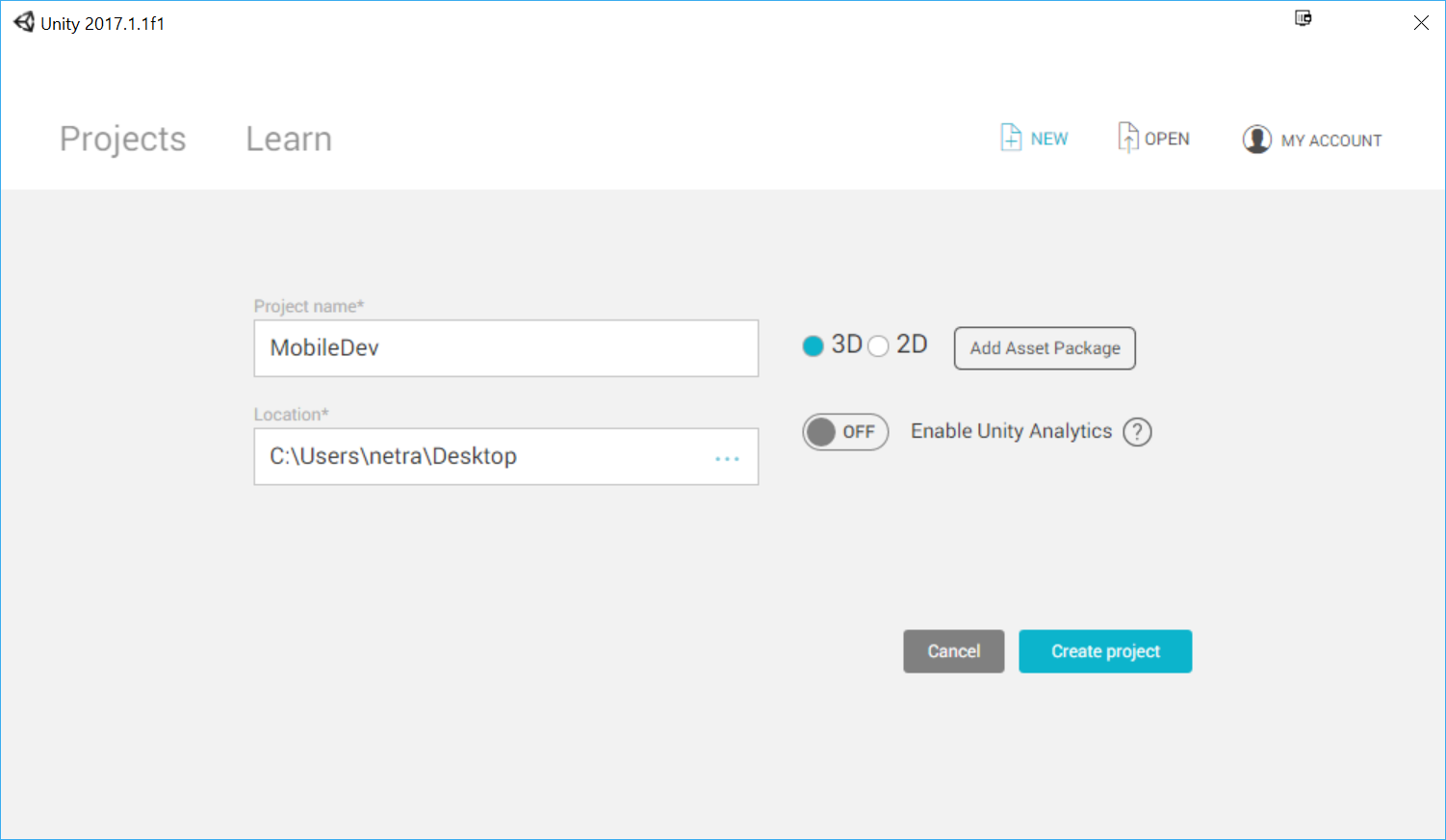
  1. From startup, we'll opt to create a new project by clicking on the New button.
  2. Next, under Project name* put in a name (I have chosen MobileDev) and make sure that 3D is selected. If Enable Unity Analytics is enabled (the check to the left of it says On), click on the Enable Unity Analytics button again in order to disable it for the time being; we will add it ourselves later on when we go through Chapter 5, Advertising with Unity Ads. Afterwards, click on Create project and wait for Unity to load up:
  1. After it's finished, you'll see the Unity Editor pop up for the first time:
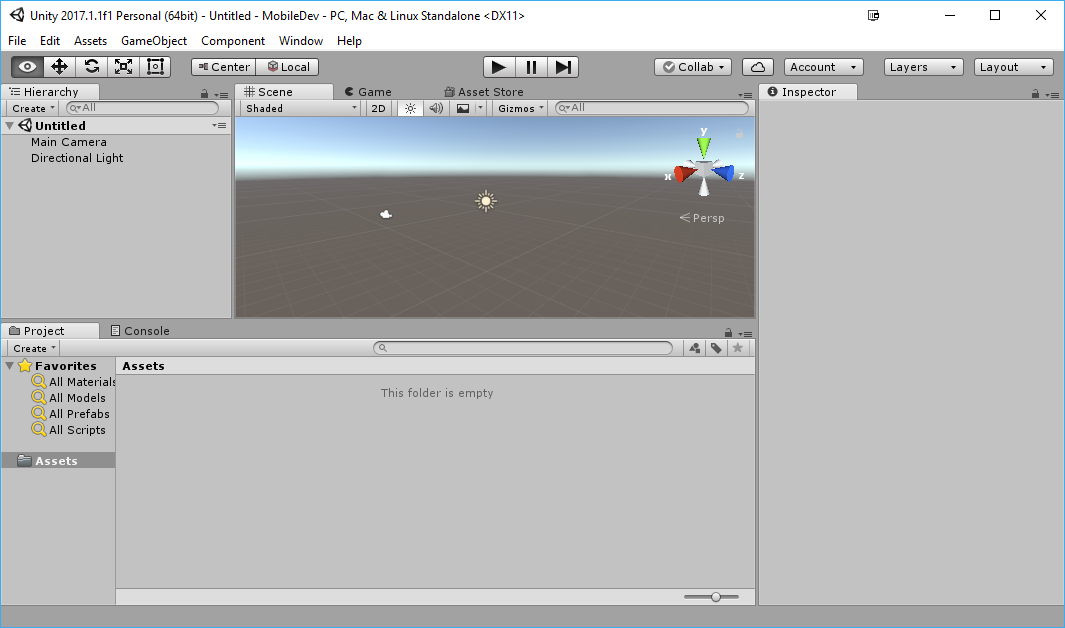
  1. If your layout doesn't look the same as in the preceding screenshot, you may go to the top-right section of the toolbar and select the drop-down menu there that reads Layers. From there, select Default from the options presented.
If this is your first time working with Unity, then I highly suggest that you read the Learning the Interface section of the Unity Manual, which you can access at https://docs.unity3d.com/Manual/LearningtheInterface.html.
CONTINUE READING
83
Tech Concepts
36
Programming languages
73
Tech Tools
Icon Unlimited access to the largest independent learning library in tech of over 8,000 expert-authored tech books and videos.
Icon Innovative learning tools, including AI book assistants, code context explainers, and text-to-speech.
Icon 50+ new titles added per month and exclusive early access to books as they are being written.
Unity 2017 Mobile Game Development
notes
bookmark Notes and Bookmarks search Search in title playlist Add to playlist download Download options font-size Font size

Change the font size

margin-width Margin width

Change margin width

day-mode Day/Sepia/Night Modes

Change background colour

Close icon Search
Country selected

Close icon Your notes and bookmarks

Confirmation

Modal Close icon
claim successful

Buy this book with your credits?

Modal Close icon
Are you sure you want to buy this book with one of your credits?
Close
YES, BUY

Submit Your Feedback

Modal Close icon
Modal Close icon
Modal Close icon